
4 Gigabytes of Ram (2 Usuable)

mtb211

Active Member
Updated 4 Gigabytes of Ram (2 Usuable) Photo Attached

I was having issues with my computer last week and just have it all fixed up.. I noticed in the bios it says 2 gigs of ram and in windows 7 64 it says 4.0 Gigs of Ram (2 usuable) whats the deal? bad ram?
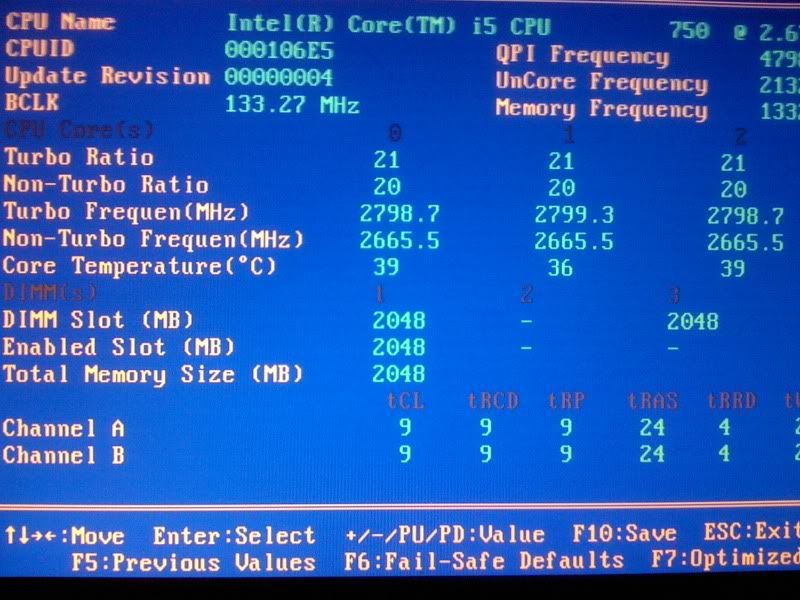
IMG_01431.jpg


as you see dim three reconizes the 2 gigs of ram but its as if its not enabled, in windows it shows 4 gigs but only 2 usuable.

I couldnt find a way to enable dimms in the bios
 
Last edited:
Double check that both sticks are seated properly. I had the same problem a few weeks ago and gave the one stick and extra hard push and it clicked.
 
I reseated them, I heard this could be because the cpu pins are bent, but I looked at the CPU, looked fine to me.... the socket pins seemed a wee bit bent but they are so gd small.
 
it says enabled slot are there any modes in your BIOS that disables certain slots? I will look into this for you man.
 
I looked around my bios and I couldnt find anything , but I am a noob when it comes to messing with the bios unless its for boot sequencing, Thanks enigmaz!
 
This may sound strange but can you try backing the speed down to 1333?

I have also heard of this with certain brands of RAM not playing nice with early P55 boards.

If it's enabled, try switching off XMP.
 
The ram worked fine before I swapped out my heatsink, what should I change the ram from 1333 to what?
 
john I can use slots 1 or 3 or 2 and 4 ... maybe ill try 2 and 4 and see if that does anything
 
Sorry, I misread the picture, I thought you were running at 1600. I don't think it will matter. Especially if you say the RAM was working before.

If you haven't already can you try what joh suggested?
 
john I can use slots 1 or 3 or 2 and 4 ... maybe ill try 2 and 4 and see if that does anything

Yeah I just sent you a message saying to try the other two slots. I think you've had a slot die on you on the motherboard. So try the other two.
 
well i hope you are correct about that, id be thrilled, i guess I could always return my motherboard too
 
nah man im at work at the moment, im just brewing for some ideas, I thought maybe you had to go 1/3 first but Ill try two and four or the blue slots
 
Read the manual. Sometimes two slots can only do 1066 or 1333mhz, and the other two can do 1600+. Perhaps that is your problem too I dunno. But just try the other two slots.
 
Read the manual. Sometimes two slots can only do 1066 or 1333mhz, and the other two can do 1600+. Perhaps that is your problem too I dunno. But just try the other two slots.
I didn't see anything to that effect in the manual, can't rule it out though. I'm leaning towards bad RAM but without playing musical RAM slots it's hard to say.
 
Back
Top