
You are using an out of date browser. It may not display this or other websites correctly.
You should upgrade or use an alternative browser.
You should upgrade or use an alternative browser.
9800GT Overclocked idleing at 70c?
- Thread starter dsolash
- Start date

g4m3rof1337
Active Member
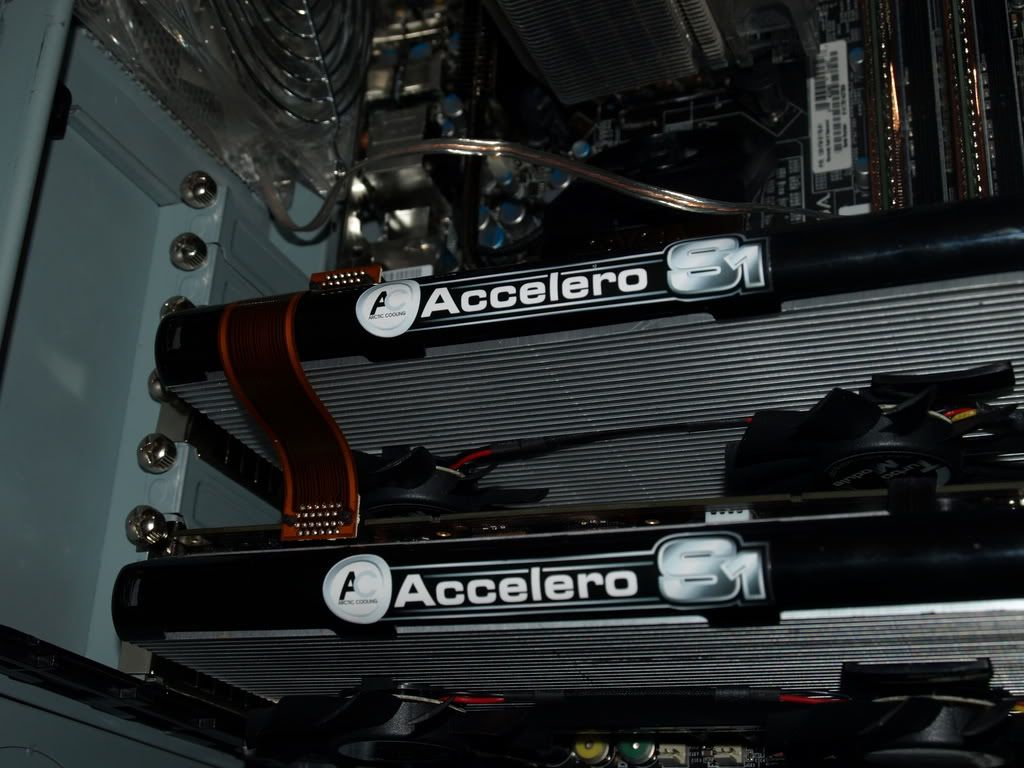
Well, I have two 8800GT's and they're practically the same card, and I have two aftermarket coolers on my GPU's, a heatsink then two fans that clip onto the heatsink.
My top GPU, which should be hotter than the bottom, is idling at, 44C and the bottom one is at 41C.
If that helps.
My top GPU, which should be hotter than the bottom, is idling at, 44C and the bottom one is at 41C.
If that helps.

kookooshortman55
New Member
My top GPU, which should be hotter than the bottom, is idling at, 44C and the bottom one is at 41C.
Dang! What cooler do you have? Haha
Well mine idles around 52C, goes up to 65C when gaming. 70C is not dangerous but it really isn't good. I think they can get up to like 90C. Anyways, I wouldn't completely recommend this, but it's a good solution to heat; I have a slot fan right next to the GPU exhaust (8800GT) and it cools it down very well. Two problems though, it depends on why your card is hot. If the air around the card is hot, then the fan will solve your problem. If the air is cool and the card is hot, you may need an aftermarket cooler. The only other bad thing is the slot fan is the loudest part of my system by far. I open up the case and unplug it when I'm not gaming.

Vipernitrox
New Member
they can take up to more than 100c but it really isn't good. I'd stop overclocking or get a better cooler when it goes over 75c.

Okedokey
Well-Known Member
Go a new comp. Gateway FX4710, it has ONE fan. It has a CM cpu fan for the cpu no prob with that, its going directly to a vent a the side of the case. The 9800 is going to a 1920x1200 screnn doing nothing but a backround. Nice rig for the price FHD2400 for $350! Costco, lol.
That's too hot. Turn the fan up with ntune, and improve case ventilation (add more 120mm fans).

dsolash
New Member
Go a new comp. Gateway FX4710, it has ONE fan. It has a CM cpu fan for the cpu no prob with that, its going directly to a vent a the side of the case. The 9800 is going to a 1920x1200 screnn doing nothing but a backround. Nice rig for the price FHD2400 for $350! Costco, lol.
No open fan slots, is prebuilt, it a gateway but its at a great price. I have a decent level of tech knowlege but not about overcloking and stuff like that. Case moding is out of my mind too. But there is a large vent at the side of the case, but no fan. Cpu is around 57C too. But i guess thats ok. The 9800GT come factory overclocked from gateway. When i stated up it was at 49C wich i guess is relly good. LOL WTF just checked been on for a while now, still at 49C. Guess the sofware was reading wrong yesterday. If i get anymore prblms ill post again.

dsolash
New Member
No open fan slots, is prebuilt, it a gateway but its at a great price. I have a decent level of tech knowlege but not about overcloking and stuff like that. Case moding is out of my mind too. But there is a large vent at the side of the case, but no fan. Cpu is around 57C too. But i guess thats ok. The 9800GT come factory overclocked from gateway. When i stated up it was at 49C wich i guess is relly good. LOL WTF just checked been on for a while now, still at 49C. Guess the sofware was reading wrong yesterday. If i get anymore prblms ill post again.
I need to know how to edit lol. gpu fan was OFF. It said at 50% but it wasnt running at all. I cliked apply then it started to run. Went up to 69 again but its rapidly dropping now. OMFG lowered fan to 53 from, 70 rapid increase in temp OMFG. Is this right cloking for a 9800gt ill try to fix it, maby the guys fingerslipped at the factory lol. 650/950/1625, LOL NVIDIA blows on monitoring, but the card is good. Rivatuner is saying its running at 59C. THats average i guess.
Last edited:
g4m3rof1337
Active Member
Dang! What cooler do you have? Haha
Well mine idles around 52C, goes up to 65C when gaming. 70C is not dangerous but it really isn't good. I think they can get up to like 90C. Anyways, I wouldn't completely recommend this, but it's a good solution to heat; I have a slot fan right next to the GPU exhaust (8800GT) and it cools it down very well. Two problems though, it depends on why your card is hot. If the air around the card is hot, then the fan will solve your problem. If the air is cool and the card is hot, you may need an aftermarket cooler. The only other bad thing is the slot fan is the loudest part of my system by far. I open up the case and unplug it when I'm not gaming.
I have the Accelero's.
kookooshortman55
New Member
Probably should have looked at your sig. Haha nice.
g4m3rof1337
Active Member
Oh, I added that in after I posted this. 
And thanks.
And thanks.
Okedokey
Well-Known Member
That's too hot. Turn the fan up with ntune, and improve case ventilation (add more 120mm fans).
try the n tune thing as well at least until you can sort the case ventilation.
g4m3rof1337
Active Member
You must be spewing that you bought 2 8800GT's now though as almost every review i have ever read says that sli 8800GT is slower than one? And with the 4870 out now..... wow that must hurt. Nice rig though...
Actually, no, I'm quite happy, since I found out that the 9800GT's are the 8800GT's.
And I haven't read that two are slower than one, and that makes no sense..
g4m3rof1337
Active Member
It only doesn't make sense if you don't understand SLI scaling. Games like Crysis, ArmA etc are actually slower with the GT architecture under SLI.
That's not true, give me a link.
Okedokey
Well-Known Member
"ArmA was almost playable on the single 8800 GT, with a minimum frame rate of 22fps at 1,680 x 1,050, but with two cards in SLI, the minimum frame rate plummeted to a jerky 5fps......in Supreme Commander with the second 8800 GT installed, the minimum frame rate in this game and Company of Heroes: Opposing Fronts nosedived faster than a Stuka over Dunkirk, dropping by awe-inspiring amounts of between 39 and 70 per cent, so we'd definitely recommend disabling SLI when playing any of these three games."
"Sadly, no title received much, if any, tangible benefit from SLI, while ArmA actually ran slower."
http://www.custompc.co.uk/labs/201405/nvidia_geforce_8800_gt.html (July 2008)
"Sadly, no title received much, if any, tangible benefit from SLI, while ArmA actually ran slower."
http://www.custompc.co.uk/labs/201405/nvidia_geforce_8800_gt.html (July 2008)
Last edited:

Burgerbob
Active Member
Actually, no, I'm quite happy, since I found out that the 9800GT's are the 8800GT's.
And I haven't read that two are slower than one, and that makes no sense..
Hate to be the grammar Nazi, but this is killing kittens every time you do it-
DON'T PUT THE APOSTROPHE unless it is the possessive.
PLURAL WORDS don't get the apostrophe.
And it doesn't make sense that SLi would slow down... I'm glad I only have one!
As for the topic, it looks like you need to mod some fans in there somewhere. It usually isn't too hard, even if you don't want to cut stuff up.
g4m3rof1337
Active Member
I'm not much of a RTS player, but I notice a big difference in FPS games..
I also got advice from this forum on what I should do GPU wise. Should I upgrade to the 9 Series, SLI my 8800GT, or go over to ATI, majority of the people recommended SLIing.
Here's a more reliable news source, http://www.tomshardware.com/forum/245760-33-8800gt-performance-scaling-review
I add the 's so I don't confuse people with GT and GTS.
And this could have been sent in a PM.
I also got advice from this forum on what I should do GPU wise. Should I upgrade to the 9 Series, SLI my 8800GT, or go over to ATI, majority of the people recommended SLIing.
Here's a more reliable news source, http://www.tomshardware.com/forum/245760-33-8800gt-performance-scaling-review
Hate to be the grammar Nazi, but this is killing kittens every time you do it-
DON'T PUT THE APOSTROPHE unless it is the possessive.
PLURAL WORDS don't get the apostrophe.
And it doesn't make sense that SLi would slow down... I'm glad I only have one!
As for the topic, it looks like you need to mod some fans in there somewhere. It usually isn't too hard, even if you don't want to cut stuff up.
I add the 's so I don't confuse people with GT and GTS.
And this could have been sent in a PM.
Last edited:
Okedokey
Well-Known Member
I wasn't attacking you just seeing if you had of wished for a different decision thats all. Custom PC is an international publication, no credibility issues whatsoever. In fact Rahul Sood (HP Chief Technologist) is a member of staff.
And actually the benchmarking in that link comes from here: http://firingsquad.com/hardware/nvidia_geforce_8800_gt_performance/default.asp which btw was written a year ago.
No where near as credible as Custom PC im sorry. Their hardware editor in chief http://www.firingsquad.com/authors/author_profile.asp/1 is not quite as credible as Rahul i think! LOL
And actually the benchmarking in that link comes from here: http://firingsquad.com/hardware/nvidia_geforce_8800_gt_performance/default.asp which btw was written a year ago.
No where near as credible as Custom PC im sorry. Their hardware editor in chief http://www.firingsquad.com/authors/author_profile.asp/1 is not quite as credible as Rahul i think! LOL
Last edited: