

MyCattMaxx
Active Member
Add a Start Menu Toolbar to Windows 8 cp for Desktop Users like me.
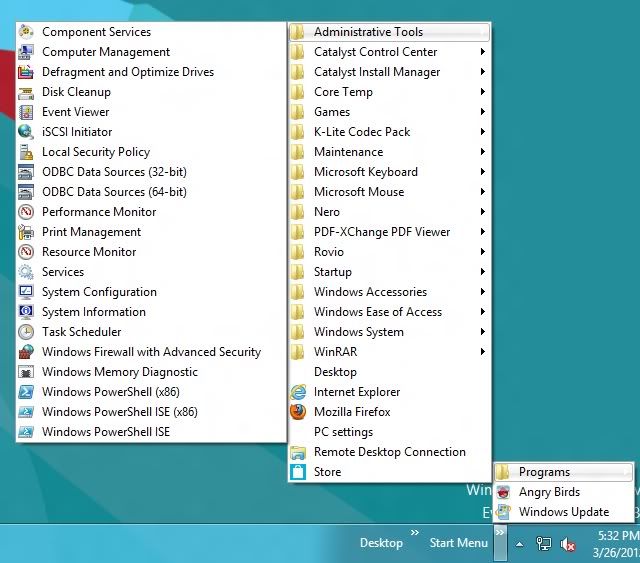
This is what it will look like and it is not the same as the Start Menu like W7 in the lower left.
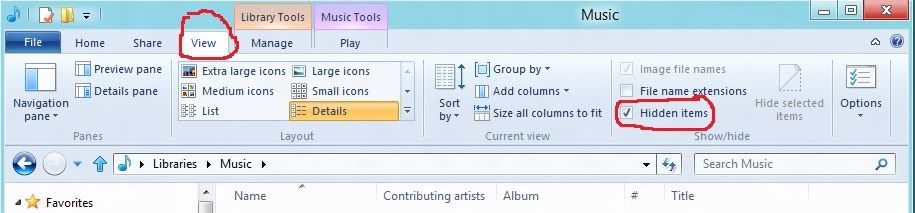
First you have to un-hide your folders, open windows explorer, click on the View tab and check on Hidden items.
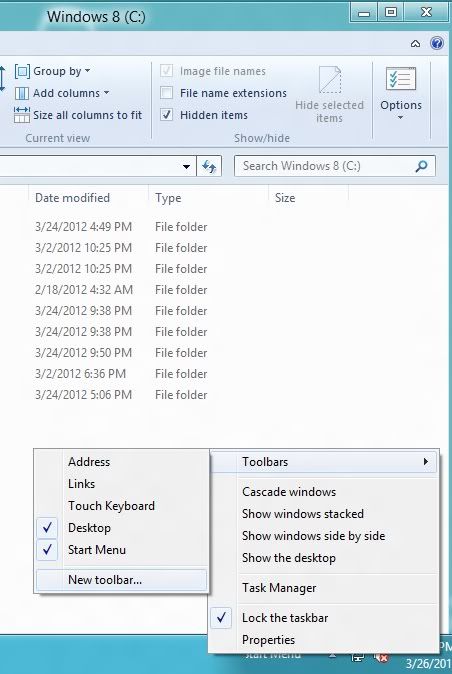
Then right click on the task bar then left click on Toolbars then New Toolbar.
Note: You will see Start Menu listed in this pic because I already installed it.
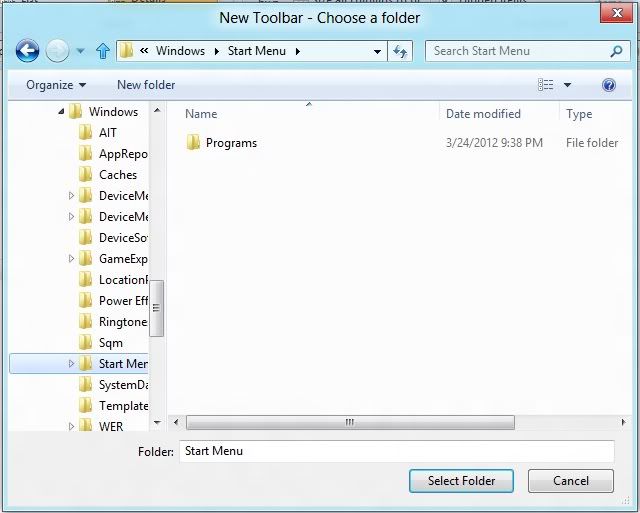
It will bring up a new window, on the left go to C: then Program Data then Microsoft then Windows and then start menu. Then click on select folder and you are done.
This is what it will look like and it is not the same as the Start Menu like W7 in the lower left.
First you have to un-hide your folders, open windows explorer, click on the View tab and check on Hidden items.
Then right click on the task bar then left click on Toolbars then New Toolbar.
Note: You will see Start Menu listed in this pic because I already installed it.
It will bring up a new window, on the left go to C: then Program Data then Microsoft then Windows and then start menu. Then click on select folder and you are done.
Last edited:
