Lomandriel
New Member
Hi, it's my first time here  So just thought i'd say hello to start things off. I have to apologise firstly becuase im quite a long winded person when it comes to details, so i have to thank anyone and everyone in advance for reading (most likely) my extremely long,detailed, and over-repeating post
Firstly i'll just post the basic stats of my computer that i saved to a notepad sometime ago since i'm pretty sure that some people might need the details:
Amd Athlon 2500+ Barton 333 FSB
120 GB Western Digital 7200RPM 8MB S-ATA
512 mb PC-3200 DDR Hyundai
Abit NF7S V2.0 Mainboard
GEFORCE FX5700 256MB TV @ DVI Graphics
AOPEN DVD/CDRW Combo 52 x 32 x 52 x 16 BLACK
1.44 mb FLOPPY DRIVE BEIGE
Antec SOnata 380W TruePower PSU CASE
Microsoft M-MEDIA Internet Keyboard OEM
Microsoft Wheel Mouse Optical USB-PS/2
Mitsubishi 1996FDB2 19"FLat Black CRT
ADD ONS since purchase:
320 GB western digital 7200RPM 8mb SATA2(22/12/06) - $155 , Model WD CAVIAR SE: WD3200JS possibly
Samsung 16x Dual Layer Black DVD+/-RW (30/08/2006) - $70
The ADD ONS are like it says, since purchase. Everything above that came with the computer when we bought the parts and got it assembled, so yeap nothing been replaced in those original parts. I think we go tthis around mid yr 2004 would be a good estimate, and the notepad file containing all this is august 2004, so it was deifnitely before then. If its that important i coudl chase up the receipt/invoice for the proper date..
Anyways continuing, basically i'm just wondering if I need to replace the original Hard drive that I got for the comp: in other words the 120 GB hard drive. I think it'd be good to clarify my hard drive /partition arrangements before i go on, and things get confusing.
From above i have a 120 gb hard drive, and 320 gb(the new add in). The 120 gb im pretty sure is a WD1200JD and the other is a WD3200JS.
Partition wise:
WD1200JD:
-C drive(windows and core system files) i think its around 8gb big last i remember
-D Drive (remaining space on hard drive, store all personal stuff, mp3s, etc etc)
WD3200JS:
-F drive: it says about 34.1 gb big in explorer, i forgot the real figure eg: 40/320 gb that was meant to be partitioned, and since you don't get the real full 320gb capacity when you use the drive, im not too sure what it was originally meant ot be allocated as. This was originally a partition to put windows on, was going to move it to this bigger partition, in end left it on C drive and this partition has been left here for future use? Just incase i guess?
-I drive: The remained of the 320gb , serving as most of my dl's for series, anime etc. Recently being filled with backups of D drive and more programs as i doubt(as i will explain) the consistency of my 120 gb drive...
Anyway still with me? *sigh* i know im prettty longwinded, and its nearlly 4am so i'll try to be as short as i can, please know that im not trying to annoy you with a long ass post! Sorry once again!
Anyway the big question is whether i need to replace my 120 gb, WD1200JD. My reasoning is this:
Towards the end of last yr, the last few months, i started to get the yellow icon with the exclamation mark ! in the system tray saying: the file or directory <insert file path> is corrupt and unreadable. Please run chkdsk utility. At first i ignored this, started getting a few more of this. Running chkdsk came up with alot of crap that i didnt bother to pay attention to, and i dont know if checkdisk saves a txt log file you can view in windows, if so where do i find this? Anyway basically that continued , until one day i just couldn't boot up... i cant remember why/what, as it was end of last yr, but basically i miraculously ran the windows recovery/dos thing, and got checkdisk to run. When that fixed things up i managed to boot up. After doing that i basically just thought it was too close for comfort(as i hadn't, and still mostly havent backed up data) . Anyway after backing up the main things like photos, personal files i reformatted the comp. When i say reformatted i mean like just the C drive partition, i never wiped the D drive files. I cannot also remember if i had the second drive , but most likely i did by then. Anyway had some problems with dodge windows cds stopping partways through installation, finally got a friends and that worked like a breeze. Everything started back up, looked peaceful, was pretty much crying at the loss of some things i coudlnt save eg: msn emoticons etc, coudlnt figure out how you backup custom emoticons.. but yeah , all was well i guess. (edit: this was probably in january)
But then a short while later(not sure if it was a week or two, days? who knows) i again got the yellow exclamation icons in the system tray popping up, with the "xxx is corruptable , run chk dsk etc". I got that a few times, even once when i ran spybot s@d to see if i caught a nasty, as soon as i did that i even got the c: appdata/spybot.exe etc was corrupt as well, but yeap it still ran/scanned and nothing came up. Anyway fast forward to now a few months down the track, where along the way nothign much eventful came up. Minus the fact that running checkdisk occasionally (having selected both the options in windows explorer when you initialise checkdisk) came up with alot of sus looking crap.. I mean things like how "xxx name was invalid" and how it would delete files, recover orphan files. As time came closer to now i also saw a pattern in consistency of Index $I30 files being on the chkdsk reporting page quite some bit.
Anyway about a week or so ago i was shuffling anime series to and from D drive to the drive I on the new hard drive in order to defrag(to get the 15% minimum free space they recommend). Anyway did that, moved things back.. and probably a few days ago i noticed that one series was unplayable. i backed the series up to disc and when that wouldnt play, inspecting the hard drive copy on d gave me basically a whole series of 12 episodes that jsut wouldnt play. those that did if you fast fowarded even abit it woudl basically screw up. Take in mind clicking these 3-4 weeks ago they woulda worked likea breeze. Anyway i assume this is what happens when files get corrupted?
Now a sub q here: is my hdd at fault? is it dying/corrupting like some people call it? and if so why would only one series/folder go dead? i mean other anime on the D drive so far seemed alright? or was defrag at fault? did it screw up my data rearranging?
about a few days ago i decided to turn on guest account (whereas previously the comp just booted straight into the desktop ready to use), as i wanted to try out an admin/guest account formation, wanted to see if this could help block oout some unauthorized file sharing of my folders that was happening around the house switching between users was fine, didnt shut down comp for a day or two. the time i did shut down, and came home later in evening windows wouldnt boot after the loading bar thing when you turn on the comp. Repairing it by reinstallation of core system files got me stuck in the first phase, the installing devices or wateva? as usual this led to just a wiping of c drive partition, and a reinstallation of windows.
Again there was peace, except now only a day or two it continued, more ! exclamation icons similar to the icon used next to the title of this thread... I actually print screened these ones, but i wont paste them unless asked, rather ill just type some of the files that were corrupted:
1) spybotSD.exe - Corrupt file:
the file or directory /WINDOWS/system32/wiavideo.dll is corrupt and unreadable. Please run the checkdisk utility.
2)Windows - corrupt file :
the file or directory : C:\Documents and settings\Warren\Local Settings\Temporary Internet Files\Content.IE5\B969ACS1 is corrupt and unreadable. Please run the checkdisk utility.
The 2) one has been popping up quite a few times when i open an IE browser, even wmp once(have no idea how wmp is related O_O ).
It might be worth mentioning that a non-user authorised checkdisk just got scheduled for d drive just before this latest format , and ive been cancelling the check as no one coudl answer me if that anime series that became unreadable was due to checkdisk deleting and corrupting the files when it rebuilt them, or if its just the hard drive itself dying/defragment killed them. But after the format and more of these exclamation corruption icons, C drive suddenly became auto scheduled for consistency/check disk scan. Still i skip it as i dont want any files deleted/repaired until i find out the problem.
So yeap thats the lowdown of everything i can recall that seemed out of the ordinary, all this wouldnt have happened 1 yr ago, heck for 1.5 yrs to two yrs ive had this comp i never reinstalled windows once. in the past few months, god i think i could write out every word in the installation process.
Sorry for the long ass post, i know the timeline of events is pretty much .. well pretty shit looking ahha (excuse the language if words like taht are censored on this web board, im new =( ), but yeah could you help me?
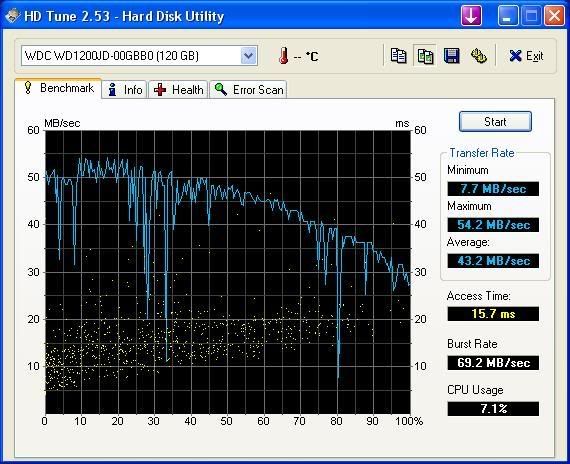
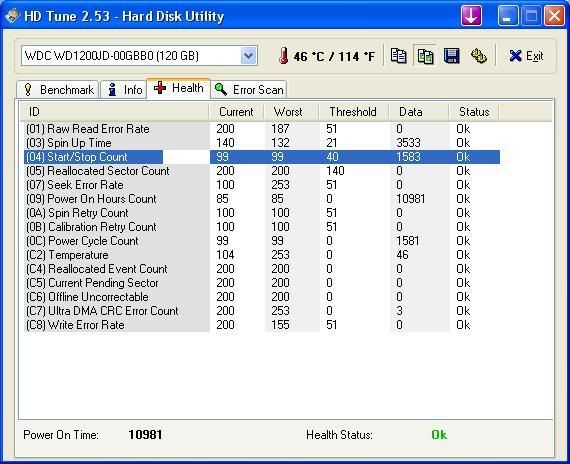
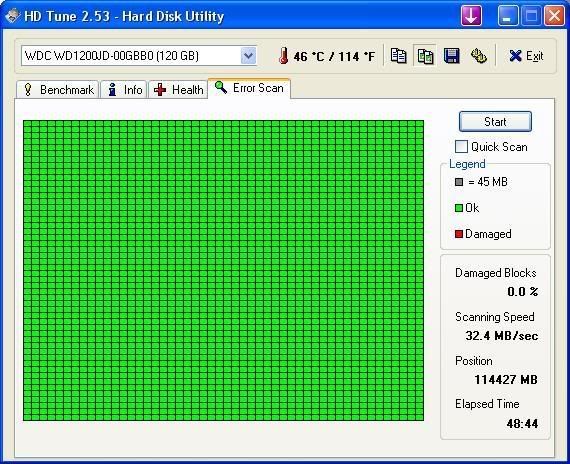
Is my 120 gb hard drive dying? Is it safe to go out and buy a replacement? I mean if its something else causing these problems i dont want ot waste the money.
Oh and one reason i havent gone and bought one, was i ran the Western digital life guard diagnostics, 5.04c in dos, quick test and extended test had NO errors, code 000 or whatever. THe windows version of extended test ALSO came up with 0 errors. Running memtest86 for about 4-5 complete passes came up with no errors(like usual). So yeap i assume memorys clean.
So all these things happening on screen point to the hard drive, but when the data lifeguard tools are coming up as a-ok im just confused. I ran hot cpu tester pro program thing(im the freeware version) and all the modules passed ... ill paste the logfile.
Hot CPU Tester Pro(Lite Edition) 4.3
Copyright © 1999-2003 7Byte Computers
Thursday, March 22, 2007 - 23:48:23
Diagnostic Report
---------------------------------------------
Test Started at: 20:25:53
Test Duration: 03:21:38
Physical Processors Available: 1
Logical Processors Available: 1
Multi-Processors System(SMP): Not Available
Hyper-Threading Technology: Not Available
CPU Name String: AMD Athlon(tm) XP 2500+
Speed: 1829MHz
Logical Processors Tested: CPU 0
Average CPU(s) Performance: 100.0%
Modules Results:
Complex Matrix: Finished without error
Calculating Pi: Finished without error
Sorting Algorithms: Finished without error
Prime Test: Finished without error
Fast Fourier Transforms:
Chipset:
L1 Cache:
L2 Cache:
Memory: Finished without error
HD: Finished without error
MMX: Finished without error
SSE:
SSE2/SSE3:
3DNow!:
The diagnostics are telling me its all good. But windows/these corrupt messages arent! checkdisk looks like every file/index $I30 is getting smacked around -_-" , and i noticed anotehr series on d drive theres no sound ? visuals a-ok but the sounds disappeared? i checked the backup copy on I drive on the new hdd, it has sound. More corruption?
So yeap, what am i dealing with? A dying/dead hdd? some other problem? a corrupted windows installation(someone told me a rumour of how a bad windows cd could installa corrupted windows? i doubt i could be this unlucky after trying so many windows cds.. but??).
again i apologise for the thread length. I tried to spill out every detail i could remember within the respective/concerned timeframe. Any help is extremely appreciated, sorry for the length!
p.s ive been using the comp for quite sometime, more of a user than a technically knowledgeable person, i know the bare bones of the trade, but some things beyond that i have no idea, so please explain anything technical! cheers
So just thought i'd say hello to start things off. I have to apologise firstly becuase im quite a long winded person when it comes to details, so i have to thank anyone and everyone in advance for reading (most likely) my extremely long,detailed, and over-repeating post Firstly i'll just post the basic stats of my computer that i saved to a notepad sometime ago since i'm pretty sure that some people might need the details:
Amd Athlon 2500+ Barton 333 FSB
120 GB Western Digital 7200RPM 8MB S-ATA
512 mb PC-3200 DDR Hyundai
Abit NF7S V2.0 Mainboard
GEFORCE FX5700 256MB TV @ DVI Graphics
AOPEN DVD/CDRW Combo 52 x 32 x 52 x 16 BLACK
1.44 mb FLOPPY DRIVE BEIGE
Antec SOnata 380W TruePower PSU CASE
Microsoft M-MEDIA Internet Keyboard OEM
Microsoft Wheel Mouse Optical USB-PS/2
Mitsubishi 1996FDB2 19"FLat Black CRT
ADD ONS since purchase:
320 GB western digital 7200RPM 8mb SATA2(22/12/06) - $155 , Model WD CAVIAR SE: WD3200JS possibly
Samsung 16x Dual Layer Black DVD+/-RW (30/08/2006) - $70
The ADD ONS are like it says, since purchase. Everything above that came with the computer when we bought the parts and got it assembled, so yeap nothing been replaced in those original parts. I think we go tthis around mid yr 2004 would be a good estimate, and the notepad file containing all this is august 2004, so it was deifnitely before then. If its that important i coudl chase up the receipt/invoice for the proper date..
Anyways continuing, basically i'm just wondering if I need to replace the original Hard drive that I got for the comp: in other words the 120 GB hard drive. I think it'd be good to clarify my hard drive /partition arrangements before i go on, and things get confusing.
From above i have a 120 gb hard drive, and 320 gb(the new add in). The 120 gb im pretty sure is a WD1200JD and the other is a WD3200JS.
Partition wise:
WD1200JD:
-C drive(windows and core system files) i think its around 8gb big last i remember
-D Drive (remaining space on hard drive, store all personal stuff, mp3s, etc etc)
WD3200JS:
-F drive: it says about 34.1 gb big in explorer, i forgot the real figure eg: 40/320 gb that was meant to be partitioned, and since you don't get the real full 320gb capacity when you use the drive, im not too sure what it was originally meant ot be allocated as. This was originally a partition to put windows on, was going to move it to this bigger partition, in end left it on C drive and this partition has been left here for future use? Just incase i guess?
-I drive: The remained of the 320gb , serving as most of my dl's for series, anime etc. Recently being filled with backups of D drive and more programs as i doubt(as i will explain) the consistency of my 120 gb drive...
Anyway still with me? *sigh* i know im prettty longwinded, and its nearlly 4am so i'll try to be as short as i can, please know that im not trying to annoy you with a long ass post! Sorry once again!
Anyway the big question is whether i need to replace my 120 gb, WD1200JD. My reasoning is this:
Towards the end of last yr, the last few months, i started to get the yellow icon with the exclamation mark ! in the system tray saying: the file or directory <insert file path> is corrupt and unreadable. Please run chkdsk utility. At first i ignored this, started getting a few more of this. Running chkdsk came up with alot of crap that i didnt bother to pay attention to, and i dont know if checkdisk saves a txt log file you can view in windows, if so where do i find this? Anyway basically that continued , until one day i just couldn't boot up... i cant remember why/what, as it was end of last yr, but basically i miraculously ran the windows recovery/dos thing, and got checkdisk to run. When that fixed things up i managed to boot up. After doing that i basically just thought it was too close for comfort(as i hadn't, and still mostly havent backed up data) . Anyway after backing up the main things like photos, personal files i reformatted the comp. When i say reformatted i mean like just the C drive partition, i never wiped the D drive files. I cannot also remember if i had the second drive , but most likely i did by then. Anyway had some problems with dodge windows cds stopping partways through installation, finally got a friends and that worked like a breeze. Everything started back up, looked peaceful, was pretty much crying at the loss of some things i coudlnt save eg: msn emoticons etc, coudlnt figure out how you backup custom emoticons.. but yeah , all was well i guess. (edit: this was probably in january)
But then a short while later(not sure if it was a week or two, days? who knows) i again got the yellow exclamation icons in the system tray popping up, with the "xxx is corruptable , run chk dsk etc". I got that a few times, even once when i ran spybot s@d to see if i caught a nasty, as soon as i did that i even got the c: appdata/spybot.exe etc was corrupt as well, but yeap it still ran/scanned and nothing came up. Anyway fast forward to now a few months down the track, where along the way nothign much eventful came up. Minus the fact that running checkdisk occasionally (having selected both the options in windows explorer when you initialise checkdisk) came up with alot of sus looking crap.. I mean things like how "xxx name was invalid" and how it would delete files, recover orphan files. As time came closer to now i also saw a pattern in consistency of Index $I30 files being on the chkdsk reporting page quite some bit.
Anyway about a week or so ago i was shuffling anime series to and from D drive to the drive I on the new hard drive in order to defrag(to get the 15% minimum free space they recommend). Anyway did that, moved things back.. and probably a few days ago i noticed that one series was unplayable. i backed the series up to disc and when that wouldnt play, inspecting the hard drive copy on d gave me basically a whole series of 12 episodes that jsut wouldnt play. those that did if you fast fowarded even abit it woudl basically screw up. Take in mind clicking these 3-4 weeks ago they woulda worked likea breeze. Anyway i assume this is what happens when files get corrupted?
Now a sub q here: is my hdd at fault? is it dying/corrupting like some people call it? and if so why would only one series/folder go dead? i mean other anime on the D drive so far seemed alright? or was defrag at fault? did it screw up my data rearranging?
about a few days ago i decided to turn on guest account (whereas previously the comp just booted straight into the desktop ready to use), as i wanted to try out an admin/guest account formation, wanted to see if this could help block oout some unauthorized file sharing of my folders that was happening around the house
switching between users was fine, didnt shut down comp for a day or two. the time i did shut down, and came home later in evening windows wouldnt boot after the loading bar thing when you turn on the comp. Repairing it by reinstallation of core system files got me stuck in the first phase, the installing devices or wateva? as usual this led to just a wiping of c drive partition, and a reinstallation of windows.Again there was peace, except now only a day or two it continued, more ! exclamation icons similar to the icon used next to the title of this thread... I actually print screened these ones, but i wont paste them unless asked, rather ill just type some of the files that were corrupted:
1) spybotSD.exe - Corrupt file:
the file or directory /WINDOWS/system32/wiavideo.dll is corrupt and unreadable. Please run the checkdisk utility.
2)Windows - corrupt file :
the file or directory : C:\Documents and settings\Warren\Local Settings\Temporary Internet Files\Content.IE5\B969ACS1 is corrupt and unreadable. Please run the checkdisk utility.
The 2) one has been popping up quite a few times when i open an IE browser, even wmp once(have no idea how wmp is related O_O ).
It might be worth mentioning that a non-user authorised checkdisk just got scheduled for d drive just before this latest format , and ive been cancelling the check as no one coudl answer me if that anime series that became unreadable was due to checkdisk deleting and corrupting the files when it rebuilt them, or if its just the hard drive itself dying/defragment killed them. But after the format and more of these exclamation corruption icons, C drive suddenly became auto scheduled for consistency/check disk scan. Still i skip it as i dont want any files deleted/repaired until i find out the problem.
So yeap thats the lowdown of everything i can recall that seemed out of the ordinary, all this wouldnt have happened 1 yr ago, heck for 1.5 yrs to two yrs ive had this comp i never reinstalled windows once. in the past few months, god i think i could write out every word in the installation process.
Sorry for the long ass post, i know the timeline of events is pretty much .. well pretty shit looking ahha (excuse the language if words like taht are censored on this web board, im new =( ), but yeah could you help me?
Is my 120 gb hard drive dying? Is it safe to go out and buy a replacement? I mean if its something else causing these problems i dont want ot waste the money.
Oh and one reason i havent gone and bought one, was i ran the Western digital life guard diagnostics, 5.04c in dos, quick test and extended test had NO errors, code 000 or whatever. THe windows version of extended test ALSO came up with 0 errors. Running memtest86 for about 4-5 complete passes came up with no errors(like usual). So yeap i assume memorys clean.
So all these things happening on screen point to the hard drive, but when the data lifeguard tools are coming up as a-ok im just confused. I ran hot cpu tester pro program thing(im the freeware version) and all the modules passed ... ill paste the logfile.
Hot CPU Tester Pro(Lite Edition) 4.3
Copyright © 1999-2003 7Byte Computers
Thursday, March 22, 2007 - 23:48:23
Diagnostic Report
---------------------------------------------
Test Started at: 20:25:53
Test Duration: 03:21:38
Physical Processors Available: 1
Logical Processors Available: 1
Multi-Processors System(SMP): Not Available
Hyper-Threading Technology: Not Available
CPU Name String: AMD Athlon(tm) XP 2500+
Speed: 1829MHz
Logical Processors Tested: CPU 0
Average CPU(s) Performance: 100.0%
Modules Results:
Complex Matrix: Finished without error
Calculating Pi: Finished without error
Sorting Algorithms: Finished without error
Prime Test: Finished without error
Fast Fourier Transforms:
Chipset:
L1 Cache:
L2 Cache:
Memory: Finished without error
HD: Finished without error
MMX: Finished without error
SSE:
SSE2/SSE3:
3DNow!:
The diagnostics are telling me its all good. But windows/these corrupt messages arent! checkdisk looks like every file/index $I30 is getting smacked around -_-" , and i noticed anotehr series on d drive theres no sound ? visuals a-ok but the sounds disappeared? i checked the backup copy on I drive on the new hdd, it has sound. More corruption?
So yeap, what am i dealing with? A dying/dead hdd? some other problem? a corrupted windows installation(someone told me a rumour of how a bad windows cd could installa corrupted windows? i doubt i could be this unlucky after trying so many windows cds.. but??).
again i apologise for the thread length. I tried to spill out every detail i could remember within the respective/concerned timeframe. Any help is extremely appreciated, sorry for the length!
p.s ive been using the comp for quite sometime, more of a user than a technically knowledgeable person, i know the bare bones of the trade, but some things beyond that i have no idea, so please explain anything technical! cheers