Hello,
I'm looking on doing some upgrading. I'm using my computer for long and heavy competitive gameplay such as Left 4 Dead 2, Call of Duty: Modern Warfare and the new Final Fantasy 14 that is coming out later this year. (the game looks like a huge resource piggy)
With that being said I'd like to also point out that with my current build I am experiencing the occasional BSOD, freezes in-game, and Black Screens. I ran some stress tests for my vid-card but it did alright. It may be a cooling issue, and for the BSOD I'm thinking my ram is damaged? But anyways, I'll leave the guesses to the pros.
My current setup is...
Machine name: BLACKMONSTER
Operating System: Windows XP Professional (5.1, Build 2600) Service Pack 3 (2600.xpsp_sp3_gdr.100216-1514)
Language: English (Regional Setting: English)
System Manufacturer: System manufacturer
System Model: System Product Name
BIOS: Phoenix - AwardBIOS v6.00PG
Processor: AMD Athlon(tm) 64 X2 Dual Core Processor 6000+, MMX, 3DNow (2 CPUs), ~3.0GHz
Memory: 2046MB RAM
Page File: 781MB used, 3156MB available
Windows Dir: C:\WINDOWS
DirectX Version: DirectX 9.0c (4.09.0000.0904)
DX Setup Parameters: Not found
DxDiag Version: 5.03.2600.5512 32bit Unicode
Card name: NVIDIA GeForce 8800 GTS
Manufacturer: NVIDIA
Chip type: GeForce 8800 GTS
DAC type: Integrated RAMDAC
Device Key: Enum\PCI\VEN_10DE&DEV_0193&SUBSYS_228919F1&REV_A2
Display Memory: 640.0 MB
Current Mode: 1680 x 1050 (32 bit) (60Hz)
Monitor: Plug and Play Monitor
Monitor Max Res: 1600,1200
Driver Name: nv4_disp.dll
Driver Version: 6.14.0011.9062 (English)
If you need any other information let me know!
My budget is around $700 CDN ($680 USD roughly)
Here are some pics of my setup:
Layout

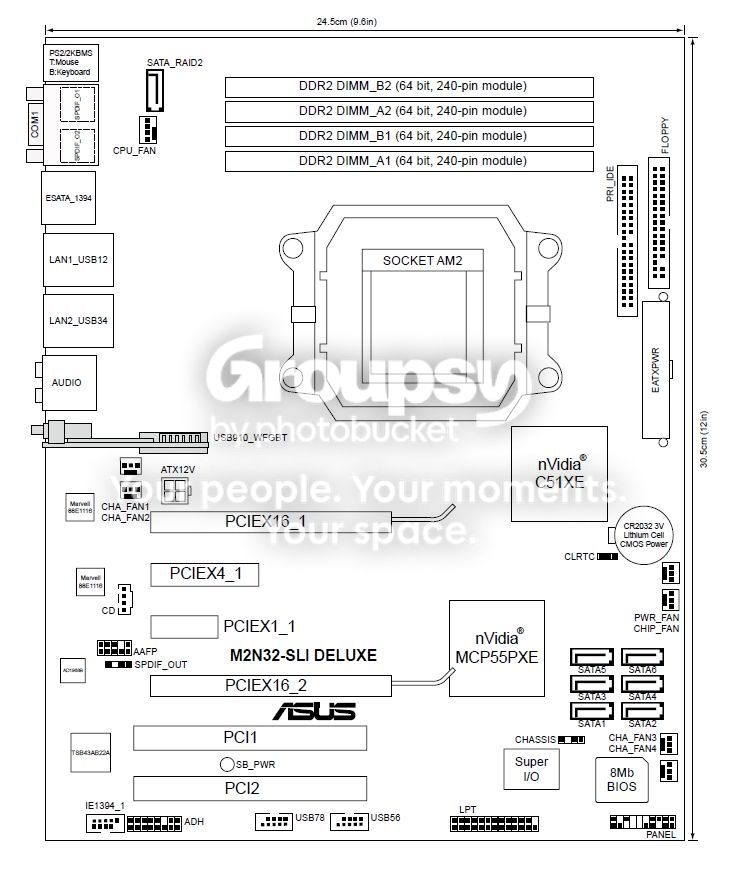
Motherboard

Ram Details

PSU Details

My Thoughts
I'm debating wither I should go with another GeForce 8800 or to buy a new videocard. If I go with another 8800 I'll probably need a riser card. But even with that I don't know if even that will work. I really do not have a whole lot of space between the PSU and the GPU slots (refer to the Layout pic)
I guess I'll have to get a new GPU all together?
So much for SLI...
Also I'd like to hit around 4g ram (what do you all think I will need for the games coming out for the next 2 ish years?)
I'm going to need a 2TB HD (this is a must)
Do I need additional cooling?
Thanks for all the help!
Please let me know if any of you need any additional information.
Thanks a whole bunch everyone.
I'm looking on doing some upgrading. I'm using my computer for long and heavy competitive gameplay such as Left 4 Dead 2, Call of Duty: Modern Warfare and the new Final Fantasy 14 that is coming out later this year. (the game looks like a huge resource piggy)
With that being said I'd like to also point out that with my current build I am experiencing the occasional BSOD, freezes in-game, and Black Screens. I ran some stress tests for my vid-card but it did alright. It may be a cooling issue, and for the BSOD I'm thinking my ram is damaged? But anyways, I'll leave the guesses to the pros.
My current setup is...
Machine name: BLACKMONSTER
Operating System: Windows XP Professional (5.1, Build 2600) Service Pack 3 (2600.xpsp_sp3_gdr.100216-1514)
Language: English (Regional Setting: English)
System Manufacturer: System manufacturer
System Model: System Product Name
BIOS: Phoenix - AwardBIOS v6.00PG
Processor: AMD Athlon(tm) 64 X2 Dual Core Processor 6000+, MMX, 3DNow (2 CPUs), ~3.0GHz
Memory: 2046MB RAM
Page File: 781MB used, 3156MB available
Windows Dir: C:\WINDOWS
DirectX Version: DirectX 9.0c (4.09.0000.0904)
DX Setup Parameters: Not found
DxDiag Version: 5.03.2600.5512 32bit Unicode
Card name: NVIDIA GeForce 8800 GTS
Manufacturer: NVIDIA
Chip type: GeForce 8800 GTS
DAC type: Integrated RAMDAC
Device Key: Enum\PCI\VEN_10DE&DEV_0193&SUBSYS_228919F1&REV_A2
Display Memory: 640.0 MB
Current Mode: 1680 x 1050 (32 bit) (60Hz)
Monitor: Plug and Play Monitor
Monitor Max Res: 1600,1200
Driver Name: nv4_disp.dll
Driver Version: 6.14.0011.9062 (English)
If you need any other information let me know!
My budget is around $700 CDN ($680 USD roughly)
Here are some pics of my setup:
Layout

Motherboard

Ram Details

PSU Details

My Thoughts
I'm debating wither I should go with another GeForce 8800 or to buy a new videocard. If I go with another 8800 I'll probably need a riser card. But even with that I don't know if even that will work. I really do not have a whole lot of space between the PSU and the GPU slots (refer to the Layout pic)
I guess I'll have to get a new GPU all together?
So much for SLI...
Also I'd like to hit around 4g ram (what do you all think I will need for the games coming out for the next 2 ish years?)
I'm going to need a 2TB HD (this is a must)
Do I need additional cooling?
Thanks for all the help!
Please let me know if any of you need any additional information.
Thanks a whole bunch everyone.