
Asus 8600GTS Extra power

tuxify

New Member
Some of you with an Asus nVidia 8 series might be familiar with the 6-pin power connecter:
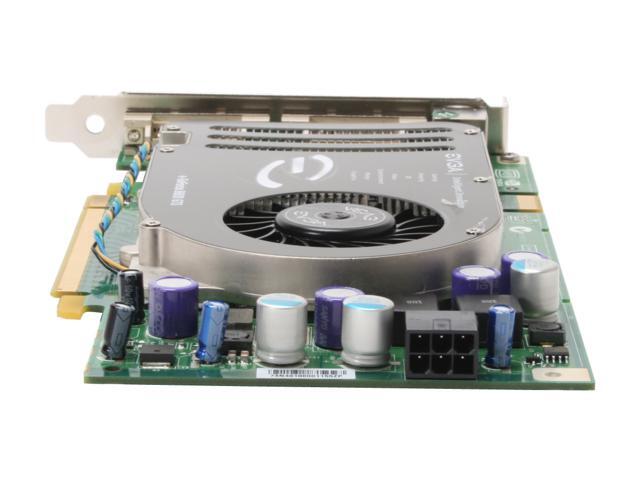
14-130-084-04.jpg
newegg.com

I also have the Gigabyte 570 SLI mobo and it has an extra power connector (4 pin?) that is near one of the PCI-E slots (circled in red):
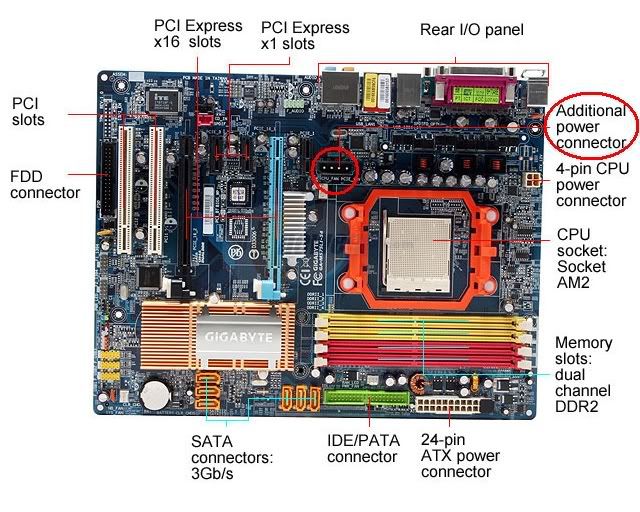
mobo.jpg
newegg.com


I'm trying to clean up my wires in my case, and I need to know if I really need anything plugged into these slots. I'm not OCing, or planning on OCing the GPU for a while, so if that's there only use I'll disconnect them. If they help the GPU stay cool or help it run, I'll keep em in.
 
Try it. I don't think your even motherboard need that extra 4 pin PSU connector, and if it does, it will be immediately apparent. The system won't start or it will act funny. The same goes for the graphics card, But I'm less sure on that, cause If it has a 6 pin connector slot, I'd figure it needs it. But to reiterate, trying won't hurt anything, but if those connectors are needed it will come to your attention sooner or later (no post, or random shutdowns)
 
On a Gigabyte the extra 4 pin molex power connector is if you run SLI, if your running a single card there no need in using it
 
I believe you need it on the video card, but the molex thats on the motherboard is just for SLI use.
 
I have it unplugged from my GPU and the temp is roughly at 56*C right now. What I really need to know now is how to test it on "idle" and on "load", which I hear people talk about, but I don't know how to do. Would it just be when I'm h-core gaming?
 
Not hard-core gaming but just normal gaming. ;) Boot up a game and test it out, if it plays then you're good, it it doesn't you'll either need to plug it back in or just stay away from games.
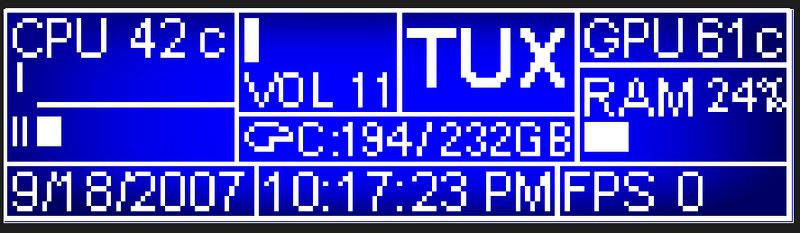
 
lol I went from 58* to ~64* on battlefield 2. I'm thinking this is okay, and seeing as how I just got a PCI Slot fan, I should be okay.
 
that 6 pin on the video card is on most high end video cards my 7800 gt oc has it but idk what its for
 
Yeah, unless I decide to OC, I think I'll leave it off so I have less clutter in my case. Sad thing is I'm gonna have to hook up my PCI fan and Cathodes when they come, so it'll kinda cancel everything out. If I can find a way to hide those two 4-pins, maybe I'll hook it up.
 
I got this thing setup for my G15 LCD screen showing the temps, and my GPU was about 60*C idle and 75-80 load. I plugged in a 6-pin that came with my PSU and it didn't really seem to lower the temps much. I'm getting a PCI fan which should arrive tomorrow or Thursday, so that should cool things down a bit.
 
I got this thing setup for my G15 LCD screen showing the temps, and my GPU was about 60*C idle and 75-80 load. I plugged in a 6-pin that came with my PSU and it didn't really seem to lower the temps much. I'm getting a PCI fan which should arrive tomorrow or Thursday, so that should cool things down a bit.

I have the g15 can I have a link for that monitor thx
 
I made it myself so it's like super customized to me. You'd need to have LcdStudio or tell me how to compile it so it doesn't need a ton of stuff running.
LCD-1.jpg

It's got a CPU Monitor (Temp and usage), Volume control, GPU Temp, RAM usage, HDD Space available, FPS (when in game), Time and Date.
 
Last edited:
Back
Top