Biostar MCP6PB M2+ Ver. 6.0 audio problem

willjm3931

New Member
i built a computer with this mb Biostar MCP6PB M2+ Ver. 6.0a several months ago and just finally got it up and running because I couldn't find my xp license. It doesn't recognize the audio. I tried downloading different drivers and still doesn't work. Any suggestions?
 
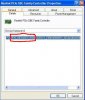
Right click on that device and click on properties, then click on the details tab and give me the 4 digit vendor and device id numbers. They look like this.
 

Attachments

  • device.JPG
    device.JPG
    31.8 KB · Views: 3,577
You didn't give me the full details I need you missed a digit on the vendor and you didn't list a device ID. Look at what is circled in red in the attached image. Getting a screen shot of the device manager would help. Do you have an entry labeled Realtek high definition audio listed under sound already? If so, do you have a video card that possibly has an hdmi port and this is the driver you are looking for?
 
nope, no attached image. Just check the numbers again. Each id needs 4 digits, which could be all numbers or combination of letters and numbers.
 
MCP6PB M2+ Audio Driver Problem

Hello Friends,

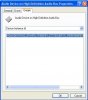
For me also same problem I have downloaded the drivers from Biostar website and Realtek website also. But, It is not getting install. Pls solve this problem. I have attached the screen shot. I hope this will be sufficient.

Thanks
Raja
 

Attachments

  • audio driver.JPG
    audio driver.JPG
    28 KB · Views: 1,274
Your only other option is to go buy a dedicated sound card as it sounds like you have a bad onboard sound chip.
 
Oh... It is sad. No other option ?

I have 3 systems and I am using it for Games. All systems are same configurations and I bought just 3 months back. The person who installed the system he missed out the mother board cds. All other drivers are downloaded from Biostar website and it is installed successfully. I don't know why this audio driver is not getting installed.
 
Last edited:
Back
Top