
Block Wireless access

bm23

Active Member
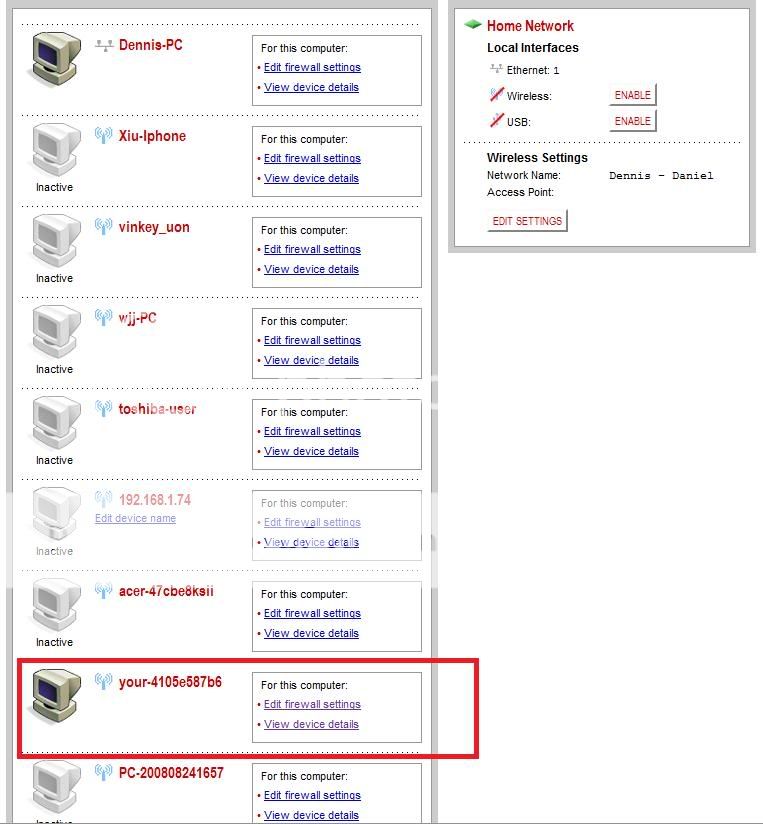
before i begin, i'd like to say i know absolutely nothing about networking so do forgive me if i ask stupid questions. I have a wireless modem. Today, suddenly my internet becomes very slow. many pages wouldnt even load. went to check the wireless setting and i saw that someone else was connected to my network (at least, that's what it seems like). how do block his accesss? or to disable wireless totally? here's the screenshot (as you can see, i've disabled the wireless, but still i see 1 user logged on using wireless)
Untitled-4.jpg
 
Since no one else has replied I'll give it a shot. Click view device details and find the MAC address. Most wireless routers have a settings page where you can block specific MAC addresses from accessing your network or alternatively, they allow you to select a list of MAC addresses that will ONLY be allowed access, thus you have to disable that filter when you want to add a new device to connect through your router in the future.
 
Why not add a security code to your wireless connection so others cannot connect without the password?

That's what it's for :)
 
Yeah, I would do as Voyagerfan suggested, enable WPA or WPA2 (or even WEP) and so they cannot access it. It shouldn't be too difficult to sort out :)
 
Back
Top