
Blue screen memory dump during internet browsing.

EthanJM

Member
Hey, not sure if I am putting this thread in the right section of the forum, but I appear to be having a memory related problem, so I chose this spot. Always come to this forum when I am having computer troubles!

So this problem is getting really annoying now, and I can't pinpoint what it is. My computer will often freeze, often accompanied by my internal speaker beeping if I push any keys, also often the mouse will freeze, the audio will continue for a minute then stop, if you leave it, it will get the blue screen of death followed by a memory dump. Below is an image I took a few weeks ago.
Now here are more subtle details. It has only ever done it to me on the internet (never during a game, demanding games even), mainly during videos on youtube or other sites, also gifs. It does it on both internet explorer and firefox. I reformatted and the problem still exists, telling me it is hardware, just not sure what. I have tried removing one stick of ram at a time and used my computer, seemed to have never found a bad stick since it has still occurred all four times with all four sticks having a turn taken out. The problem always occurs unexpectedly, never like clockwork. Sometimes it happens, sometimes it doesn't. It can happen 30 seconds into youtube, or several hours. Of course I have checked for maleware, virus, spyware, etc, no finds, seems to be hardware anyway. Also made sure adobe flash player was up to date. I have windows xp 32bit, latest service pack, and all windows updates applied. 4 gigs of ddr2 ram. Any help would be appreciated! I do not have money to just build another computer, have to stick with what I have, if I can find the problem hardware I can afford to replace it.
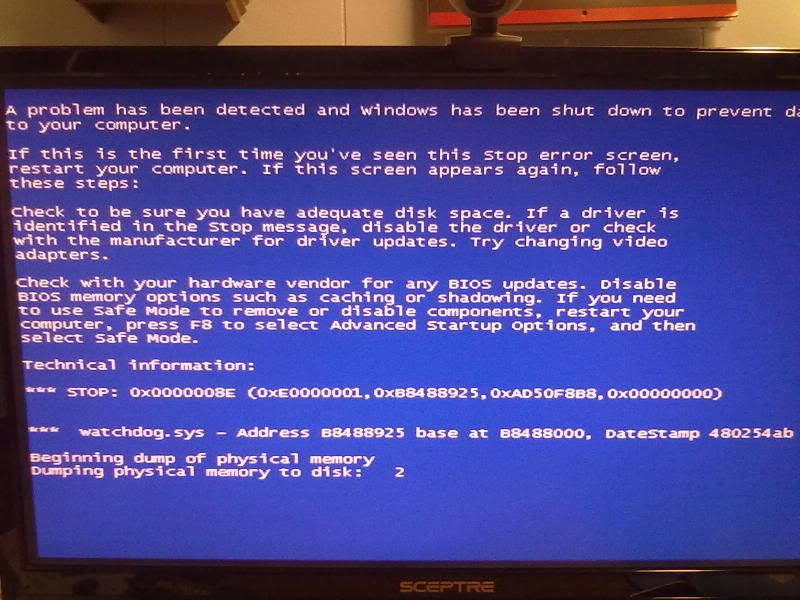

10272011236.jpg
 
Lets see if we can get any more information from your system.

Download BlueScreenView
No installation required.
Unzip downloaded file and double click on BlueScreenView.exe file to run the program.
When scanning is done, go Edit>Select All.
Go File>Save Selected Items, and save the report as BSOD.txt.
Open BSOD.txt in Notepad, copy all content, and paste it into your next reply.
 
Thanks John, trying to run it, but it doesn't seem to be doing anything. It starts, but the program has no sign of activity, maybe it is running but maybe it isn't, I looked at the read me and it says to just start the exe file and it runs automatically. Will reply if I get results, but at this moment, it does not appear to be scanning, will do some research.

EDIT
Do I have to wait for a crash?

EDIT
Ok, I think I know the problem, this problem has been going on for at least two months straight, for the past couple of weeks when it freezes, instead of waiting a minute and letting it go to the blue screen, I just restart the computer, so perhaps my computer has no log of these blue screens. Could this be why bluescreenviewer isn't bringing up anything? If so, next crash I will leave my computer alone and let it run the bluescreen.
 
Last edited:
Sigh...
Trying to force a crash by running about 20 videos, just won't crash on demand, will have to wait for it to happen naturally I guess, this probably wouldn't create the same type of crash anyway. Will be back when I get something.
 
When you open the program it automatically scans in the background. So when you open the program and there are no entries listed on that page, then either there has been no bluescreens or you have ran a tempfile cleaner that deletes the dumpfiles such as Ccleaner.
 
When you open the program it automatically scans in the background. So when you open the program and there are no entries listed on that page, then either there has been no bluescreens or you have ran a tempfile cleaner that deletes the dumpfiles such as Ccleaner.

Not sure why it wasn't working, it crashed again, I got something this time. I am pretty sure I did everything you asked, here is the report.

==================================================
Dump File : Mini120511-01.dmp
Crash Time : 12/5/2011 9:31:43 AM
Bug Check String : KERNEL_MODE_EXCEPTION_NOT_HANDLED
Bug Check Code : 0x1000008e
Parameter 1 : 0xe0000001
Parameter 2 : 0xb8468925
Parameter 3 : 0xad6808b8
Parameter 4 : 0x00000000
Caused By Driver : watchdog.sys
Caused By Address : watchdog.sys+925
File Description : Watchdog Driver
Product Name : Microsoft® Windows® Operating System
Company : Microsoft Corporation
File Version : 5.1.2600.5512 (xpsp.080413-2108)
Processor : 32-bit
Crash Address : watchdog.sys+925
Stack Address 1 :
Stack Address 2 :
Stack Address 3 :
Computer Name :
Full Path : C:\WINDOWS\Minidump\Mini120511-01.dmp
Processors Count : 4
Major Version : 15
Minor Version : 2600
Dump File Size : 65,536
==================================================
 
Are you using onboard video or a dedicated graphics card? Are the drivers updated for it? It seems this is due to video. Some have found that turning off hardware acceleration in flash player settings helps.
 
Are you using onboard video or a dedicated graphics card? Are the drivers updated for it? It seems this is due to video. Some have found that turning off hardware acceleration in flash player settings helps.

Thanks for the reply, I have a dedicated card, geforce 9800, updated drivers. It is a couple years old, my friend bought the same one in the same week and his just tanked on him, but he overclocked his 24/7 where I only overclocked mine 10% of the time, and it is a card quite frankly intended to be overclocked.
How did you determine it is a problem due to video? Is this a crash that has happened to others using flash player? I have never had this crash whilst gaming. I will get into the settings and turn it off, hope it is a solution, thanks, I will get back with results.
 
Watchdog.sys search online points to either bad video drivers or most likely incompatibility between video drivers and flash player. What version of flash player do you have installed? Go here to download the latest version.

http://get.adobe.com/flashplayer/?promoid=BUIGP

Thanks, I am pretty sure I have the latest one but I will download it anyway, no harm done. So far it seems your solution has worked, not going to say for sure though, but it is rare to go this long without a crash. I can't even see any degradation in video quality, if I turn a youtube video on 1080p, it is running crisp and smooth. I will be if I either crash again, or things seem fixed.
Thanks John, you have helped me in the past and you are helping me now, do you work in a computer junkyard? Putting computers together from salvaged parts, selling them, and fixing computers in the process?

Again, will be back eventually, hopefully with good news.
 
Last edited:
Has not crashed since, thanks a lot John, seems to have fixed my ongoing problem. If it somehow isn't fixed after all, at least you narrowed it down to video problems for me. I appreciate your help once again. This forum never lets me down. Have a good one man.
 
Back
Top