
You are using an out of date browser. It may not display this or other websites correctly.
You should upgrade or use an alternative browser.
You should upgrade or use an alternative browser.
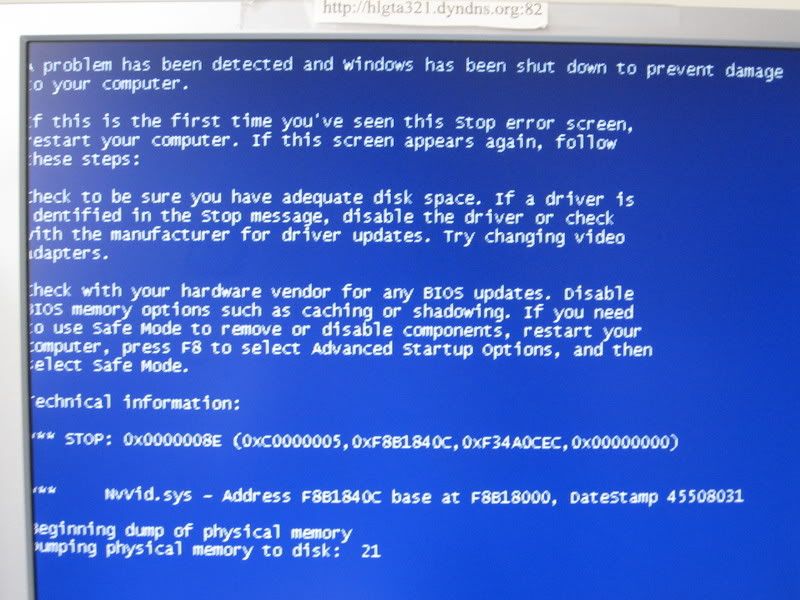
Blue Screen of Death
- Thread starter r89
- Start date
Irishwhistle
New Member
First try romoving the new video card.
~Jordan
~Jordan
http://www.nvidia.com/content/drivers/drivers.asp try here and look for it...
Whether prebuilt or custom there's one freeware for system information that will give you a complete breakdown on any system. This will indicate the make and model board as well as the make and model cpu, video card which you already know, how memory is installed, the total software enviroment, and even system temps. SIW creates a desktop shortcut and is a small tool for finding out just about anything. Download a copy from http://www.gtopala.com/
Here's the Info:
Property Value
Manufacturer Intel Corporation
Model D865GBF
Version AAC25843-407
Serial Number ABBF40705092
Chipset Vendor Intel Corporation
Chipset Model 82865G/PE/P, 82848P DRAM Controller / Host-Hub Interface
South Bridge 82801EB/ER (ICH5/ICH5R) LPC Interface Bridge
SMBus Intel Corporation 82801EB/ER (ICH5/ICH5R) SMBus Controller @C800h
CPU Intel Pentium 4 HT
Cpu Socket Socket 478 [J2E1]
Processor Upgrade
Max CPU Speed 3060 MHz
System Slots 6 PCI, 1 AGP
OnBoard devices
Video (Disabled) Intel GMCH AGP Graphics Controller
Ethernet (Enabled) Intel 82562 Ethernet Device
Sound (Enabled) Intel ICH4 Audio Device
Memory Summary
Location System board or motherboard
Maximum Capacity 4096 MBytes
Memory Slots 4
Error Correction None
Use System memory
Maximum Memory Module Size 1024 MBytes
Property Value
Manufacturer Intel Corporation
Model D865GBF
Version AAC25843-407
Serial Number ABBF40705092
Chipset Vendor Intel Corporation
Chipset Model 82865G/PE/P, 82848P DRAM Controller / Host-Hub Interface
South Bridge 82801EB/ER (ICH5/ICH5R) LPC Interface Bridge
SMBus Intel Corporation 82801EB/ER (ICH5/ICH5R) SMBus Controller @C800h
CPU Intel Pentium 4 HT
Cpu Socket Socket 478 [J2E1]
Processor Upgrade
Max CPU Speed 3060 MHz
System Slots 6 PCI, 1 AGP
OnBoard devices
Video (Disabled) Intel GMCH AGP Graphics Controller
Ethernet (Enabled) Intel 82562 Ethernet Device
Sound (Enabled) Intel ICH4 Audio Device
Memory Summary
Location System board or motherboard
Maximum Capacity 4096 MBytes
Memory Slots 4
Error Correction None
Use System memory
Maximum Memory Module Size 1024 MBytes
Who made the case? is the information now needed for that model Intel board. Is it a Dell, HP, other brand? You should see that right on the case if it was a prebuilt system. Once you know the make you simply go to the manufacturer's support site and look up that model for driver updates there.