Booting Problems

Erdhexe

New Member
Hello everyone!

I built a new computer and have two annoying problems, both occuring while booting to Windows XP SP2:

Most of the time when I turn on the computer, it is powered up, but the screen stays black. I can hear the hds, the fans, and everything else and it beeps (just like a computer always does when its booting up), but nothing happens on the monitor. The computer does that especially when it had been off for a while. Only after I press the reboot button, or turn it off and back on, it will boot to Windows. When the computer has been running and I need to reboot, it will do that no problem.

The second problem is that whenever it boots to Windows, the monitor will enter sleep mode for a short time right between the Windows and the Welcome screen. This does not happen when I do not have the driver for the graphics card installed. I have tried various versions, including the newest 7.9 Catalyst and an Omega, but they all cause the same thing.

I have reinstalled Windows, checked the cables and connectors, disconnected it from the power, pressed the on-button to see if perhaps some electricity has remained in the system, but nothing helps. Unfortunately I cannot take parts from another computer in order to try out which hardware might be at fault, because the new system has DDR2 RAM, not DDR, has PCI-e instead of AGP, and socket AM2, not A anymore.

Here's the hardware (all of them brand new):

Motherboard: MSI K9N Neo-F V3 nForce 560 Socket AM2 (Award BIOS)
RAM: 1024MB DDR2RAM Corsair Value Select PC667 CL5
CPU: AMD Athlon64 X2 4600+ EE tray AM2 2x 2.40GHz (Windsor, F2)
CPU Cooler: CPU Arctic Cooling Freezer 64 Pro PWM 754/939/940/AM2
Power Supply: Seasonic M12-500 80Plus, 500Watt
+3.3V = 24A, +5V = 30A, +12V1 = 18A, +12V2 = 18A, +12V3 = 18A, +12V4 = 18A,
-12V = 0.8A, +5Vsb = 3A
Graphics Card: Sapphire 256MB X1950Pro GDDR3 SDRAM 256-bit PCIe
Hard Drive: Samsung 80GB SP0802N 7200rpm
Samsung 250GB SP2514N 7200rpm

I'm very grateful for every suggestion that might help!!!

Greetings,

Erdhexe
 
You certainly need a Welcome to the Computer Forum! http://www.computerforum.com/70672-official-welcome-thread.html and of course the reminder to new members to review the http://www.computerforum.com/52038-forum-rules.html

Apparently I'm not alone afterall seeing the exact same problems on a new build here. There is one exception however that being a Direct X 10 capable card while you are running or trying to run an oldr DX 9 type card there. The common problem? The latest version of the ATI Catalyst!

The 7.9 finally went on XP and worked after some time. Your problem is too new a catalyst for the model card you have. You should go with the previous drivers and softwares link and go for a slightly older version like the 6.5. This is typical where the latest version always sees an older model dropped. The latest versions are for the HD 2xxx series not X1xxx models. That was seen on XP here while Vista saw no problems.
 
You certainly need a Welcome to the Computer Forum! http://www.computerforum.com/70672-official-welcome-thread.html and of course the reminder to new members to review the http://www.computerforum.com/52038-forum-rules.html

Oops, I'm sorry... I didn't mean to be rude. I went there and introduced myself now. :o

Apparently I'm not alone afterall seeing the exact same problems on a new build here. There is one exception however that being a Direct X 10 capable card while you are running or trying to run an oldr DX 9 type card there. The common problem? The latest version of the ATI Catalyst!

The 7.9 finally went on XP and worked after some time. Your problem is too new a catalyst for the model card you have. You should go with the previous drivers and softwares link and go for a slightly older version like the 6.5. This is typical where the latest version always sees an older model dropped. The latest versions are for the HD 2xxx series not X1xxx models. That was seen on XP here while Vista saw no problems.

Thank you for replying!

I had installed many older drivers (7.1, 7.6, 7.8), including the one Sapphire had included in the box, which was a 7.4 Catalyst. The 7.9 I installed only a few days ago.

I went to their site as you said and the oldest version I was able to install was the 6.11. The others refused to be installed, claiming there was no needed VGA driver found. I looked on the site and saw that the earlier drivers were for models X1900 and lower.

Unfortunately, not even the 6.11 solved any of those problems. :(

I agree, the "Entering Sleep Mode" is definitely a graphics card problem, but having to turn on the computer twice before it boots... is that a graphics card problem also? Or could it be a faulty mainboard?

What else could I try?
 
Last edited:
You can simply click on the edit button to use the delete message option to remove a double post when spotted. Or have a mod take care of it for you.

The ATI installer for the Catalyst won't run if it detects another version is already installed. You then go into the ATI Technologies folder to use the AtiCimUn.exe remover found in the UninstallAll sub folder found there. That will see the current version completely removed for installing a different version.

The other thing that would be a cause for concern would be having onboard video enabled if a board has an onboard gpu chip. The specifications on the new model don't show it as having this however. http://www.msicomputer.com/product/p_spec.asp?model=K9N_Neo-F_V3&class=mb

With the new build here and a newer DX10 capatible card several Catalysts were tried to see if any in Cat 7 series besides the 7.9 would work. NADA! Besides the software cd that was the only one. But the card has been out for awhile now where that was one thought to see which would see the best results if the 7.9 was too new and not for that model card.
 
When you installed the Catalyst drivers did you uninstall the other drivers first? ATI drivers need to be uninstalled before installing other ones. You should use the ATI uninstaller program to do this.

You can simply click on the edit button to use the delete message option to remove a double post when spotted. Or have a mod take care of it for you.

I had uninstalled the driver with cat-uninstaller, then I had cleaned it with Driver Cleaner. After that, I tried to install the older versions, of which only the 6.11 and higher worked.

The other thing that would be a cause for concern would be having onboard video enabled if a board has an onboard gpu chip. The specifications on the new model don't show it as having this however. http://www.msicomputer.com/product/p...-F_V3&class=mb

My mainboard does not have on-board video. It only has on-board lan and on-board audio. If it had, I would have disabled it in the BIOS. :)
 
Last edited:
That's what I pointed out there when looking over the specifications to see if that model did have onboard. The different versions can be touchy at times however. For an older AGP 9xxx series Radeon model the drivers for the 6.1 would go right on. But the last version for that series of card was the 5,14. For that specific model the 5,11 actually proved to be the most reliable seeing few errors over a period of time.

For the X1950 Pro there you may find that you have to stay with just one to see good results. At the present time Vista sees a fading of some obhects while running a game that was never seen on the old build. For some reason the auto calibrate for color and contrast is now seeing problems there while XP is now past the problems with video and sound both.

This is one possibility there as far as something else being the culprit. One thing you can try at this point is disabling a few items in ths startup group seen in the msconfig utiltiy. Start with anything non essential there to begin with. Once you disable anything from starting along with Windows you can go back there later to re-enable it once you know what the problem is.
 
For the X1950 Pro there you may find that you have to stay with just one to see good results. At the present time Vista sees a fading of some obhects while running a game that was never seen on the old build. For some reason the auto calibrate for color and contrast is now seeing problems there while XP is now past the problems with video and sound both.

You mean if I stick with one driver, the problems will disappear on their own? Now that would be very nice!

In Gothic (I know, it's an old game) for example, I cannot see the pictures of the objects the hero and the merchants are carrying around anymore. That's annoying too, because now I have to move field to field to read what's in there. I was considering posting in the Gothic forum about this, though, but I figured I'd mention it now that you told me about the "fading issue" in Vista. Btw., I don't want to have Vista yet. I like the XP...

This is one possibility there as far as something else being the culprit. One thing you can try at this point is disabling a few items in ths startup group seen in the msconfig utiltiy. Start with anything non essential there to begin with. Once you disable anything from starting along with Windows you can go back there later to re-enable it once you know what the problem is.

I've always disabled everything except my Avast Anti-Virus and the ZoneAlarm firewall. These are the only two icons in my system tray. The third icon is my DSL connection. I don't like things running when I don't actually use them.

The strange thing I've noticed is that when I install any of these graphics card drivers, Windows (often) tells me that it was not properly installed and might not run correctly. There's nothing anyone could do wrong while installing a simple driver, so what the heck? Does WinXP not "like" these drivers? I think that's odd, considering that Sapphire's driver CD has the 7.4 Catalyst on it, claiming it's for WinXP and for that graphics card. It should work, it really should... (sorry, a bit frustrated here).
 
Last edited:
The thing you just mentioned about antivirus and and active firewall is the one thing you want to avoid having running when trying to install just about anything including device drivers. The first thing seen on any instrictions is to disable antivirus programs since those can interfere. Try disabling those to see how things go from there. You can re-enable them later once you have any driver problems resolved.
 
The thing you just mentioned about antivirus and and active firewall is the one thing you want to avoid having running when trying to install just about anything including device drivers. The first thing seen on any instrictions is to disable antivirus programs since those can interfere. Try disabling those to see how things go from there. You can re-enable them later once you have any driver problems resolved.

With Avast and ZoneAlarm disabled, I just installed the 7.4 driver from CD and Windows said it was installed properly. When I did the reboot, it went into sleep mode again.

I uninstalled the driver and installed 6.11 again (still Avast and ZoneAlarm disabled), and Win said it wasn't installed properly. When I did the reboot, it too, flashed the Entering Sleep Mode again.

P.S. Often, when I install something from CD, my screen goes black for a few seconds... what's up with that? :confused:
 
When first seeing the auto run on some softwares start up it takes up cpu time with it's own request for that. Sometimes when running a tv tuner card here the screen will simply go blank for a few seconds when a demand is also placed on power. Usually the installer will lag at times for those few seconds with a blank screen seen. Other programs will see a solid splash screen linger until a prompt finally appears.

If the monitor is going into hibernation mode there check the bios settings for the power settings. Those should be at the user defined setting where the power options seen in Windows has control for that.

Another thought would be to remove all drivers and simply boot up to see how Windows itself ran while not planning any gaming of course to see if the card is the problem itself. If you restart the system after and still see it stall while Windows is loading you would have to start looking at a possible fault iwth the card or something else? You could try reseating the card to see if it is lifted up a little in the slot.
 
When first seeing the auto run on some softwares start up it takes up cpu time with it's own request for that. Sometimes when running a tv tuner card here the screen will simply go blank for a few seconds when a demand is also placed on power. Usually the installer will lag at times for those few seconds with a blank screen seen. Other programs will see a solid splash screen linger until a prompt finally appears.

So, there's no need to worry about that then?

If the monitor is going into hibernation mode there check the bios settings for the power settings. Those should be at the user defined setting where the power options seen in Windows has control for that.

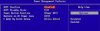
I've uploaded a screenshot of the BIOS settings...

Another thought would be to remove all drivers and simply boot up to see how Windows itself ran while not planning any gaming of course to see if the card is the problem itself. If you restart the system after and still see it stall while Windows is loading you would have to start looking at a possible fault iwth the card or something else? You could try reseating the card to see if it is lifted up a little in the slot.

It is difficult to test if I need to start the computer twice before it boots (after it's been off for a while) without all the drivers, because that problem doesn't occur ALL the time. Sometimes it boots right away, and lately more often than even a few days ago, which surprises me. (However, I'm not sure if this means it's all right now)

The Sleep Mode thing between "Windows" and "Welcome" never occurs when there's no VGA driver installed.
 

Attachments

  • Power Management 1.jpg
    Power Management 1.jpg
    64.2 KB · Views: 36
The lack of seeing Windows stall while loading without drivers shows that some driver most likely for video is hanging up on you. That fortunately points at a software rather then hardware problem.

The idea there was see what happened without the drivers/software installed for the card. Once you removed and restart the first time to see that done you watch what happened the next time the system was restarted but necessary immediately. That would be for hardware there whether the card or a possible fault with the memory installed.

Some boards can be particular on what memory is installed while no faults are found. Memtest reported a good number or errors on two sets of different brand dimms to later be found with no flaws when later tried on the last build here. The build before that saw quite a few driver errors for sound there however. On the new build some ATI driver errors were initially seen then corrected by trying an earlier and then the 7.9 version.

One look at the bios screen there shows that option mentioned earlier isn't seen there. Apparently MSI doesn't see that or maybe on other models instead. The boards run here are Asus models but I thought I would ask you about that. The settings there are normal and nothing to worry about just from the initial look here. Some boards by various makes will see an option for user instead of a preset factory default.

As far as the screen winking at you when using a software installer that usually a minor thing and no worries are needed. Plus you are still debugging video drivers seeing hangs on boot. With your card you don't have to have the Catalyst as well as the driver set to run the card that way with the 7.4 or higher.

The two things I could mention here refer to the version off Zone Alarm and Avast. If that the free version of Zone Alarm the advice would be to dump it for something like Jetico or Commodo for a freeware type firewall. One newer freeware for removing adwares and spywares also sees a milder firewall that prompts you whenever going to install something called the Spyware Terminator. Too many complaints heard on the free version of ZA.

I tried Avast on a few occasions and went back to Grisoft's AVG. When disabling antivirus programs the one thing I didn't mention earlier is you have to go into the services as well as startup group in the msconfig utility to see them totally disabled. But I doubt that's the problem you are seeing there. Sometimes you have to repeatedly install the same set of drivers to see them go on fullly due to the installer they use.
 
The lack of seeing Windows stall while loading without drivers shows that some driver most likely for video is hanging up on you. That fortunately points at a software rather then hardware problem.

The idea there was see what happened without the drivers/software installed for the card. Once you removed and restart the first time to see that done you watch what happened the next time the system was restarted but necessary immediately. That would be for hardware there whether the card or a possible fault with the memory installed.

The past few days my computer booted up the first time I started it (except once at night, when I had disconnected it to work on my old computer which I'm getting ready for my father). This morning, however, I had to press the reboot button again for it to boot. Tonight, I will uninstall ALL the drivers and see for the next few days how it works.

Some boards can be particular on what memory is installed while no faults are found. Memtest reported a good number or errors on two sets of different brand dimms to later be found with no flaws when later tried on the last build here. The build before that saw quite a few driver errors for sound there however. On the new build some ATI driver errors were initially seen then corrected by trying an earlier and then the 7.9 version.

I checked on the MSI site for that particular board if it takes that Corsair RAM I had chosen, and it says that this RAM causes no problems on their tests. I also had done a Memtest (for a bit over an hour) and it ran without errors.

As far as the screen winking at you when using a software installer that usually a minor thing and no worries are needed. Plus you are still debugging video drivers seeing hangs on boot. With your card you don't have to have the Catalyst as well as the driver set to run the card that way with the 7.4 or higher.

I'm not exactly sure what you mean by that. I only install the Driver, not the CCC or anything else of the Catalyst Suite. As a matter of fact, I always only download the naked driver, not the Suite at all. :)

The two things I could mention here refer to the version off Zone Alarm and Avast. If that the free version of Zone Alarm the advice would be to dump it for something like Jetico or Commodo for a freeware type firewall. One newer freeware for removing adwares and spywares also sees a milder firewall that prompts you whenever going to install something called the Spyware Terminator. Too many complaints heard on the free version of ZA.

So far, ZA never gave me problems. I was always happy with it. I dont' think that it causes these stalls, but if it does, I'll remove it right then and there. I've never heard of Jetico or Commodo. I'll definitely try those out.

I tried Avast on a few occasions and went back to Grisoft's AVG. When disabling antivirus programs the one thing I didn't mention earlier is you have to go into the services as well as startup group in the msconfig utility to see them totally disabled. But I doubt that's the problem you are seeing there. Sometimes you have to repeatedly install the same set of drivers to see them go on fullly due to the installer they use.

I use System Mechanic to disable progs. Was that wrong?


Does it hurt the computer or the monitor, when the monitor goes in Sleep Mode for a few seconds while it boots up? If it doesn't, then I could actually live with that. What I really, really want fixed is the thing with having to turn the (cold) computer on twice before it boots (although, it doesn't do that every time anymore).
 
Last edited:
You will see Corsair and Kingston as the manufacturer's recommended or on their list of recommended brands of memory. Asus also advertizes Corsair while Gigabyte will see Kingston being the brand promoted. But despite Asus promoting Corsair memtest reported errors when Corsair DDR400 was used on an older Asus model. That is what meant by some boards themselves being particular with what memory is installed.

Apparently you could rule out the Catalyst Control Center(ccc at the support site) since you run the driver only type update. Sometimes you download a fresh set and they still will be buggy! On the new build here everything will seem to be running smooth for video and sound alike having seen driver problems while multimedia on top of assigning wav files to some Windows functions see no problems with audio. Kaboom! The ATI driver suddenly gets caught in the old "driver thread caught in infinite loop". And the problems on the XP side and not seen with Vista have been sound with a Creative card.

The one thing about the free version of Zone Alarm is that it doesn't offer any real time protection with only one feature even available. It's mainly for evaluation before buying a full featured retail version. Jetico Personal Firewall and Commodo are strictly freeware not sharewares where they offer far more by being the full versions of what they ate.

As far as the System Mechanic that's still a 3rd party software while the msconfig is a regular system tool included in Windows itself for diagnostic purposes. The effectiveness would be the thing to look at there. If System Mechanic for instance was seeing a problem disabling that in the msconfig would then see any problems suddenly stop. That's how the msconfig utility is able to help isolate problem sources at times.
 
You will see Corsair and Kingston as the manufacturer's recommended or on their list of recommended brands of memory. Asus also advertizes Corsair while Gigabyte will see Kingston being the brand promoted. But despite Asus promoting Corsair memtest reported errors when Corsair DDR400 was used on an older Asus model. That is what meant by some boards themselves being particular with what memory is installed.

Okay, but this is MSI and I looked on their list of tested RAM. That was no advertising. They had tested all kinds of different brands with each of their boards. Why would they say that my model was compatible with the board if it wasn't? :confused:
I had done a Memtest for over an hour. The RAM worked fine.

Apparently you could rule out the Catalyst Control Center(ccc at the support site) since you run the driver only type update. Sometimes you download a fresh set and they still will be buggy! On the new build here everything will seem to be running smooth for video and sound alike having seen driver problems while multimedia on top of assigning wav files to some Windows functions see no problems with audio. Kaboom! The ATI driver suddenly gets caught in the old "driver thread caught in infinite loop". And the problems on the XP side and not seen with Vista have been sound with a Creative card.

I don't really understand "Kaboom! The ATI driver suddenly gets caught in the old "driver thread caught in infinite loop". And the problems on the XP side and not seen with Vista have been sound with a Creative card."
I was about to install the X-fi Music from Creative. Does that mean I can forget that? Currently I'm still using the on-board sound from Realtek.

The one thing about the free version of Zone Alarm is that it doesn't offer any real time protection with only one feature even available. It's mainly for evaluation before buying a full featured retail version. Jetico Personal Firewall and Commodo are strictly freeware not sharewares where they offer far more by being the full versions of what they ate.

Which one would you recommend? Jetico or Commodo?

As far as the System Mechanic that's still a 3rd party software while the msconfig is a regular system tool included in Windows itself for diagnostic purposes. The effectiveness would be the thing to look at there. If System Mechanic for instance was seeing a problem disabling that in the msconfig would then see any problems suddenly stop. That's how the msconfig utility is able to help isolate problem sources at times.

System Mechanic had no problems, but I now used the misconfig to disable these progs in order to reinstall the drivers.

This morn, my computer had to be turned on twice before it booted again. I had all the drivers uninstalled. I doubt that the booting problem and the "entering sleep mode" between the Windows and Welcome screen are connected now. The latter only occurs with any of the Catalyst drivers installed. The other occurs randomly, no matter what.

Do any of these problems hurt my hardware or monitor?
 
I'd be extremely grateful if someone would answer my questions...

I've been left hanging in other forums. I hope this isn't the case here. :(

I was thinking about replacing the motherboard now.
 
Back
Top