Building Comp. Please Help Asap

Bajadan236

New Member
I got all the hard ware in, and started connecting wires. My Cd Drives dont have , omg i for get brain hurts, the ribbon cables (dont know name), But i can plug these SATA cables into them, well olny the one because that how many SATA cables i have. Please, i no my descrption is not good, but just ask me what it looks like and i will describe it to you as best as i can. Please help, im realy frustrated and dont want to F*** up anything.

Thanks

Dan
 
I got all the hard ware in, and started connecting wires. My Cd Drives dont have , omg i for get brain hurts, the ribbon cables (dont know name), But i can plug these SATA cables into them, well olny the one because that how many SATA cables i have. Please, i no my descrption is not good, but just ask me what it looks like and i will describe it to you as best as i can. Please help, im realy frustrated and dont want to F*** up anything.

Thanks

Dan

It's ok! Making an computer is easy, just calm down. The motherboard, you should have an 24pin connector (biggest), and an yellow and black 12V connector (4pin). You GFX may have an 6pin you need to plug in from your PSU. You DVD drive is probably SATA (right? You said ribbon cable too). If you can tell me this, I can tell you what power connector you need.

Can you post up what you bought?

http://youtube.com/watch?v=41sq0RnPjeQ

^^ Lifesaver :D
 
There Sata, theres no ribbon, which is confussing cuz thats what i was used to. Can you help me out?

Thanks

Dan

SATA is newer. Smaller, more efficient. Plug the SATA cord in the drive, and connect it to the motherboard. Done! Then connect the power. Should be an 1" long flat black connector on the power supply. Connect that into the optical drive, done!
 
yes...plus my HDD. New thing. All i do is plug the SATA connector to my CD and its all set to go? do i need to plug in a power connector?

Thanks

Dan
 
yes...plus my HDD. New thing. All i do is plug the SATA connector to my CD and its all set to go? do i need to plug in a power connector?

Thanks

Dan

Yes. Your power supply has a cable that looks like this:
images-1.jpg
That's a SATA power cable.
 
ok, i have an antec 900 case. The 2 front fans work, side fan works and thats it. The Zalman Cpu Fan lights up but dose not work, cant tell about the GeForce 8800Ultra fan. The 200mm fan dosent work. They kinda twitch, the will try to turn but dont make it, and they keep doing that. I have them connected all to 2 Fan connecors...I have a 650W PSU. Should i connect them to regular Molex Connectors? Can the Mother moard not be working? The CD Rom Drivs work, they open and the little light comes on. Please any idea whould be very helpfull.

Thanks

Dan
 
p35-DS3R, the video card fan works, but the Zalman fan dose not, neither dose the top fan infront of the case. I got the 200mm Fan to work, but it wont start up. The LCD screan says Check Video Cables. I bade sure everything worked fine. But the Cord that goes from the video card to the monitor are differnt. But the still plug in do i havbe to get an adapter or what? is that the problem? IM jsut rly Pissed b/c i put out 2k on this thing and i cant get it to run.. PLEASE HELP.

Thanks

Dan
 
Ya its connected, it started to go but then died....thanks for replaying guys, i hope i get it workering.

Thanks

dan
 
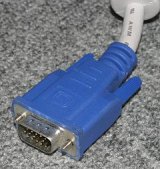
You could have either a VGA or DVI cord,

VGA
vga-plug.jpg


DVI
dvi-dvi%20cable.jpg


Adapter (DVI to VGA) or you can get (VGA to DVI)
DVI_adapter.jpg


Good Luck
 
Last edited:
You should take a picture of the interior of the case and post it on this thread. Clean up the wiring as much as possible. We need a clear look at the motherboard. I suspect the case wiring isn't properly connected. There could be other problems that can be seen with a picture.
 
I have a DVI Connector, but my video card is not a VGA, but its donse not look like a DVI connector. I have a digital Camera, but my old Comp is so slow it took me An hour and a half to upload a 45sec video. I dont know how to post a pic. Could it be the mother board beacause the CPU fan dose not work, and it connects to the motherboard. Beacause the other fans (besides the front top fan) all work.

Oscaryu1, what is RMA?

Ill install the Fan that came with the CPU wheni get home fron School and ill see if that works. I mean its not even Booting. Im just realy concerend about this JUST WORKING. I would like to thank you guys/girls for even replying to this post. :D

Thanks

Dan ( :( )
 
With your CPU fan, did you connect it to the one that says CPU fan, or 1 that just says SYS fan?

It needs to be connected to the CPU fan port.
 
Back
Top