Code Corruption

Chenz

New Member
Can someone help me with a little problem?........
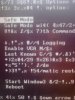
When I start up the computer, or try to boot to safe mode, the text appears jumbled with random characters. So instead of reading: "Boot to safe mode", "Boot to safe mode with networking", (whatever they're supposed to say); my text reads: $%#t &* s^*%&*d$ (or something to that effect, just jumbled code). I can't read any of the options. It allows me to go to Bios, allows me to go into safe mode, I just can't read anything.
Is there anyway to fix this?
Thanks
Chenz
 
It sounds like Windows was either hit with a virus or a language translation pack went on somehow. Have you downloaded any new lately?

If you are running XP and have the installation disk one method before seeing a need to perform a full install is the repair install method that leaves all folders intact to basically see system files reinstalled by themselves. With a virus using the manual method for starting up the system restore feature is ruled out since that would only see a reinfection.

Memory problems? That's possible if it isn't from a hard drive going on you. Some general information on the system as well as the OS(98, ME, 2000, XP, Vista) would be a help here. Then we can go step by step.
 
Using XP. Have tried re-loading operating system keeping files, and also wiping everything out and starting all over.....it's still there. Should I try writing zeros to disk and reload operating system? (I'd rather not, what a pain!) I've attached a picture that I shot with my cell showing what comes up. It's been this way for about 3 years now. Have run all kinds of anti-virus (Norton, Resolution, Resolution Online Dr., Kapernski online scanner, Ad-Aware, Spybot, etc.), and nothing comes up as being detected. The only other peculiar thing is that my start up programs don't always load or appear in the system tray.
Your help is greatly appreciated PC Eye! :)
Thanks
Chenz
 

Attachments

  • screen shot.jpg
    screen shot.jpg
    80 KB · Views: 71
I was also wondering if you just happened to be seeing a corrupted or partitially corrupted bios explaining this or a simple need to replace the battery on the board. Since you have already nuked the drive that rules out any infection unless a file backedup elsewhere was the source.

With an older system a need for a bios upddate or a simple reflash would be one thought since this has been a persistant problem. If it was only just lately then you would look at a battery going. I've seen those go in a year's time while others can last upto 5yrs.

The first things to try there would be looking for the latest or last bios update and running a good tool like memtest to see if hardware is the source. The scrambled eggs look of the program lines point at the bios or even a bad copy of Windows to be seeing that.
 
I'll change the battery and try to update the bios. I did just have a problem for the first time; the bios had an issue and reset themselves. Do you recommend that I just go to the motherboard manufacturer's website and look for updated bios info? I built the computer around 01-02, Gigabyte motherboard.
Thanks
 
Ran memtest for 20 minutes and it came back wIth 0 errors. I'll try to update bios. Thanks for the help! I really appreciate it! :)
 
It looks like more like either the bios is messed somehow where Windows is misreading or you may be seeing a problem with the Windows installer either not fully copying all files or a slight defect. When going to install if the lens was blurred in the optical drive used or the disk was finger marked or scratched that could also provide an answer. Memtest not showing errors helps hardware wise.
 
Well, I've been working on my system for about a month with no luck.....just more problems. I updated the bios (I had version F8 installed, I upgraded to F9, so no big jumps), now when I turn the computer on sometimes it reads Bios version F6, and sometimes it reads F9........what did I do?!!! LOL.
Also, the computer sometimes takes up to 30 seconds (or doesn't at all) to beep and start loading the operating system; sometimes I'll turn it on and the screen will say: "no signal, going into power save". Then maybe the computer will beep, and begin loading, showing the normal bios info, disk info, etc. Do you think I have a hardware problem? The computer worked perfect for about 2-3 years, then all of a sudden started having all of these issues, so I thought it was software/virus related. Any recommendations?
Thanks:confused:
 
8yrs. old! :eek: Forget trying to get that running as a main system but leave it as a beater or Linux box. You're long overdue for getting into something much newer and faster plus updated that you can work with.

With Windows 7 coming out in about 1 1/2yrs. as well as having Vista out now you'll want to move into something that has room for later expansion. Following the next version MS will be going strictly 64bit it seems where tossing in a few more gigs of memory if needed won't be a problem to worry about.
 
Yeah, it's still a good machine.....I built it from the ground up, it's decently fast (for being 8 years old!! ;) .....but definitely time to upgrade and build a new one. I haven't really kept up on my tech news, can you guys recommend the best new gear? Still Asus and MSI for motherboards, and Intel for chips? Or has AMD come up? What about memory? Thanks for all of your help, I really appreciate it! :)
 
Back
Top