Combofix and Hijack This for a friend..

Ok i have run the norton removal tool but i cannot post the log you want still its almost 5x to large for the limit.. i did try to follow the isntructions you gave to run it but they dont match up with anything on their page... Help? Anything else needed i can run guys?
 
Click the
reply.gif
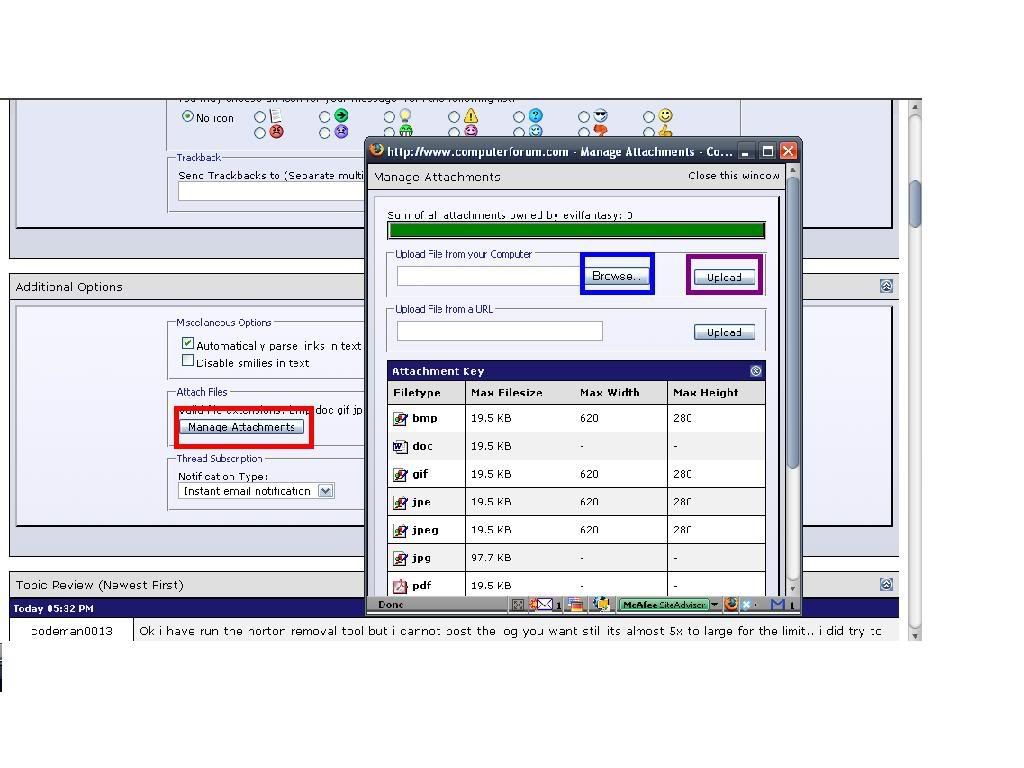
button right under and to the left of this post, scroll down a little and click Manage Attachments > In the window that pops up click Browse > and locate the Bitdefender log to Upload it as an attachment. See picture below.
attach.jpg
 
evilfantasy, this forum has a 19.5KB file size limit on any text files uploaded as attachments.

If it doesn't fit within the 19.5KB, please go to http://savefile.com and upload the file there. There is no need to register, just click the UPLOAD MY FILE button. After you upload the file, please post the link to the file. That way, anyone on the board can see the log almost as easily as if it were posted here.
 
Last edited:
Thanks ceewi1. I didn't know the forum limit was the problem.

The reason it is so large is because the BitDefender logs produced are in HTML.

Great link also!!!!:)
 
Other than the Symantec entry in the HJT log everything looks OK. The BitDefender cleaned a few active trojans but it was mostly entries from Nortons old quarantine folders and system restore points.

How is the computer now?
 
Appears to be a lot better thanks for all your help i just decided the other day i'm goin to try to learn these logs so i appreciate all of your help!!!
 
Sounds good.

Let's clear out the programs we've been using to clean up your computer, they are not suitable for
general malware removal and could cause damage if launched accidentally.

Please download OTMoveIt2 by OldTimer OTMoveIt2.exe and place it on your desktop.

1. Double click OTMoveIt2.exe to launch it.
2. Click on the CleanUp! button.
3. OTMoveIt2 will download a list from the Internet, if your firewall or other defensive programs alerts you, allow it access.
4. Click YES at the next prompt (list downloaded, Do you want to begin cleanup process?)
  • When finished exit out of OTMoveIt2

Toggle System Restore to clear infected restore points

1. Turn off System Restore
On the Desktop, right-click My Computer.
Click Properties.
Click the System Restore tab.
Check Turn off System Restore.
Click Apply, and then click OK.

2. Restart your computer

3. Turn ON System Restore
On the Desktop, right-click My Computer.
Click Properties.
Click the System Restore tab.
UN-Check Turn off System Restore.
Click Apply, and then click OK.

Let us know if anything else comes up.

 
Back
Top