Hey guys, ran into a new problem! (Suprise suprise)
My new build has been running great, that is until yesterday...
I have noticed that all of a sudden it's playing up. After around 5-7 minutes of the computer being on and working as normal, everything seems to stop functioning. After everything has settled down from startup (which only takes about 3-4 minutes), a few more minutes pass, and everything stops working.
I can't open up programs, I cant open folders, I can't open up task manager... everything ceases to work!
I have "Core Temp" running at startup, and this tells me the CPU usage aswell, which stays at it's lowest speed (around 900Mhz) and occasionally goes up to 1700Mhz for a split second. My temp is also normally about 30C ut when this happens it levels at about 27C indicating the computer is doing nothing whatsoever.
When this happens, I've noticed my HDD doesnt seem to do much, the indicator flashes on for a couple of seconds and off for a couple of seconds repeatedly, but there is little to no noise coming from it indicating to me that it's probably doing nothing.
If I click on something which wont work (such as opening a a web browser) it will open it about 5 mins later, but i am still able to do nothing. The mouse works and moves around but I clicking something barely seems to have any effect.
I ran a disk check at start up and the same thing happened, after about the 5 minute mark, it stopped checking through it completely. (it was just stuck at something like 5700/15000)
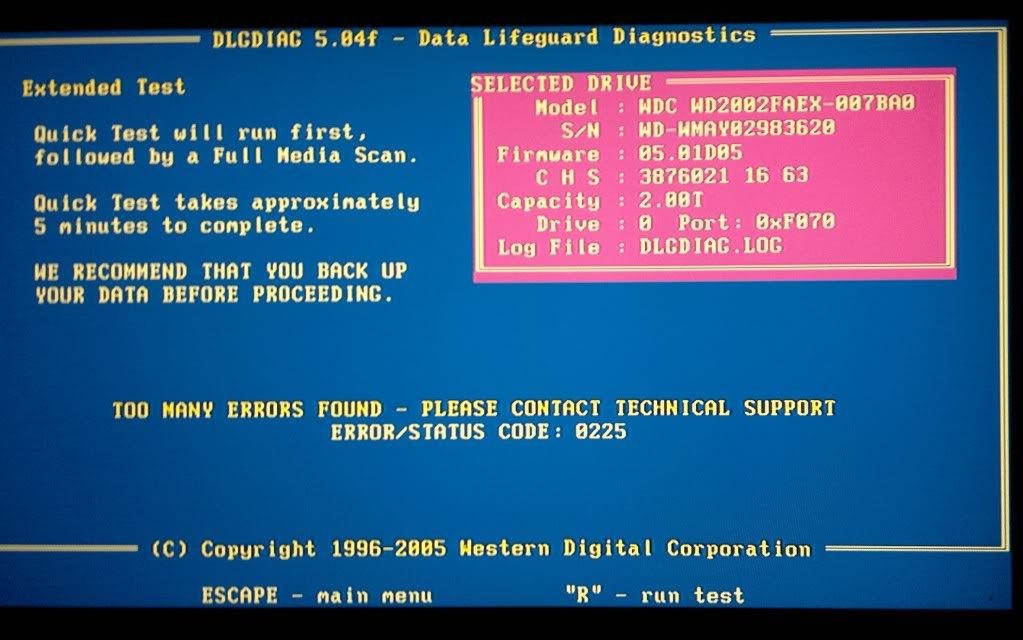
Is it just me or is the HDD broken? or could it be something else? My comp is newly built and virus free. (I did load all my documents from my previous computer the night before that worked fine, but I know that they are virus free too)
Please help! After all this effort building my first computer I really didnt need this downslide!
HDD: 2TB WD Caviar black
Runnning win7 64
AMD phenom 1100t
Asus M5A99X EVO
(I will sort out my signature soon)
My new build has been running great, that is until yesterday...
I have noticed that all of a sudden it's playing up. After around 5-7 minutes of the computer being on and working as normal, everything seems to stop functioning. After everything has settled down from startup (which only takes about 3-4 minutes), a few more minutes pass, and everything stops working.
I can't open up programs, I cant open folders, I can't open up task manager... everything ceases to work!
I have "Core Temp" running at startup, and this tells me the CPU usage aswell, which stays at it's lowest speed (around 900Mhz) and occasionally goes up to 1700Mhz for a split second. My temp is also normally about 30C ut when this happens it levels at about 27C indicating the computer is doing nothing whatsoever.
When this happens, I've noticed my HDD doesnt seem to do much, the indicator flashes on for a couple of seconds and off for a couple of seconds repeatedly, but there is little to no noise coming from it indicating to me that it's probably doing nothing.
If I click on something which wont work (such as opening a a web browser) it will open it about 5 mins later, but i am still able to do nothing. The mouse works and moves around but I clicking something barely seems to have any effect.
I ran a disk check at start up and the same thing happened, after about the 5 minute mark, it stopped checking through it completely. (it was just stuck at something like 5700/15000)
Is it just me or is the HDD broken? or could it be something else? My comp is newly built and virus free. (I did load all my documents from my previous computer the night before that worked fine, but I know that they are virus free too)
Please help! After all this effort building my first computer I really didnt need this downslide!
HDD: 2TB WD Caviar black
Runnning win7 64
AMD phenom 1100t
Asus M5A99X EVO
(I will sort out my signature soon)