Compatibility with my PC

dudleyboxer

New Member
Hello all,

I've finally decided to upgrade the graphics card on my computer after realizing too late just how miniscule the stock one is. Is there any reason why this graphics card inparticular wouldn't work with my system?

My system

http://reviews.cnet.com/desktops/gateway-dx4200-09/4507-3118_7-33513602.html?tag=mncolBtm;rnav

Sought after Video Card

http://www.newegg.com/Product/Product.aspx?Item=N82E16814150448

And I'm going to be upgrading my powersupply along with it with this

http://www.newegg.com/Product/Product.aspx?Item=N82E16817341016

It'd be wonderful if anyone could help me out before I make a purchase like this. I don't want to be stuck with a less than ideal situation :/

Thanks,

Dud
 
Looks like everything will work good together. The only thing you need to worry about is that is there enough room in the case for a large video card?
 
Thanks for the quick response johnb35.
To further alleviate my curiousity,
is there a way I can check if I'll have enough space? Or do I kinda just have to shimmy it in my tower. I have the knowledge to open the thing but that's just about as far as it goes. I really appreciate your patience and help. :o
 
You will have to find out the dimensions of the card to make sure it won't be too long. And that card you linked to will take up 2 expansion slots.
 
The processor is AMD Phenom X4 9100e / 1.8 GHz...It might just prove to be the bottleneck when combined with a card like 5750 and almost certainly it will...you need to change your processor if you want to use that graphics card to its full potential...and ofcourse you need to change that 300W power supply to something higher...minimum 500W as you have chosen...
 
Last edited:
You're going to need a new power supply because the default power supplies that are included in desktops don't have any PCIe power cords, which you will need as you have to plug one of them into the 5750. Besides, 300 watts may be enough but it would really be pushing, I would recommend at least 450 watts to be safe, and make sure it has a PCIe power cord. I'm kind of like you, I'm 16 years old and my mother purchased my current computer (Dell Inspiron 530) about two years ago but I didn't pick out a "good" one because I didn't even know what the hell was involved with building a computer.

Anyways, fast forward to today and I'm getting into computer gaming big time (Battlefield Bad Company 2 ftw) but obviously that was impossible with the default graphics chip that is included with the desktops. I had to purchase a 530 watt power supply and swap it with the default one that was in there. After that I purchased a HD 4870 graphics card - and making that thing fit was a nightmare. I had to move the hard drive, shave down a clip that holds in one of the RAM sticks, use a tin snips to cut open the back of the case (it was a two slot card), drill a new screw hole and finally move the optical drive. Anyways, good luck on your upgrading.
 
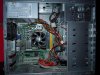
Please post a picture with the side cover off your case looking in.

The 5750's are short cards, there should be no length issues at all. I'm only worried if there's an expansion card in the slot below the x16 slot and you won't be able to use a dual slot cooler card.
The power supply you chose will be fine.

As for the CPU, it's still a quad core, just low clocks. With the video card you plan to get I doubt you will have a serios bottleneck. The 9950, although is a decent CPU, *MAY* not work because it's a 125w cpu. Your board may only be able to run up to 89w or 95w cpu's who knows. It's too risky to spend that much. I say give just the video card a shot and see if you really have a CPU bottleneck or not. The video card will always be compatible should you choose to upgrade the motherboard and CPU down the road.
 
CIMG5613.jpg


Here is an idea of what he has.
HIS 4670 size
XFX 5750 size

Not really sure if the 5750 would fit.
 
Last edited:
....is that one in the middle just a fan? Thats gonna have to go because a 5750 is a dual slot card...your 4670 is just a single.
 
Wow, thanks for all of the quick replies guys. Sorry for getting back so late.
Anyways,
The picture that hamster posted looks very identical to mine, sans the video card.
Attached is my pc open.
So if the sough after card will not fit with what I need, any other recommendations?
I'm sorry to ask this of all of you and I promise to give back the knowledge you supply me with to others like my current self :(
Budget-wise, around 400-500 in all.
 

Attachments

  • DSCN0463.jpg
    DSCN0463.jpg
    80.9 KB · Views: 20
Oh whoops I wasn't even looking who posted that pic LOL I thought that was yours.

OK, well the card you originally posted is now unavailable on newegg. But thats OK, you can get a 5770, which is a little stronger than a 5750, for about the same price.

I personally like sappire the best, and the reference cooler design looks awesome in the case-

http://www.newegg.com/Product/Product.aspx?Item=N82E16814102858


So if you get that card, and I highly recommend a modular power supply over the one you picked. Modular means that the cables hook into the power supply, so you only have to hook the ones up that you need. This alleviates clutter, because you won't need any molex style connectors at all so thats atleast two cables you won't have to worry about tucking away.

This power supply right here is perfect for you, and is one of the best brands there is-

http://www.newegg.com/Product/Product.aspx?Item=N82E16817371016


Now, if you have that kind of budget you should upgrade your motherboard and CPU as well. You have 4gb of DDR2 ram, so upgrading to ddr3 at this point isn't necessary. You also have a microATX only case, so I'll pick a very good AM2+ mATX board that uses DDR2. This board will support the latest AM3 cpu's, including the new thuban hex core. But you have to pop in your current CPU to do a Bios update first-

http://www.newegg.com/Product/Product.aspx?Item=N82E16813157162


Now for the CPU, this is your choice on how much you want to spend. Both will be in your budget, one will keep you on the low end one will put you at the high end of your budget but will last you a long time.

Athlon II 635 quad core, this just came out this is the C3 stepping so it will run cooler and overclock better (if you want too, not really necessary)-
http://www.newegg.com/Product/Product.aspx?Item=N82E16819103882

Phenom II 1055t hex core-
http://www.newegg.com/Product/Product.aspx?Item=N82E16819103851

The hex core will be so awesome, and pretty futureproof. You'll simply need to install your current Phenom cpu and update the Bios on the board first. We can walk you through that it's pretty easy. Then you can pop that hex core right in and go to town having one sweet gaming PC.

But if you want to stay on the low end and get the Athlon II, it's still a way plenty strong CPU for all current games.
 
Last edited:
wow, I never thought I'd be replacing my motherboard hehe, will it really help me out that much? Is it difficult to do? I'm pretty much following guidelines from youtube with everything I do :o

But thank you very much for the information dtna. I literally just might add everything you told me to get to my cart and purchase it. The Phenom II is looking quite appetizing.
 
I wonder with all of this if I shoulder just spend some extra and build a brand new machine..

You should. With your budget between $400-$500 plus selling your computer you can build decent pc. Not really sure how much you can get off that pc, but could be enough.
 
Your ram, hard drive, dvd rom, and case don't need to be replaced at all. That stuff is another $250 you don't have to spend.
 
Back
Top