Computer "Reboot using ...

Biffyyy

New Member
"Reboot and select proper boot device or insert boot media"

No matter what I do I cant get the computer to boot from my hard disk....I have tried pretty much everything there is, making sure the bios is working properly, boot order is fine, formatted, partitioned, live usb, live cd's...I have tried to install XP to it but all that does is setup the files restart and then the whole cycle is repeated. All I want to do is get some sort of life out of my pc.

Any Ideas anyone?

P.S. The hard disk is actually being read as it shows in the bios.... i'm clever enough to realise that ;)
 
If you are installing XP after the files are installed it will reboot and it will say to boot from cd hit any key. DON'T hit any key or it will start from the beginning reinstalling again.
Try to reinstall but this time remove all the partitions and format then let it install.
 
I have attempted a full format and deleted all the partitions, no message comes up after the install it just goes straight into the setup :(...... i'm definitely running out of ideas. Cheers for the reply though.
 
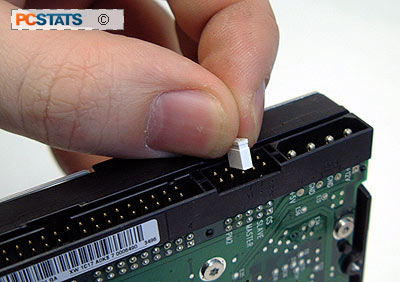
on the back of your hard drive might be a little piece of plastic hooked around two of the pins. on the hard drive should be a key which will tell you what each combination does.
Look below:

hddinstall_jump.jpg
 
Last edited:
There's a little jumper at the back of the drive to indicate whether the device is a "master" or "slave" (and cable select & bunch of others you probably don't want to touch). If the hard drive is the only one on that channel (i.e. the only device connected to the IDE ribbon) or, if there's two, it's connected to the port at the end of the cable, you'll want it set to master, otherwise it should be set to slave. CS would pick the right setting automatically but fails on certain configurations (usually because of an old-style IDE cable).

Anyway, since your hard disc is being detected, I doubt it's the jumper that causing the problem.

What is your current boot order anyway? Even though the order can technically be correct, sometimes certain devices can interfere with the process (I found that sometimes having a CD in one of my computers during boot, for example, fouled something up and caused a mysterious blank screen... maybe you have something similar going on).
 
Anyway, since your hard disc is being detected, I doubt it's the jumper that causing the problem.

If the jumper is set to slave then the install won't take place because there is no master drive. It must be set to either master or cable select but if its set to cable select then the hard drive must be on the end connector of the cable, not the middle connector.
 
I see, I took advice and have tried faffing about with the jumper and so far no luck although i will keep trying :/

CD-ROM
Hard Drive
Floppy
USB
Network

Because im trying to install XP, although I have tried Hard Drive first.

No matter what order if the disk is in it starts XP setup and the setup fails or if the disk isnt it goes straight to the boot message :confused:
 
Yes its a working drive, it works perfectly fine on the other computers i've tested it with. Im setting up XP again on it with the jumper set to cable...although it will probably just restart, I may actually give up :/
 
If the jumper is set to slave then the install won't take place because there is no master drive. It must be set to either master or cable select but if its set to cable select then the hard drive must be on the end connector of the cable, not the middle connector.
There's nothing special about master as far as installing/booting is concerned, as far as booting goes all you need in correct boot order. I've had my main (OS) HD as slave in multiple computers simply because I found it's ususally a more convenient in tower cases to have optical drives as masters and hard drives as slaves due to their positioning (HDs were almost always closer to the IDE connectors than the optical drives). That was even back in the K6-2 days so I imagine you'd have to be dealing with a really old computer if having it as master/slave matters.

But I digress.
 
There's nothing special about master as far as installing/booting is concerned, as far as booting goes all you need in correct boot order. I've had my main (OS) HD as slave in multiple computers simply because I found it's ususally a more convenient in tower cases to have optical drives as masters and hard drives as slaves due to their positioning (HDs were almost always closer to the IDE connectors than the optical drives). That was even back in the K6-2 days so I imagine you'd have to be dealing with a really old computer if having it as master/slave matters.

But I digress.

I have to disagree with you on that one. I can't remember what system it was or how long ago, but I had an issue with installing windows and turned out it was the jumper. Some systems just won't boot to a drive jumpered as slave. If I remember right, it was only a few years ago.
 
Back
Top