
Constant Freezing

Suzuku

New Member
Well the freezing started about a month ago after i upgraded to windows 7 and at the same time my computer was also crashing from overheating but that problem was solved with a new fan now the freezing isnt like it just stops moving the screen becomes a repetitive rectangular box that goes across the whole screen and it only happens when it comes across certain things like sometimes it would happen when im scrolling down a page or some games it would just freeze and sometimes it would just occur randomly

Can someone tell me what's causing it? I cant tell if its the windows 7 or my video card has gone down the drain because it occurs on specific things sometimes like a certain part of a movie im watching would cause it to freeze or a certain part of a game would freeze it

The colors on the screen changes depending on what was on the screen at the time like if it was yellow the freezing would be yellow blocks
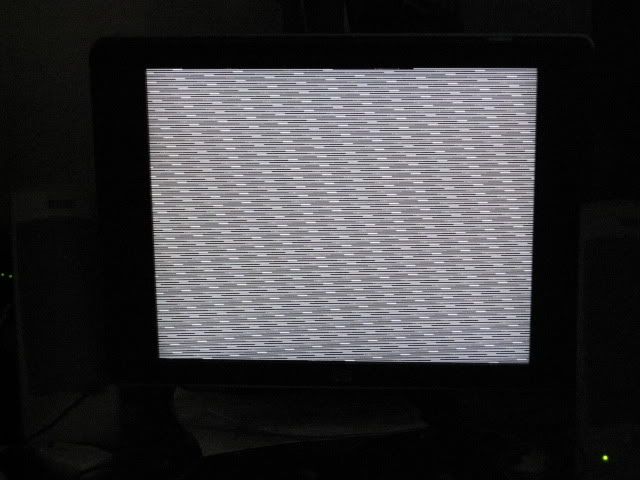
Freeze.jpg
 
Thats onboard graphics, you can try updating the drivers but I doubt that will do anything. If you had an overheating issue I imagine it did some damage to the onboard graphics. Does the computer have an open Pci-express slot for a dedicated video card?
 
Well if thats not the video card i have no clue how to check it other than opening up the computer....
Also I have no clue what a pci-express slot is...

I feel so clueless =/
 
What brand and model of computer do you have? or what motherboard if its a custom built computer.
 
According to HP, you have an open Pci express slot for a dedicated card.

c01080291.jpg


That picture should look exactly like the motherboard in your system. See the larger brown slot above the smaller brown one? Thats the pci express slot for a video card. If updating the drivers for the onboard graphics don't do anything then your only other option would be to buy a dedicated card.

Here is the driver for the onboard graphics.

http://h10025.www1.hp.com/ewfrf/wc/...dlc=en&cc=ca&product=3436818&sw_lang=&os=2093
 
Thank you so much :)
Just curious though are you definitely sure its a video card problem? Because i dont want to go buy a video card and find out it doesnt fix the problem

And What brown slot?

and a gain tank you very much

Umm it says my system doesnt meet the minimum requirement which is probably because i have windows 7
 
Last edited:
It's either a graphics issue or a monitor issue. I gave the link to the driver update for your machine, you can try downloading it and see if it helps. You can also try a different monitor. If none of that works then most likely the onboard graphics is damaged and you would need to get a dedicated card.
 
Thank you
I guess im going to have to buy a dedicated card because i have my computer hooked up to my 52' flat screen and it also freezes there also
 
Back
Top