
CPU-z says RAM frequency is lower than label on the stick.

Strokes

New Member
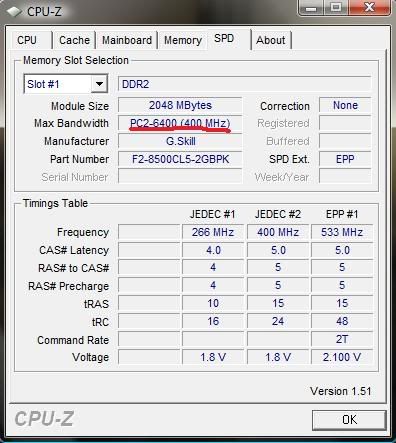
I officially lost a stick of RAM, It just died and its been passed 30 days so newegg wont replace it, and G.skill said "tough luck". I'm down to one 2 GB stick and opened CPU-z to discover it's frequency is not as advertised.

This is the RAM I ordered:
http://www.newegg.com/Product/Product.aspx?Item=N82E16820231166
And it says PC8500 on the sticker on the RAM stick.

And this is what CPU-z says:
ramproblem-1.jpg


Am I reading something wrong? Or is CPU-z wrong, or is the stick defective?
 
You can see in the SPD table that the RAM has an EPP set for the correct speed, timing and voltage. So either your board doesn't support EPP in which case you need to set it all manually in the BIOS or you don't have EPP enabled. Either way you'll have to go into the BIOS and adjust some settings.
 
It reads exactly the same on my Media PC.

I bought (PC2 6400) and it's displayed exactly the same as above.

But, in the Memory Tab it shows it running at 400Mhz (@dual data rate)
so effectively running at 800Mhz.

Not sure why CPU-Z has an issue with this.
 
Adjust the speeds of your ram to 1066mhz in the bios,on some motherboards they run slower that they are meant too until you adjust the timings.
 
It reads exactly the same on my Media PC.

I bought (PC2 6400) and it's displayed exactly the same as above.

But, in the Memory Tab it shows it running at 400Mhz (@dual data rate)
so effectively running at 800Mhz.

Not sure why CPU-Z has an issue with this.
It's reading correct for PC6400, the problem is it is PC8500 RAM. But as Nevakonaza and I said, the BIOS needs to be told to use the EPP settings or you need to set them yourself.
 
sorry about the double post, but it works. AMD overdrive is showing me 1066 MHz for my ram, how ever, CPU-z is still showing the same, but I defiantly notice a speed increase in my overall computer. Thanks a million!
 
Last edited:
Back
Top