
You are using an out of date browser. It may not display this or other websites correctly.
You should upgrade or use an alternative browser.
You should upgrade or use an alternative browser.
creating a partition in xp pro
- Thread starter `PaWz
- Start date
I bypass the Disk Management tool altogether for creating, deleting, or resizing partitions with the free Linux tool known as GParted. But for the DM tool not to be able to create a new one over 1mb suggests that the drive already has an existing partition on it. Windows won't see a Linux partition on it's own. Yet the DM should indicate something like an unknown partition type is present. Is this on a new or previously used drive? The worsst case would be a failing drive where the read/write heads are the cause.
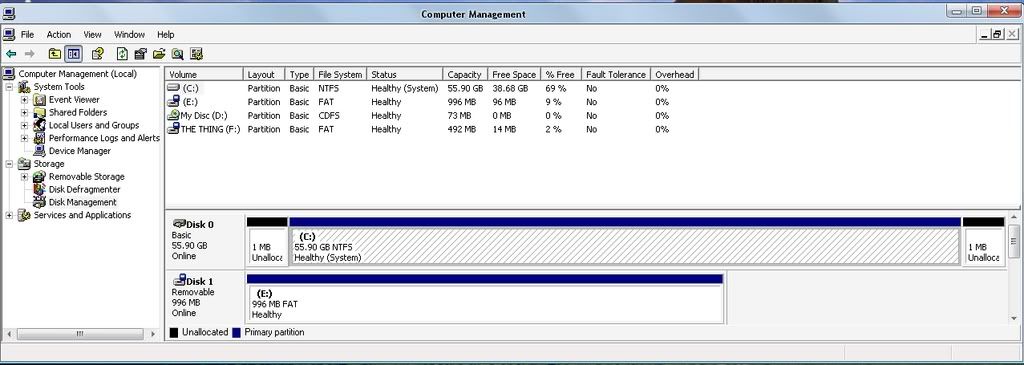
Well, the entire drive C: says primary partition. And there are two little blocks to the left and right of it that says 'unallocated', and those are the only ones I can create partitions off of, but they both only allow 1MB. I just reformatted the drive and installed xp pro on it.
Last edited:
The first part of the drive is reserved by the Windows installer for the mbr there. That's normal. What I found when using the XP installer for the primary ide drive here and GParted on the second drive was that the XP installer left some 8nb unallocated at the back end of the drive. This was ione two identical WD 250gb drives. So seeing 1mb there is no surprise here. GParted was then used to stretch the existing partition into it. Vista now has the ability to resize partitions in the updated version of the DM there. Finally MS realized a slight flaw?
You wouldn't even be able to create a partition in a 1mb amount of drive space. I use GParted here for seeing the best results. You want to give that a try for simply filling in the small gap at the rear of the drive and try a repair install until you buy a new and even larger drive.
You can also shrink the current partition down far enough to create a second partition for backing files up. Once you have a new drive in and have that running Windows slave the current and copy files from it. If you have a cd or dvd burner you can also burn a few data disks for saving any important files to removable media as well.
You can also shrink the current partition down far enough to create a second partition for backing files up. Once you have a new drive in and have that running Windows slave the current and copy files from it. If you have a cd or dvd burner you can also burn a few data disks for saving any important files to removable media as well.
bump and update:
This is how a drive partition should look with only a single primary on it. You'll notice that there is no unallocated space before or after the primary partition seen on any of the four hard drives installed here. The mbr and boot information is reserved by Windows in the first 100mb of the active partitions on the three of four OSed drives 2 ide and one sata as seen below.

This is how a drive partition should look with only a single primary on it. You'll notice that there is no unallocated space before or after the primary partition seen on any of the four hard drives installed here. The mbr and boot information is reserved by Windows in the first 100mb of the active partitions on the three of four OSed drives 2 ide and one sata as seen below.