Desktop and start menu are gone.

cmschlatt

New Member
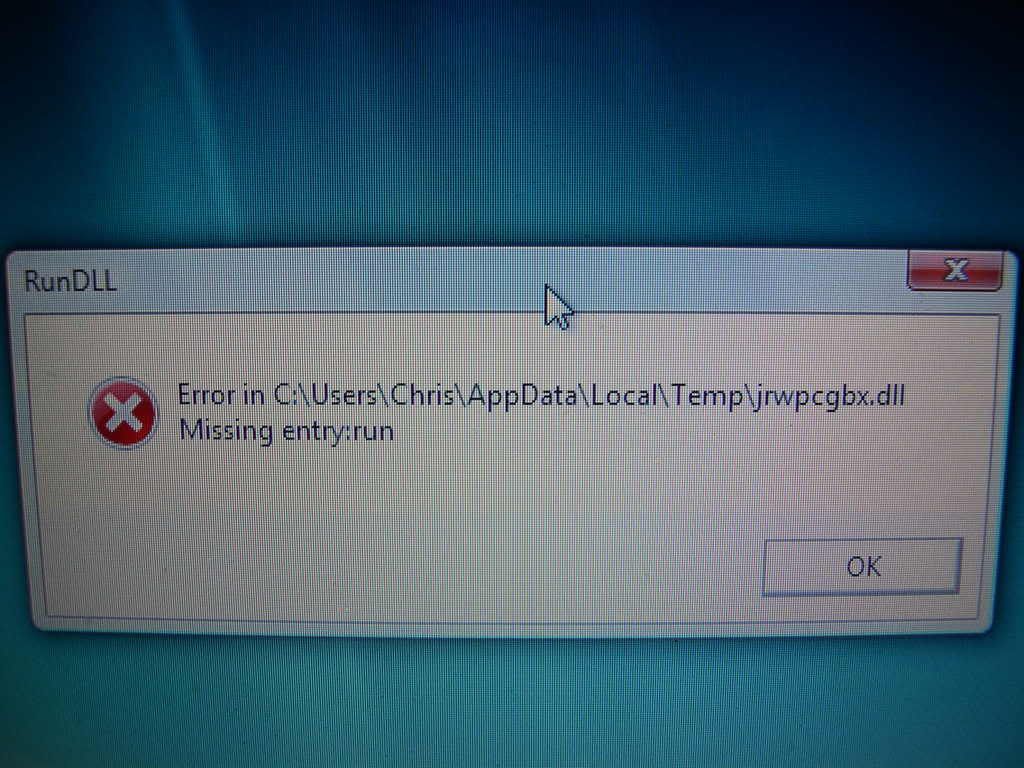
I turn on my computer, get this message:

DSCN1184.jpg


and then everything on my screen disappears except for my background and Windows Sidebar. Even when I press the "Windows key" on my keyboard, the start menu does not open. The only way I got Internet Explorer to open was by restarting my computer and clicking the icon before it disappeared. I couldn't even upload that image to my computer... I had to use my roommate's computer to upload it to Photobucket. So then I ran the program "SUPERAntiSpyware" and it caught 72 adware programs and 1 trojan that Trend Micro PC - cillin didn't catch. I removed all those and restarted my computer. When it rebooted, the everything was back to normal, but now these four windows appear:

http://i140.photobucket.com/albums/r20/cmschlatt/badcomputer.jpg
 
Post a HijackThis log:

Please download the HijackThis installer from http://www.trendsecure.com/portal/en-US/threat_analytics/HJTInstall.exe.

Run the installer and choose Install, indicating that you accept the licence agreement. The installer will place a shortcut on your desktop and launch HijackThis.

Click Do a system scan and save a logfile

When the Notepad window opens choose Edit -> Select All to select the entire log, and copy and paste the log into a reply post.
Most of what it lists will be harmless or even essential, don't fix anything yet.
 
Logfile of Trend Micro HijackThis v2.0.2
Scan saved at 9:53:41 PM, on 2/22/2008
Platform: Windows Vista (WinNT 6.00.1904)
MSIE: Internet Explorer v7.00 (7.00.6000.16609)
Boot mode: Normal

Running processes:
C:\Windows\system32\Dwm.exe
C:\Windows\Explorer.EXE
C:\Program Files\Windows Defender\MSASCui.exe
C:\Program Files\Synaptics\SynTP\SynTPEnh.exe
C:\Windows\sttray.exe
C:\Program Files\Common Files\Logitech\LComMgr\Communications_Helper.exe
C:\Program Files\Common Files\Logitech\LComMgr\LVComSX.exe
C:\Program Files\Logitech\QuickCam10\QuickCam10.exe
C:\Program Files\Trend Micro\Internet Security 14\pccguide.exe
C:\Program Files\Dell\MediaDirect\PCMService.exe
C:\Program Files\Hp\HP Software Update\hpwuSchd2.exe
C:\Windows\System32\igfxtray.exe
C:\Windows\System32\hkcmd.exe
C:\Windows\System32\igfxpers.exe
C:\Program Files\iTunes\iTunesHelper.exe
C:\Program Files\DellSupport\DSAgnt.exe
C:\Program Files\Windows Sidebar\sidebar.exe
C:\Windows\ehome\ehtray.exe
C:\Program Files\Dell Support Center\bin\sprtcmd.exe
C:\Program Files\Siber Systems\AI RoboForm\robotaskbaricon.exe
C:\Program Files\SUPERAntiSpyware\SUPERAntiSpyware.exe
C:\Program Files\Digital Line Detect\DLG.exe
C:\Program Files\Google\Google Updater\GoogleUpdater.exe
C:\Program Files\Hp\Digital Imaging\bin\hpqtra08.exe
C:\Program Files\Dell\QuickSet\quickset.exe
C:\Program Files\WinZip\WZQKPICK.EXE
C:\Program Files\Windows Sidebar\sidebar.exe
C:\Windows\ehome\ehmsas.exe
C:\Users\Chris\AppData\Local\Microsoft\Windows Sidebar\Gadgets\Logitech%20Typing%20Speed%20(32%20bits)[1].gadget\KeyboardListenerServer.exe
C:\Program Files\Common Files\Logishrd\LQCVFX\COCIManager.exe
C:\Program Files\Internet Explorer\ieuser.exe
C:\Program Files\Internet Explorer\iexplore.exe
C:\Windows\system32\taskeng.exe
C:\Program Files\HP\Digital Imaging\bin\hpqSTE08.exe
C:\Program Files\Trend Micro\HijackThis\HijackThis.exe
C:\Windows\system32\SearchFilterHost.exe

R1 - HKCU\Software\Microsoft\Internet Explorer\Main,Search Page = http://go.microsoft.com/fwlink/?LinkId=54896
R0 - HKCU\Software\Microsoft\Internet Explorer\Main,Start Page = http://home.myspace.com/index.cfm?fuseaction=user&MyToken=bad58341-dc6d-4f4e-8a9b-1c992a54d275
R1 - HKLM\Software\Microsoft\Internet Explorer\Main,Default_Search_URL = http://go.microsoft.com/fwlink/?LinkId=54896
R1 - HKLM\Software\Microsoft\Internet Explorer\Main,Search Page = http://go.microsoft.com/fwlink/?LinkId=54896
R0 - HKLM\Software\Microsoft\Internet Explorer\Main,Start Page = http://go.microsoft.com/fwlink/?LinkId=69157
R0 - HKLM\Software\Microsoft\Internet Explorer\Search,SearchAssistant =
R0 - HKLM\Software\Microsoft\Internet Explorer\Search,CustomizeSearch =
R1 - HKCU\Software\Microsoft\Internet Explorer\Main,Window Title = Internet Explorer provided by Dell
R1 - HKCU\Software\Microsoft\Windows\CurrentVersion\Internet Settings,ProxyOverride = *.local
R0 - HKCU\Software\Microsoft\Internet Explorer\Toolbar,LinksFolderName =
O1 - Hosts: ::1 localhost
O2 - BHO: Adobe PDF Reader Link Helper - {06849E9F-C8D7-4D59-B87D-784B7D6BE0B3} - C:\Program Files\Common Files\Adobe\Acrobat\ActiveX\AcroIEHelper.dll
O2 - BHO: Skype add-on (mastermind) - {22BF413B-C6D2-4d91-82A9-A0F997BA588C} - C:\Program Files\Skype\Toolbars\Internet Explorer\SkypeIEPlugin.dll
O2 - BHO: BitComet ClickCapture - {39F7E362-828A-4B5A-BCAF-5B79BFDFEA60} - G:\Program Files\BitComet\tools\BitCometBHO_1.1.11.30.dll (file missing)
O2 - BHO: (no name) - {724d43a9-0d85-11d4-9908-00400523e39a} - C:\Program Files\Siber Systems\AI RoboForm\roboform.dll
O2 - BHO: SSVHelper Class - {761497BB-D6F0-462C-B6EB-D4DAF1D92D43} - c:\Program Files\Java\jre1.6.0\bin\ssv.dll
O2 - BHO: Google Toolbar Helper - {AA58ED58-01DD-4d91-8333-CF10577473F7} - c:\program files\google\googletoolbar1.dll
O2 - BHO: Google Toolbar Notifier BHO - {AF69DE43-7D58-4638-B6FA-CE66B5AD205D} - C:\Program Files\Google\GoogleToolbarNotifier\2.1.1119.1736\swg.dll
O2 - BHO: Browser Address Error Redirector - {CA6319C0-31B7-401E-A518-A07C3DB8F777} - C:\Program Files\BAE\BAE.dll
O3 - Toolbar: &RoboForm - {724d43a0-0d85-11d4-9908-00400523e39a} - C:\Program Files\Siber Systems\AI RoboForm\roboform.dll
O3 - Toolbar: &Google - {2318C2B1-4965-11d4-9B18-009027A5CD4F} - c:\program files\google\googletoolbar1.dll
O4 - HKLM\..\Run: [Windows Defender] %ProgramFiles%\Windows Defender\MSASCui.exe -hide
O4 - HKLM\..\Run: [SynTPEnh] C:\Program Files\Synaptics\SynTP\SynTPEnh.exe
O4 - HKLM\..\Run: [SigmatelSysTrayApp] sttray.exe
O4 - HKLM\..\Run: [LogitechCommunicationsManager] "C:\Program Files\Common Files\Logitech\LComMgr\Communications_Helper.exe"
O4 - HKLM\..\Run: [LVCOMSX] "C:\Program Files\Common Files\Logitech\LComMgr\LVComSX.exe"
O4 - HKLM\..\Run: [LogitechQuickCamRibbon] "C:\Program Files\Logitech\QuickCam10\QuickCam10.exe" /hide
O4 - HKLM\..\Run: [ISUSScheduler] "C:\Program Files\Common Files\InstallShield\UpdateService\issch.exe" -start
O4 - HKLM\..\Run: [pccguide.exe] "C:\Program Files\Trend Micro\Internet Security 14\pccguide.exe"
O4 - HKLM\..\Run: [ECenter] c:\dell\E-Center\EULALauncher.exe
O4 - HKLM\..\Run: [Google Desktop Search] "C:\Program Files\Google\Google Desktop Search\GoogleDesktop.exe" /startup
O4 - HKLM\..\Run: [PCMService] "C:\Program Files\Dell\MediaDirect\PCMService.exe"
O4 - HKLM\..\Run: [HP Software Update] C:\Program Files\HP\HP Software Update\HPWuSchd2.exe
O4 - HKLM\..\Run: [IgfxTray] C:\Windows\system32\igfxtray.exe
O4 - HKLM\..\Run: [HotKeysCmds] C:\Windows\system32\hkcmd.exe
O4 - HKLM\..\Run: [Persistence] C:\Windows\system32\igfxpers.exe
O4 - HKLM\..\Run: [dscactivate] C:\Program Files\Dell Support Center\gs_agent\custom\dsca.exe
O4 - HKLM\..\Run: [MSConfig] "C:\Windows\system32\msconfig.exe" /auto
O4 - HKLM\..\Run: [Adobe Reader Speed Launcher] "C:\Program Files\Adobe\Reader 8.0\Reader\Reader_sl.exe"
O4 - HKLM\..\Run: [QuickTime Task] "C:\Program Files\QuickTime\QTTask.exe" -atboottime
O4 - HKLM\..\Run: [iTunesHelper] "C:\Program Files\iTunes\iTunesHelper.exe"
O4 - HKCU\..\Run: [WindowsWelcomeCenter] rundll32.exe oobefldr.dll,ShowWelcomeCenter
O4 - HKCU\..\Run: [DellSupport] "C:\Program Files\DellSupport\DSAgnt.exe" /startup
O4 - HKCU\..\Run: [Sidebar] C:\Program Files\Windows Sidebar\sidebar.exe /autoRun
O4 - HKCU\..\Run: [ehTray.exe] C:\Windows\ehome\ehTray.exe
O4 - HKCU\..\Run: [DellSupportCenter] "C:\Program Files\Dell Support Center\bin\sprtcmd.exe" /P DellSupportCenter
O4 - HKCU\..\Run: [swg] C:\Program Files\Google\GoogleToolbarNotifier\GoogleToolbarNotifier.exe
O4 - HKCU\..\Run: [RoboForm] "C:\Program Files\Siber Systems\AI RoboForm\RoboTaskBarIcon.exe"
O4 - HKCU\..\Run: [MSServer] rundll32.exe C:\Users\Chris\AppData\Local\Temp\hggdd.dll,#1
O4 - HKCU\..\Run: [cmds] rundll32.exe C:\Users\Chris\AppData\Local\Temp\iiigh.dll,c
O4 - HKCU\..\Run: [da3cb213] rundll32.exe "C:\Users\Chris\AppData\Local\Temp\mwmabigk.dll",b
O4 - HKCU\..\Run: [MS Juan] rundll32 "C:\Users\Chris\AppData\Local\Temp\jrwpcgbx.dll",run
O4 - HKCU\..\Run: [SUPERAntiSpyware] C:\Program Files\SUPERAntiSpyware\SUPERAntiSpyware.exe
O4 - HKUS\S-1-5-19\..\Run: [Sidebar] %ProgramFiles%\Windows Sidebar\Sidebar.exe /detectMem (User 'LOCAL SERVICE')
O4 - HKUS\S-1-5-19\..\Run: [WindowsWelcomeCenter] rundll32.exe oobefldr.dll,ShowWelcomeCenter (User 'LOCAL SERVICE')
O4 - HKUS\S-1-5-20\..\Run: [Sidebar] %ProgramFiles%\Windows Sidebar\Sidebar.exe /detectMem (User 'NETWORK SERVICE')
O4 - HKUS\S-1-5-21-2622958193-1114919225-582707605-1001\..\Run: [WindowsWelcomeCenter] rundll32.exe oobefldr.dll,ShowWelcomeCenter (User '?')
O4 - HKUS\S-1-5-21-2622958193-1114919225-582707605-501\..\Run: [WindowsWelcomeCenter] rundll32.exe oobefldr.dll,ShowWelcomeCenter (User 'Guest')
O4 - Global Startup: Digital Line Detect.lnk = C:\Program Files\Digital Line Detect\DLG.exe
O4 - Global Startup: Google Updater.lnk = C:\Program Files\Google\Google Updater\GoogleUpdater.exe
O4 - Global Startup: HP Digital Imaging Monitor.lnk = C:\Program Files\Hp\Digital Imaging\bin\hpqtra08.exe
O4 - Global Startup: QuickSet.lnk = ?
O4 - Global Startup: WinZip Quick Pick.lnk = C:\Program Files\WinZip\WZQKPICK.EXE
O8 - Extra context menu item: &D&ownload &with BitComet - res://G:\Program Files\BitComet\BitComet.exe/AddLink.htm
O8 - Extra context menu item: &D&ownload all video with BitComet - res://G:\Program Files\BitComet\BitComet.exe/AddVideo.htm
O8 - Extra context menu item: &D&ownload all with BitComet - res://G:\Program Files\BitComet\BitComet.exe/AddAllLink.htm
O8 - Extra context menu item: Customize Menu - file://C:\Program Files\Siber Systems\AI RoboForm\RoboFormComCustomizeIEMenu.html
O8 - Extra context menu item: E&xport to Microsoft Excel - res://C:\PROGRA~1\MICROS~2\Office12\EXCEL.EXE/3000
O8 - Extra context menu item: Fill Forms - file://C:\Program Files\Siber Systems\AI RoboForm\RoboFormComFillForms.html
O8 - Extra context menu item: RoboForm Toolbar - file://C:\Program Files\Siber Systems\AI RoboForm\RoboFormComShowToolbar.html
O8 - Extra context menu item: Save Forms - file://C:\Program Files\Siber Systems\AI RoboForm\RoboFormComSavePass.html
O9 - Extra button: (no name) - {08B0E5C0-4FCB-11CF-AAA5-00401C608501} - c:\Program Files\Java\jre1.6.0\bin\ssv.dll
O9 - Extra 'Tools' menuitem: Sun Java Console - {08B0E5C0-4FCB-11CF-AAA5-00401C608501} - c:\Program Files\Java\jre1.6.0\bin\ssv.dll
O9 - Extra button: Fill Forms - {320AF880-6646-11D3-ABEE-C5DBF3571F46} - file://C:\Program Files\Siber Systems\AI RoboForm\RoboFormComFillForms.html
O9 - Extra 'Tools' menuitem: Fill Forms - {320AF880-6646-11D3-ABEE-C5DBF3571F46} - file://C:\Program Files\Siber Systems\AI RoboForm\RoboFormComFillForms.html
O9 - Extra button: Save - {320AF880-6646-11D3-ABEE-C5DBF3571F49} - file://C:\Program Files\Siber Systems\AI RoboForm\RoboFormComSavePass.html
O9 - Extra 'Tools' menuitem: Save Forms - {320AF880-6646-11D3-ABEE-C5DBF3571F49} - file://C:\Program Files\Siber Systems\AI RoboForm\RoboFormComSavePass.html
O9 - Extra button: PokerStars - {3AD14F0C-ED16-4e43-B6D8-661B03F6A1EF} - C:\Program Files\PokerStars\PokerStarsUpdate.exe
O9 - Extra button: RoboForm - {724d43aa-0d85-11d4-9908-00400523e39a} - file://C:\Program Files\Siber Systems\AI RoboForm\RoboFormComShowToolbar.html
O9 - Extra 'Tools' menuitem: RoboForm Toolbar - {724d43aa-0d85-11d4-9908-00400523e39a} - file://C:\Program Files\Siber Systems\AI RoboForm\RoboFormComShowToolbar.html
O9 - Extra button: Skype - {77BF5300-1474-4EC7-9980-D32B190E9B07} - C:\Program Files\Skype\Toolbars\Internet Explorer\SkypeIEPlugin.dll
O9 - Extra button: Research - {92780B25-18CC-41C8-B9BE-3C9C571A8263} - C:\PROGRA~1\MICROS~2\Office12\REFIEBAR.DLL
O10 - Unknown file in Winsock LSP: c:\windows\system32\wpclsp.dll
O13 - Gopher Prefix:
O16 - DPF: {49312E18-AA92-4CC2-BB97-55DEA7BCADD6} (WMI Class) - http://support.dell.com/systemprofiler/SysProExe.CAB
O16 - DPF: {4F1E5B1A-2A80-42CA-8532-2D05CB959537} (MSN Photo Upload Tool) - http://gfx2.hotmail.com/mail/w2/resources/VistaMSNPUplden-us.cab
O16 - DPF: {5F8469B4-B055-49DD-83F7-62B522420ECC} (Facebook Photo Uploader Control) - http://upload.facebook.com/controls/FacebookPhotoUploader.cab
O16 - DPF: {6B75345B-AA36-438A-BBE6-4078B4C6984D} (HpProductDetection Class) - http://h20270.www2.hp.com/ediags/gmn2/install/HPProductDetection.cab
O16 - DPF: {700EF03F-A472-4D26-8ACB-300F4D04FD96} (Recovery ActiveX Control Module) - http://www.lojackforlaptops.com/ctmweb/testoc.cab
O16 - DPF: {CF40ACC5-E1BB-4AFF-AC72-04C2F616BCA7} (get_atlcom Class) - http://www.adobe.com/products/acrobat/nos/gp.cab
O18 - Protocol: skype4com - {FFC8B962-9B40-4DFF-9458-1830C7DD7F5D} - C:\PROGRA~1\COMMON~1\Skype\SKYPE4~1.DLL
O20 - AppInit_DLLs: C:\PROGRA~1\Google\GOOGLE~2\GOEC62~1.DLL
O20 - Winlogon Notify: !SASWinLogon - C:\Program Files\SUPERAntiSpyware\SASWINLO.dll
O23 - Service: Access Utility Service - SprintNextel - C:\Program Files\Sprint\Mobile Broadband\SMBAUtilSvc.exe
O23 - Service: Apple Mobile Device - Apple, Inc. - C:\Program Files\Common Files\Apple\Mobile Device Support\bin\AppleMobileDeviceService.exe
O23 - Service: Bonjour Service - Apple Inc. - C:\Program Files\Bonjour\mDNSResponder.exe
O23 - Service: DSBrokerService - Unknown owner - C:\Program Files\DellSupport\brkrsvc.exe
O23 - Service: GoogleDesktopManager - Google - C:\Program Files\Google\Google Desktop Search\GoogleDesktop.exe
O23 - Service: Google Updater Service (gusvc) - Google - C:\Program Files\Google\Common\Google Updater\GoogleUpdaterService.exe
O23 - Service: InstallDriver Table Manager (IDriverT) - Macrovision Corporation - C:\Program Files\Common Files\InstallShield\Driver\1050\Intel 32\IDriverT.exe
O23 - Service: iPod Service - Apple Inc. - C:\Program Files\iPod\bin\iPodService.exe
O23 - Service: Process Monitor (LVPrcSrv) - Logitech Inc. - c:\program files\common files\logitech\lvmvfm\LVPrcSrv.exe
O23 - Service: LVSrvLauncher - Logitech Inc. - C:\Program Files\Common Files\Logitech\SrvLnch\SrvLnch.exe
O23 - Service: Trend Micro Central Control Component (PcCtlCom) - Trend Micro Inc. - C:\PROGRA~1\TRENDM~1\INTERN~1\PcCtlCom.exe
O23 - Service: RoxMediaDB9 - Sonic Solutions - C:\Program Files\Common Files\Roxio Shared\9.0\SharedCOM\RoxMediaDB9.exe
O23 - Service: Roxio Hard Drive Watcher 9 (RoxWatch9) - Sonic Solutions - C:\Program Files\Common Files\Roxio Shared\9.0\SharedCOM\RoxWatch9.exe
O23 - Service: Remote Procedure Call (RPC) Net (Rpcnet) - Absolute Software Corp. - C:\Windows\SYSTEM32\Rpcnet.exe
O23 - Service: SupportSoft Sprocket Service (dellsupportcenter) (sprtsvc_dellsupportcenter) - SupportSoft, Inc. - C:\Program Files\Dell Support Center\bin\sprtsvc.exe
O23 - Service: SigmaTel Audio Service (STacSV) - SigmaTel, Inc. - C:\Program Files\SigmaTel\C-Major Audio\WDM\STacSV.exe
O23 - Service: stllssvr - MicroVision Development, Inc. - C:\Program Files\Common Files\SureThing Shared\stllssvr.exe
O23 - Service: Trend Micro Real-time Service (Tmntsrv) - Trend Micro Inc. - C:\PROGRA~1\TRENDM~1\INTERN~1\Tmntsrv.exe
O23 - Service: Trend Micro Personal Firewall (TmPfw) - Trend Micro Inc. - C:\PROGRA~1\TRENDM~1\INTERN~1\TmPfw.exe
O23 - Service: Trend Micro Proxy Service (tmproxy) - Trend Micro Inc. - C:\PROGRA~1\TRENDM~1\INTERN~1\tmproxy.exe
O23 - Service: Viewpoint Manager Service - Viewpoint Corporation - C:\Program Files\Viewpoint\Common\ViewpointService.exe
O23 - Service: XAudioService - Conexant Systems, Inc. - C:\Windows\system32\DRIVERS\xaudio.exe

--
End of file - 15104 bytes

 
Firstly, your logfile shows signs of Viewpoint Manager.
Viewpoint Manager is considered as foistware instead of malware since it is installed without users approval but doesn't spy or do anything bad. It is known to be intrusive, but there is some possibility that it is now being used by those companies to give them info about your habits. It is not considered spyware since this is not clear, but I would not tolerate it on my machine if I didn't install it.

I suggest you remove it. To do so, click on Start -> Control Panel -> Add or Remove Programs. Click on Viewpoint Manager and click Remove.

Please run HijackThis and choose Do a system scan only.

Place a check next to the following entries:

  • [*]R0 - HKLM\Software\Microsoft\Internet Explorer\Search,SearchAssistant =
    [*]R0 - HKLM\Software\Microsoft\Internet Explorer\Search,CustomizeSearch =
    [*]O2 - BHO: BitComet ClickCapture - {39F7E362-828A-4B5A-BCAF-5B79BFDFEA60} - G:\Program Files\BitComet\tools\BitCometBHO_1.1.11.30.dll (file missing)
    [*]O4 - HKCU\..\Run: [MSServer] rundll32.exe C:\Users\Chris\AppData\Local\Temp\hggdd.dll,#1
    [*]O4 - HKCU\..\Run: [cmds] rundll32.exe C:\Users\Chris\AppData\Local\Temp\iiigh.dll,c
    [*]O4 - HKCU\..\Run: [da3cb213] rundll32.exe "C:\Users\Chris\AppData\Local\Temp\mwmabigk.dl l",b
    [*]O4 - HKCU\..\Run: [MS Juan] rundll32 "C:\Users\Chris\AppData\Local\Temp\jrwpcgbx.dll",r un

If you chose to remove Viewpoint Manager, also check the following entry (if still present):
  • O23 - Service: Viewpoint Manager Service - Viewpoint Corporation - C:\Program Files\Viewpoint\Common\ViewpointService.exe
Please close all open windows except for HijackThis and choose Fix checked

Please reboot and post a new HijackThis log. How is your system running now?
 
Logfile of Trend Micro HijackThis v2.0.2
Scan saved at 10:59:21 PM, on 2/22/2008
Platform: Windows Vista (WinNT 6.00.1904)
MSIE: Internet Explorer v7.00 (7.00.6000.16609)
Boot mode: Normal

Running processes:
C:\Windows\system32\Dwm.exe
C:\Windows\Explorer.EXE
C:\Program Files\Windows Defender\MSASCui.exe
C:\Program Files\Synaptics\SynTP\SynTPEnh.exe
C:\Windows\sttray.exe
C:\Program Files\Common Files\Logitech\LComMgr\Communications_Helper.exe
C:\Program Files\Common Files\Logitech\LComMgr\LVComSX.exe
C:\Program Files\Logitech\QuickCam10\QuickCam10.exe
C:\Program Files\Trend Micro\Internet Security 14\pccguide.exe
C:\Program Files\Dell\MediaDirect\PCMService.exe
C:\Program Files\Hp\HP Software Update\hpwuSchd2.exe
C:\Windows\System32\igfxtray.exe
C:\Windows\System32\hkcmd.exe
C:\Windows\System32\igfxpers.exe
C:\Program Files\Adobe\Reader 8.0\Reader\reader_sl.exe
C:\Program Files\iTunes\iTunesHelper.exe
C:\Program Files\DellSupport\DSAgnt.exe
C:\Program Files\Windows Sidebar\sidebar.exe
C:\Windows\ehome\ehtray.exe
C:\Program Files\Dell Support Center\bin\sprtcmd.exe
C:\Program Files\Siber Systems\AI RoboForm\robotaskbaricon.exe
C:\Program Files\SUPERAntiSpyware\SUPERAntiSpyware.exe
C:\Program Files\Digital Line Detect\DLG.exe
C:\Program Files\Google\Google Updater\GoogleUpdater.exe
C:\Program Files\Hp\Digital Imaging\bin\hpqtra08.exe
C:\Program Files\Dell\QuickSet\quickset.exe
C:\Program Files\WinZip\WZQKPICK.EXE
C:\Windows\ehome\ehmsas.exe
C:\Program Files\Windows Sidebar\sidebar.exe
C:\Users\Chris\AppData\Local\Microsoft\Windows Sidebar\Gadgets\Logitech%20Typing%20Speed%20(32%20bits)[1].gadget\KeyboardListenerServer.exe
C:\Windows\system32\taskeng.exe
C:\Program Files\Common Files\Logishrd\LQCVFX\COCIManager.exe
C:\Windows\system32\SearchFilterHost.exe
C:\Program Files\HP\Digital Imaging\bin\hpqSTE08.exe
C:\Program Files\Trend Micro\HijackThis\HijackThis.exe

R1 - HKCU\Software\Microsoft\Internet Explorer\Main,Search Page = http://go.microsoft.com/fwlink/?LinkId=54896
R0 - HKCU\Software\Microsoft\Internet Explorer\Main,Start Page = http://home.myspace.com/index.cfm?fuseaction=user&MyToken=bad58341-dc6d-4f4e-8a9b-1c992a54d275
R1 - HKLM\Software\Microsoft\Internet Explorer\Main,Default_Search_URL = http://go.microsoft.com/fwlink/?LinkId=54896
R1 - HKLM\Software\Microsoft\Internet Explorer\Main,Search Page = http://go.microsoft.com/fwlink/?LinkId=54896
R0 - HKLM\Software\Microsoft\Internet Explorer\Main,Start Page = http://go.microsoft.com/fwlink/?LinkId=69157
R0 - HKLM\Software\Microsoft\Internet Explorer\Search,SearchAssistant =
R0 - HKLM\Software\Microsoft\Internet Explorer\Search,CustomizeSearch =
R1 - HKCU\Software\Microsoft\Internet Explorer\Main,Window Title = Internet Explorer provided by Dell
R1 - HKCU\Software\Microsoft\Windows\CurrentVersion\Internet Settings,ProxyOverride = *.local
R0 - HKCU\Software\Microsoft\Internet Explorer\Toolbar,LinksFolderName =
O1 - Hosts: ::1 localhost
O2 - BHO: Adobe PDF Reader Link Helper - {06849E9F-C8D7-4D59-B87D-784B7D6BE0B3} - C:\Program Files\Common Files\Adobe\Acrobat\ActiveX\AcroIEHelper.dll
O2 - BHO: Skype add-on (mastermind) - {22BF413B-C6D2-4d91-82A9-A0F997BA588C} - C:\Program Files\Skype\Toolbars\Internet Explorer\SkypeIEPlugin.dll
O2 - BHO: (no name) - {724d43a9-0d85-11d4-9908-00400523e39a} - C:\Program Files\Siber Systems\AI RoboForm\roboform.dll
O2 - BHO: SSVHelper Class - {761497BB-D6F0-462C-B6EB-D4DAF1D92D43} - c:\Program Files\Java\jre1.6.0\bin\ssv.dll
O2 - BHO: Google Toolbar Helper - {AA58ED58-01DD-4d91-8333-CF10577473F7} - c:\program files\google\googletoolbar1.dll
O2 - BHO: Google Toolbar Notifier BHO - {AF69DE43-7D58-4638-B6FA-CE66B5AD205D} - C:\Program Files\Google\GoogleToolbarNotifier\2.1.1119.1736\swg.dll
O2 - BHO: Browser Address Error Redirector - {CA6319C0-31B7-401E-A518-A07C3DB8F777} - C:\Program Files\BAE\BAE.dll
O3 - Toolbar: &RoboForm - {724d43a0-0d85-11d4-9908-00400523e39a} - C:\Program Files\Siber Systems\AI RoboForm\roboform.dll
O3 - Toolbar: &Google - {2318C2B1-4965-11d4-9B18-009027A5CD4F} - c:\program files\google\googletoolbar1.dll
O4 - HKLM\..\Run: [Windows Defender] %ProgramFiles%\Windows Defender\MSASCui.exe -hide
O4 - HKLM\..\Run: [SynTPEnh] C:\Program Files\Synaptics\SynTP\SynTPEnh.exe
O4 - HKLM\..\Run: [SigmatelSysTrayApp] sttray.exe
O4 - HKLM\..\Run: [LogitechCommunicationsManager] "C:\Program Files\Common Files\Logitech\LComMgr\Communications_Helper.exe"
O4 - HKLM\..\Run: [LVCOMSX] "C:\Program Files\Common Files\Logitech\LComMgr\LVComSX.exe"
O4 - HKLM\..\Run: [LogitechQuickCamRibbon] "C:\Program Files\Logitech\QuickCam10\QuickCam10.exe" /hide
O4 - HKLM\..\Run: [ISUSScheduler] "C:\Program Files\Common Files\InstallShield\UpdateService\issch.exe" -start
O4 - HKLM\..\Run: [pccguide.exe] "C:\Program Files\Trend Micro\Internet Security 14\pccguide.exe"
O4 - HKLM\..\Run: [ECenter] c:\dell\E-Center\EULALauncher.exe
O4 - HKLM\..\Run: [Google Desktop Search] "C:\Program Files\Google\Google Desktop Search\GoogleDesktop.exe" /startup
O4 - HKLM\..\Run: [PCMService] "C:\Program Files\Dell\MediaDirect\PCMService.exe"
O4 - HKLM\..\Run: [HP Software Update] C:\Program Files\HP\HP Software Update\HPWuSchd2.exe
O4 - HKLM\..\Run: [IgfxTray] C:\Windows\system32\igfxtray.exe
O4 - HKLM\..\Run: [HotKeysCmds] C:\Windows\system32\hkcmd.exe
O4 - HKLM\..\Run: [Persistence] C:\Windows\system32\igfxpers.exe
O4 - HKLM\..\Run: [dscactivate] C:\Program Files\Dell Support Center\gs_agent\custom\dsca.exe
O4 - HKLM\..\Run: [MSConfig] "C:\Windows\system32\msconfig.exe" /auto
O4 - HKLM\..\Run: [Adobe Reader Speed Launcher] "C:\Program Files\Adobe\Reader 8.0\Reader\Reader_sl.exe"
O4 - HKLM\..\Run: [QuickTime Task] "C:\Program Files\QuickTime\QTTask.exe" -atboottime
O4 - HKLM\..\Run: [iTunesHelper] "C:\Program Files\iTunes\iTunesHelper.exe"
O4 - HKCU\..\Run: [WindowsWelcomeCenter] rundll32.exe oobefldr.dll,ShowWelcomeCenter
O4 - HKCU\..\Run: [DellSupport] "C:\Program Files\DellSupport\DSAgnt.exe" /startup
O4 - HKCU\..\Run: [Sidebar] C:\Program Files\Windows Sidebar\sidebar.exe /autoRun
O4 - HKCU\..\Run: [ehTray.exe] C:\Windows\ehome\ehTray.exe
O4 - HKCU\..\Run: [DellSupportCenter] "C:\Program Files\Dell Support Center\bin\sprtcmd.exe" /P DellSupportCenter
O4 - HKCU\..\Run: [swg] C:\Program Files\Google\GoogleToolbarNotifier\GoogleToolbarNotifier.exe
O4 - HKCU\..\Run: [RoboForm] "C:\Program Files\Siber Systems\AI RoboForm\RoboTaskBarIcon.exe"
O4 - HKCU\..\Run: [SUPERAntiSpyware] C:\Program Files\SUPERAntiSpyware\SUPERAntiSpyware.exe
O4 - HKUS\S-1-5-19\..\Run: [Sidebar] %ProgramFiles%\Windows Sidebar\Sidebar.exe /detectMem (User 'LOCAL SERVICE')
O4 - HKUS\S-1-5-19\..\Run: [WindowsWelcomeCenter] rundll32.exe oobefldr.dll,ShowWelcomeCenter (User 'LOCAL SERVICE')
O4 - HKUS\S-1-5-20\..\Run: [Sidebar] %ProgramFiles%\Windows Sidebar\Sidebar.exe /detectMem (User 'NETWORK SERVICE')
O4 - HKUS\S-1-5-21-2622958193-1114919225-582707605-1001\..\Run: [WindowsWelcomeCenter] rundll32.exe oobefldr.dll,ShowWelcomeCenter (User '?')
O4 - HKUS\S-1-5-21-2622958193-1114919225-582707605-501\..\Run: [WindowsWelcomeCenter] rundll32.exe oobefldr.dll,ShowWelcomeCenter (User 'Guest')
O4 - Global Startup: Digital Line Detect.lnk = C:\Program Files\Digital Line Detect\DLG.exe
O4 - Global Startup: Google Updater.lnk = C:\Program Files\Google\Google Updater\GoogleUpdater.exe
O4 - Global Startup: HP Digital Imaging Monitor.lnk = C:\Program Files\Hp\Digital Imaging\bin\hpqtra08.exe
O4 - Global Startup: QuickSet.lnk = ?
O4 - Global Startup: WinZip Quick Pick.lnk = C:\Program Files\WinZip\WZQKPICK.EXE
O8 - Extra context menu item: &D&ownload &with BitComet - res://G:\Program Files\BitComet\BitComet.exe/AddLink.htm
O8 - Extra context menu item: &D&ownload all video with BitComet - res://G:\Program Files\BitComet\BitComet.exe/AddVideo.htm
O8 - Extra context menu item: &D&ownload all with BitComet - res://G:\Program Files\BitComet\BitComet.exe/AddAllLink.htm
O8 - Extra context menu item: Customize Menu - file://C:\Program Files\Siber Systems\AI RoboForm\RoboFormComCustomizeIEMenu.html
O8 - Extra context menu item: E&xport to Microsoft Excel - res://C:\PROGRA~1\MICROS~2\Office12\EXCEL.EXE/3000
O8 - Extra context menu item: Fill Forms - file://C:\Program Files\Siber Systems\AI RoboForm\RoboFormComFillForms.html
O8 - Extra context menu item: RoboForm Toolbar - file://C:\Program Files\Siber Systems\AI RoboForm\RoboFormComShowToolbar.html
O8 - Extra context menu item: Save Forms - file://C:\Program Files\Siber Systems\AI RoboForm\RoboFormComSavePass.html
O9 - Extra button: (no name) - {08B0E5C0-4FCB-11CF-AAA5-00401C608501} - c:\Program Files\Java\jre1.6.0\bin\ssv.dll
O9 - Extra 'Tools' menuitem: Sun Java Console - {08B0E5C0-4FCB-11CF-AAA5-00401C608501} - c:\Program Files\Java\jre1.6.0\bin\ssv.dll
O9 - Extra button: Fill Forms - {320AF880-6646-11D3-ABEE-C5DBF3571F46} - file://C:\Program Files\Siber Systems\AI RoboForm\RoboFormComFillForms.html
O9 - Extra 'Tools' menuitem: Fill Forms - {320AF880-6646-11D3-ABEE-C5DBF3571F46} - file://C:\Program Files\Siber Systems\AI RoboForm\RoboFormComFillForms.html
O9 - Extra button: Save - {320AF880-6646-11D3-ABEE-C5DBF3571F49} - file://C:\Program Files\Siber Systems\AI RoboForm\RoboFormComSavePass.html
O9 - Extra 'Tools' menuitem: Save Forms - {320AF880-6646-11D3-ABEE-C5DBF3571F49} - file://C:\Program Files\Siber Systems\AI RoboForm\RoboFormComSavePass.html
O9 - Extra button: PokerStars - {3AD14F0C-ED16-4e43-B6D8-661B03F6A1EF} - C:\Program Files\PokerStars\PokerStarsUpdate.exe
O9 - Extra button: RoboForm - {724d43aa-0d85-11d4-9908-00400523e39a} - file://C:\Program Files\Siber Systems\AI RoboForm\RoboFormComShowToolbar.html
O9 - Extra 'Tools' menuitem: RoboForm Toolbar - {724d43aa-0d85-11d4-9908-00400523e39a} - file://C:\Program Files\Siber Systems\AI RoboForm\RoboFormComShowToolbar.html
O9 - Extra button: Skype - {77BF5300-1474-4EC7-9980-D32B190E9B07} - C:\Program Files\Skype\Toolbars\Internet Explorer\SkypeIEPlugin.dll
O9 - Extra button: Research - {92780B25-18CC-41C8-B9BE-3C9C571A8263} - C:\PROGRA~1\MICROS~2\Office12\REFIEBAR.DLL
O10 - Unknown file in Winsock LSP: c:\windows\system32\wpclsp.dll
O13 - Gopher Prefix:
O16 - DPF: {49312E18-AA92-4CC2-BB97-55DEA7BCADD6} (WMI Class) - http://support.dell.com/systemprofiler/SysProExe.CAB
O16 - DPF: {4F1E5B1A-2A80-42CA-8532-2D05CB959537} (MSN Photo Upload Tool) - http://gfx2.hotmail.com/mail/w2/resources/VistaMSNPUplden-us.cab
O16 - DPF: {5F8469B4-B055-49DD-83F7-62B522420ECC} (Facebook Photo Uploader Control) - http://upload.facebook.com/controls/FacebookPhotoUploader.cab
O16 - DPF: {6B75345B-AA36-438A-BBE6-4078B4C6984D} (HpProductDetection Class) - http://h20270.www2.hp.com/ediags/gmn2/install/HPProductDetection.cab
O16 - DPF: {700EF03F-A472-4D26-8ACB-300F4D04FD96} (Recovery ActiveX Control Module) - http://www.lojackforlaptops.com/ctmweb/testoc.cab
O16 - DPF: {CF40ACC5-E1BB-4AFF-AC72-04C2F616BCA7} (get_atlcom Class) - http://www.adobe.com/products/acrobat/nos/gp.cab
O18 - Protocol: skype4com - {FFC8B962-9B40-4DFF-9458-1830C7DD7F5D} - C:\PROGRA~1\COMMON~1\Skype\SKYPE4~1.DLL
O20 - AppInit_DLLs: C:\PROGRA~1\Google\GOOGLE~2\GOEC62~1.DLL
O20 - Winlogon Notify: !SASWinLogon - C:\Program Files\SUPERAntiSpyware\SASWINLO.dll
O23 - Service: Access Utility Service - SprintNextel - C:\Program Files\Sprint\Mobile Broadband\SMBAUtilSvc.exe
O23 - Service: Apple Mobile Device - Apple, Inc. - C:\Program Files\Common Files\Apple\Mobile Device Support\bin\AppleMobileDeviceService.exe
O23 - Service: Bonjour Service - Apple Inc. - C:\Program Files\Bonjour\mDNSResponder.exe
O23 - Service: DSBrokerService - Unknown owner - C:\Program Files\DellSupport\brkrsvc.exe
O23 - Service: GoogleDesktopManager - Google - C:\Program Files\Google\Google Desktop Search\GoogleDesktop.exe
O23 - Service: Google Updater Service (gusvc) - Google - C:\Program Files\Google\Common\Google Updater\GoogleUpdaterService.exe
O23 - Service: InstallDriver Table Manager (IDriverT) - Macrovision Corporation - C:\Program Files\Common Files\InstallShield\Driver\1050\Intel 32\IDriverT.exe
O23 - Service: iPod Service - Apple Inc. - C:\Program Files\iPod\bin\iPodService.exe
O23 - Service: Process Monitor (LVPrcSrv) - Logitech Inc. - c:\program files\common files\logitech\lvmvfm\LVPrcSrv.exe
O23 - Service: LVSrvLauncher - Logitech Inc. - C:\Program Files\Common Files\Logitech\SrvLnch\SrvLnch.exe
O23 - Service: Trend Micro Central Control Component (PcCtlCom) - Trend Micro Inc. - C:\PROGRA~1\TRENDM~1\INTERN~1\PcCtlCom.exe
O23 - Service: RoxMediaDB9 - Sonic Solutions - C:\Program Files\Common Files\Roxio Shared\9.0\SharedCOM\RoxMediaDB9.exe
O23 - Service: Roxio Hard Drive Watcher 9 (RoxWatch9) - Sonic Solutions - C:\Program Files\Common Files\Roxio Shared\9.0\SharedCOM\RoxWatch9.exe
O23 - Service: Remote Procedure Call (RPC) Net (Rpcnet) - Absolute Software Corp. - C:\Windows\SYSTEM32\Rpcnet.exe
O23 - Service: SupportSoft Sprocket Service (dellsupportcenter) (sprtsvc_dellsupportcenter) - SupportSoft, Inc. - C:\Program Files\Dell Support Center\bin\sprtsvc.exe
O23 - Service: SigmaTel Audio Service (STacSV) - SigmaTel, Inc. - C:\Program Files\SigmaTel\C-Major Audio\WDM\STacSV.exe
O23 - Service: stllssvr - MicroVision Development, Inc. - C:\Program Files\Common Files\SureThing Shared\stllssvr.exe
O23 - Service: Trend Micro Real-time Service (Tmntsrv) - Trend Micro Inc. - C:\PROGRA~1\TRENDM~1\INTERN~1\Tmntsrv.exe
O23 - Service: Trend Micro Personal Firewall (TmPfw) - Trend Micro Inc. - C:\PROGRA~1\TRENDM~1\INTERN~1\TmPfw.exe
O23 - Service: Trend Micro Proxy Service (tmproxy) - Trend Micro Inc. - C:\PROGRA~1\TRENDM~1\INTERN~1\tmproxy.exe
O23 - Service: XAudioService - Conexant Systems, Inc. - C:\Windows\system32\DRIVERS\xaudio.exe

--
End of file - 14433 bytes
 
I notice that

R0 - HKLM\Software\Microsoft\Internet Explorer\Search,SearchAssistant =

and

R0 - HKLM\Software\Microsoft\Internet Explorer\Search,CustomizeSearch =

are still there even though I checked and "fixed" them...
 
Oh ya, and no error messages this time :) My computer also seems to be running a little faster (either that or I'm crazy).
 
Excellent, your logfile appears to be clean, and don't worry about those remaining entries - they're not malicious.

Below I have included some ideas on how to prevent future infections.

Please consider using these ideas to help secure your computer. While there is no way to guarantee safety when you use a computer, these steps will make it much less likely that you will need to endure another infection. While we really like to help people, we would rather help you protect yourself so that you won't need that help in the future.

Please navigate to http://windowsupdate.microsoft.com and download all the Critical Updates for Windows. These will patch many of the security holes through which attackers can gain access to your computer.

Please either enable Automatic Updates under Start -> Control Panel -> Automatic Updates or get into the habit of checking Windows Update regularly. They usually have security updates every month. You can set Windows to notify you of Updates so that you can choose, but only do this if you believe you are able to understand which ones are needed. This is a crucial security measure.

As a minimum, you need at least an antivirus, firewall and some type of anti-spyware program.

I notice you are running SuperAntispyware, which is good. You might want to consider installing and running some of the following programs; they are either free or have free versions of commercial programs, and will work alongside SuperAntispyware to protect you.:

Spybot-Search & Destroy
A tutorial on using Spybot to remove spyware from your computer may be found here. Please also remember to enable Spybot's
Immunize and TeaTimer features if you don't have the resident part of another anti-spyware program running.

SpywareBlaster
A tutorial on using SpywareBlaster to prevent malware from ever installing on your computer may be found here.

SpywareGuard
A tutorial on using SpywareGuard for real-time protection against spyware and hijackers may be found here.

If you use Internet Explorer, it is a good idea to use IE-Spyad which provides protections against malicious websites.

Please keep these programs up-to-date and run them whenever you suspect a problem to prevent malware problems. A number of programs have resident protection and it is a good idea to run the resident protection of one of each type of program to maintain protection. However, it is important to run only one resident program of each type since they can conflict and become less effective. That means only one antivirus, firewall and scanning anti-spyware program at a time. Passive protectors, like SpywareBlaster and IE-Spyad can be run with any of them.

Note that there are a lot of rogue programs out there that want to scare you into giving them your money and some malware actually claims to be security programs. If you get a popup for a security program that you did not install yourself, do NOT click on it and ask for help immediately. It is very important to run an antivirus and firewall, but you can't always rely on reviews and ads for information. Ask in a security forum that you trust if you are not sure. If you are unsure are looking for anti-spyware programs, you can find out if it is a rogue here:

http://www.spywarewarrior.com/rogue_anti-spyware.htm

Please consider using an alternate browser. Mozilla's Firefox browser is a very good alternative. In addition to being generally more secure than Internet Explorer, it has a very good built-in popup blocker and add-ons, like NoScripts, can make it even more secure. Opera is another good option.
If you are interested, Firefox may be downloaded from here
Opera is available here: http://www.opera.com/download/

Hopefully these steps will help to keep you error free. If you run into more difficulty, we will certainly do what we can to help. :)
 
Back
Top