raiderfan
Member
Wasn't sure where to post this....
Upgraded our laptop from Vista to Windows 7, did clean install (reformatted etc)... everything went smooth with the install however when I checked the device manager there is one error showing.... it's listed under Other Devices - Base System Device' with the explanation mark symbol. Has no drivers for it.
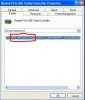
Under details says PCI Bus 9, device 3, function 2 ????
I have no idea what this is, and if I remember it was showing the same when running Vista. Everything is working fine, is this something I can just ignore then? Or whatever it is where would I get drivers for it? Thanks
Upgraded our laptop from Vista to Windows 7, did clean install (reformatted etc)... everything went smooth with the install however when I checked the device manager there is one error showing.... it's listed under Other Devices - Base System Device' with the explanation mark symbol. Has no drivers for it.
Under details says PCI Bus 9, device 3, function 2 ????
I have no idea what this is, and if I remember it was showing the same when running Vista. Everything is working fine, is this something I can just ignore then? Or whatever it is where would I get drivers for it? Thanks
Last edited: