Display Problem

josh088

New Member
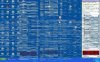
At work, I am using a Gateway laptop running Windows XP. I turned the computer on this morning and when i turned it on the screen was distorted (see attached image). We do a lot of video work and often times the computer is left on recording video for 24-48 hours. I did a virus scan and there were no viruses. Is it just the screen going bad?

Thanks,
 

Attachments

  • Screen.jpg
    Screen.jpg
    93.4 KB · Views: 64
thats awesome.... try booting it in safe and tell me if it looks the same.... also does it do this during post when you first turn your pc on?
 
Could be the cable or video card or something.....

Try a different cable and also do what Quiltface suggested.

Thankyou
 
My Dell 8200 did that after it had been off for a while. It ended up needing updated video driver. After it warmed up(30 sec) you could restart it and it was fine. It's your card or driver.
 
It has done is speratically. I was working on it for an hour or so ebfore it did it the first time. Turned it off for the rest of the day. The next morning it came up like that so I restarted it and it was fine for about 30 mins before doing it again. Havent touched it since Monday morning.

Just restarted it and the propem still exists, it starts right from the time it turns on all through the boot up process.
 
We have an external monitor hooked up to it as well and it has the same issue. I'm guessing it is a Video Card related problem.
 
does it look like that on the post screen and windows loading screen,I ask because i had a gpu that had the same sort of problem and it was a bad memory on the gpu and basically i had to replace it.
 
does it look like that on the post screen and windows loading screen,I ask because i had a gpu that had the same sort of problem and it was a bad memory on the gpu and basically i had to replace it.

Yes it does look like that on the windows loading screen as well
 
Back
Top