Dual channell

Shane

Super Moderator
Staff member
guys,

Do you have dual channel if both sticks are the same speed?

OR

do they have to be the same size/speed?

Is my mobo dual chanel? and am i running in dual chanel?

Lol i dunno:D
Please clear me up on this one.
 
How many RAM slots does your computer have?
If there are two the same colour and both sticks of RAM are in there, then it should run in dual channel, providing your MOBO supports it...
 
there are 2 memory slots....my max memorysopported is 2GB but i have 1 stick of Pc3200 1Gb and a 256Mb of pc3200.

they are both the same colour slots.

Heres a small pic of my mobo

200510121535_deska1.gif


I dont think my mobo is dual channel though....could be wrong :confused:
 
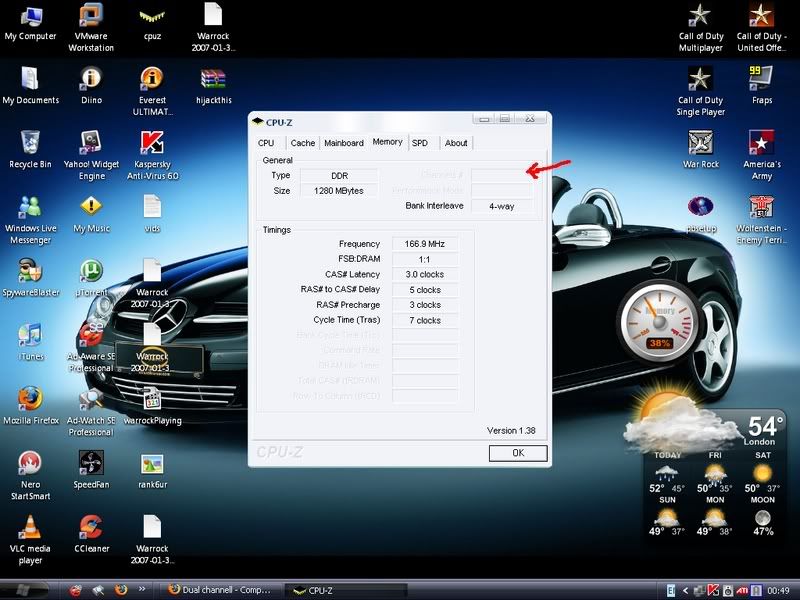
I'm not too sure, the easiest way to tell is to download CPU-Z once you open it click the memory tabs and it'll tell you if its running in Dual Channel.
 
It doesnt say mate....its greyed out look....

channels.jpg


Does this mean its not running in dual channel then?
 
1GB and 256MB cant run in dual-channel.

They dont have to be the same speed (they will all run at the slowest RAM's speed), but they have to be the same size.
 
[-0MEGA-];570664 said:
1GB and 256MB cant run in dual-channel.

They dont have to be the same speed (they will all run at the slowest RAM's speed), but they have to be the same size.

ooh i see...so do you realy notice much differance in dual channel?
 
Both your RAM and your board have to support dual channel for it to work, and both of your RAM sticks have to be the same speed, size, and brand.
 
Your RAM supports dual channel by default. You don't need special RAM, you just need (usually anyway, there are a couple exceptions) same size sticks of RAM.
 
ok it doesnt realy matter i was just wondering if it was dual channel :)

Does dual channel perform alot better?
 
Back
Top