Dual monitor help

What you see in the picture is what I got. So you'll have to tell me, Because I have no idea.

Don't you have to disable the Onboard graphics in the BIOS if you install a graphic card?

This is how it works with AGP, I assume PCI-E is the same.

Get the cable, as from my understanding (and apparently the only one who has provided outside sources and proof) is the most effective way to get dual monitors working for you.
 
I guess if you can, It would help if we had a picture of the inside of the graphics card. Sorry about all the pics, but I'm not sure what pins you have on it that might help us. ;)
 
OK. Im on the verge of giving up on dual monitors. I ordered the DMS-59 to dual DVI. It got here today.

There is no way the DMS-59 is pluging into the back off my computer. So it was a waste of 20$. Im going to order a DVI to dual VGA and see if that works. If not, guess Im S.O.L on dual monitors
 
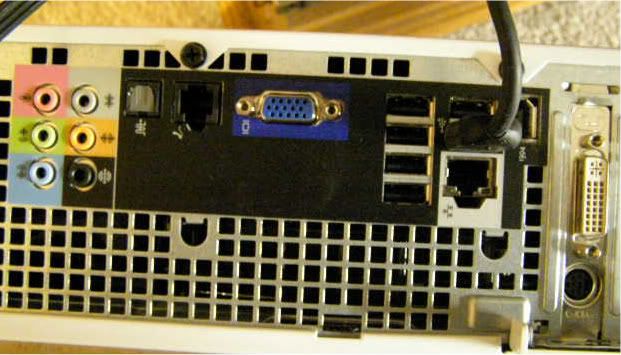
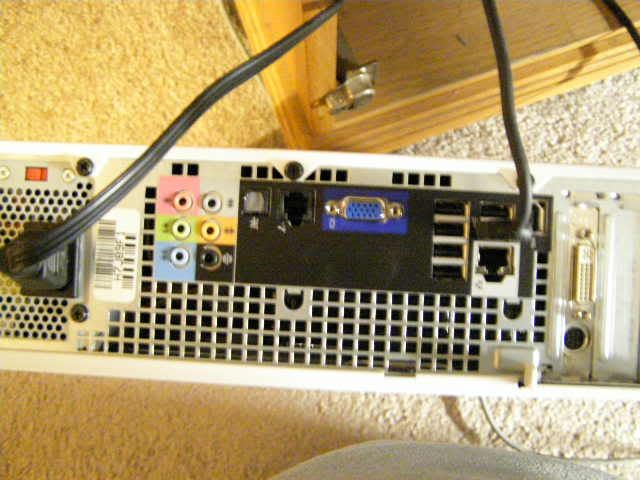
OK, So this is the back of my computer.
From what wiki says. it's some type of dvi plugin.
take a look

PC020726.jpg
Regarding the DMS-59 adapter, obviously it will not fit your DVI port since the pin pattern is different. This should be clear by merely carefully looking at the ends of the connectors.

Also, there's absolutely no mention by you of how you want to use dual monitors. Do you want the second screen to be a clone of the primary monitor? The DMS-59 adapter, as discussed in this forum thread, is just a splitter. So, both monitors will receive the same output from the computer. In other words, cloning will be the only option with such a setup.

If you want to have the capability to run different programs on each monitor instead of merely have the second monitor clone the primary monitor, then you need a video card that supports direct connections to two monitors. It might look like http://www.newegg.com/Product/Product.aspx?Item=N82E16814129042 or http://www.newegg.com/Product/Product.aspx?Item=N82E16814127473.
 
My Video Card is a ATI Radeon HD 2400 Pro. It has both plug ins ( vga & dvi ). Now what one is what i don't know.
So, you were wrong about that, right? The VGA port shown in your image is on the motherboard, not on the card. By the way, your image appears to cutoff part of the end of your video card. Is there another port on your video card that's not shown in your image? How about posting an image that shows it all?
 
So, you were wrong about that, right? The VGA port shown in your image is on the motherboard, not on the card. By the way, your image appears to cutoff part of the end of your video card. Is there another port on your video card that's not shown in your image? How about posting an image that shows it all?

yeah, There is only a DVI & S-video,

There isn't another port below it. I just trimmed the picture up. So it wasn't so big. I'll post one anyhow.

I thought I posted I wanted this for a seconded monitor, But I went back and looked at my post and I didn't, My bad. I want to be able to watch videos or use my music players on one and surf the web with the other.

I figured the DMS wouldn't fit, But I asked and someone posted saying it would fit.
Even while I was ordering it, I had doubts about it fitting.

So even if I get a DVI to dual VGA it will only clone my monitors?

Is there anything I can plug into my DVI port to run 2 monitors the way I want?

PC020722-1.jpg
 
Back
Top