Dual monitor Issue with Lenovo IdeaPad S340 Laptop

Da Mail Man

Active Member
Greetings all,

1)...I have a Lenovo laptop computer (as above)....

2)...Using Windows 10 64bit......Plenty of ram and HD space..

3)...I have purchased a HDMI cord that terminates to a "VGA" end which is plugged into a 19'' (?) Dell monitor with the 2 typical video inputs...

4)...I have the ext monitor powered "on" , have restarted...have shut down and booted back up and still, no display on ext monitor...

5)...The computer says in effect - no other monitor/display detected....

6)...
I have pressed the windows key and "P", and made all the sections I could....
STILL, no display appears on ext monitor...

7)...I have selected "analog input" and "digital input" as well as "auto-detect" ---- still nothing...

8)...
Cord is good......

What now?
 
Most likely the wrong cable. It could be actually a vga to hdmi cable and its not bidirectional so its not sending a signal from hdmi to vga. Do you buy the cable online or what? Need part number to determine what it actually is.
 
Darn!...I never gave it a thought about that!...let me find the item purchased on line and post...
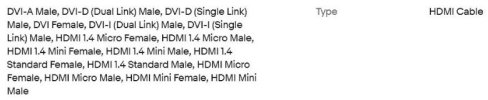
Here is the description of cable via picture -


description of cable.jpg

**What is it that I should have asked for/purchased?......
 
Last edited:
That description says nothing about a vga connector. It says DVI and HDMI, so its contradicting to what you have said. Can you paste the link to this item?
 
I"m not saying its the cable but there is no way to guarantee exactly what that cable is, it is HDMI on one end and vga on the other but a lot of cables are only 1 direction and not both.

For instance I bought this for a client of mine and it worked just fine. Its a unidirectional HDMI to VGA cable


Yoiu might want to try ordering that one.

8)...Cord is good......
How do you know the cable is working like it should?

Also something to realize is that on some monitors you need to select in the monitors menu which input is being used. If you don't select the correct one then nothing will show.
 
I"m not saying its the cable but there is no way to guarantee exactly what that cable is, it is HDMI on one end and vga on the other but a lot of cables are only 1 direction and not both.
I didn't know about "bi-directional...It seems to me that a signal is sent to the monitor and nothing is "returned" to the computer...
It has a "VGA" connector at one end and, the typical HDMI at the other.....


For instance I bought this for a client of mine and it worked just fine. Its a unidirectional HDMI to VGA cable
I will look at in in a few moments...

How do you know the cable is working like it should?
without a "dedicated" cable tester, I wouldn't know but, know that it is a possibility...I assume is good......

Also something to realize is that on some monitors you need to select in the monitors menu which input is being used. If you don't select the correct one then nothing will show.
I thought I stated that already...Yes, I know and I played with the "selections" and "auto-detect"..
 
I looked at the link you provided -
SUPERIOR STABILITY - Built-in advanced IC chip converts HDMI digital signal to VGA analog signal; ✅ It is NOT a bi-directional converter and cannot transmit signals from VGA to HDMI

"says cannot transmit signals"...huh?
 
It means it's not able to send the video feed from VGA to HDMI because VGA is Analog and HDMI is digital, hence not being bi-directional. You cannot upscale analog to digital, but you can downscale digital to analog.

This is from the tech specs:

"supports external digital monitor via HDMI"

I suspect that your cable may not be converting from digital to analog correctly.

You have not specifically mentioned if you have used the HDMI port on the IdeaPad on any other HDMI displays. I would first try HDMI to HDMI to make sure that it works. If it does, then I would recommend buying a HDMI to DisplayPort cable instead as Dells use DPs and that would be digital to digital instead of VGA.... Unless your monitor is really old and has DVI...
 
I suspect that your cable may not be converting from digital to analog correctly.
very well may not be doing that...

You have not specifically mentioned if you have used the HDMI port on the IdeaPad on any other HDMI displays.
I thought that it was "implied" re: the laptop which it is what I am using and the only computer with HDMI here.........
All the monitors here are Dell...


I would first try HDMI to HDMI to make sure that it works.
I really would not want to buy a "case" of assorted cords....
In all of this, I only have 1 HDMI and that is on the laptop...


If it does, then I would recommend buying a HDMI to DisplayPort cable instead as Dells use DPs and that would be digital to digital instead of VGA.... Unless your monitor is really old and has DVI...
It may be because I just woke up but, still confused...
The Dell monitor I am using has 2 video inputs; 1 VGA and 1 DVI....
I am seeing cords labeled as "not a converter" and the one you stated I should try...
 
The cable I linked you to will only transmit a signal from the HDMI to the vga it will not transmit from the VGA to the HDMI as @Couriant mentioned. The monitor doesn't send a signal back the computer at all.

If anything, get a HDMI to DVI cable if the monitor has a dvi connection.
 
Back
Top