Failing drive?

Shane

Super Moderator
Staff member
Hey guys,

So i purchased a Samsung Spinpoint F1 1TB hard drive from a member on here....plugged it in my external hub when i recieved it to make sure its fine....and it seemed to be okay.

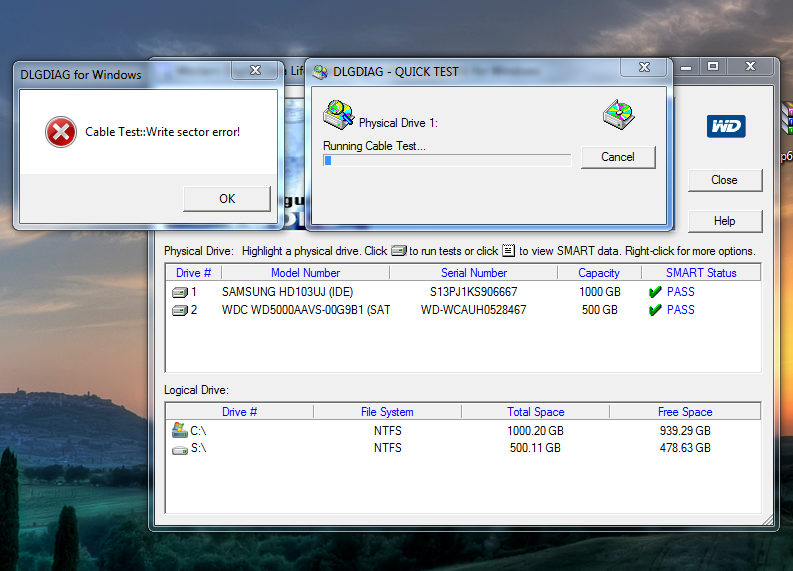
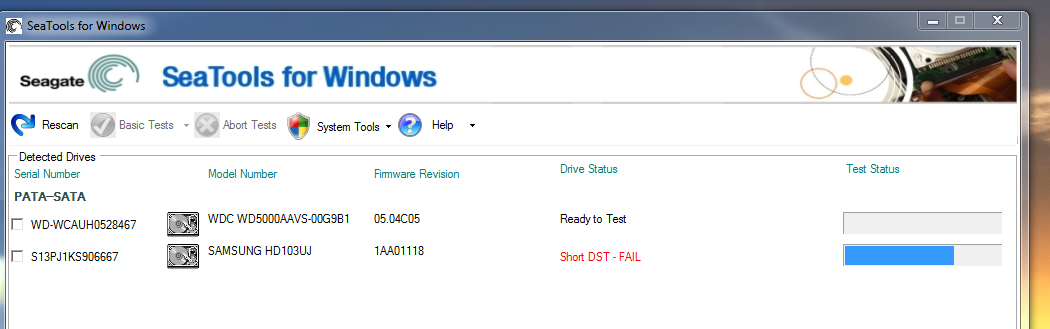
however i installed windows 7 on it and made it my main drive and the system runs so damn slow and doesnt respond very well at all,ive ran Seatools for windows and it passed Smart test but fails Short DST and also fails Short generic test aswell....+ when i run Western digital diagnostic tools i get the error...Cable test:Write section error do i have a failing drive?

I tried running the manufacturers (Samsung) diagnostic tools,but doesnt want to work with x64 bit 7 :cool:

I realy hope this isnt a failing drive!!!!

EDIT:Screens.............
short.png


1fail.png


EDIT:Looks like Samsung have an ISO version of their test utility,i download that later and test this drive!,But somethings definatly not right with my system atm.
 
Last edited:
At that point it's probably beyond repair. You could try chkdsk or a zero-write but i'm rather doubtful there's anything that could really be done with it.

Now Seagate's typically have a 5 year warranty. Maybe see if it's eligible for an exchange?
 
the drive war purchased from me, hardly used... About 1-2 months old, used as primary drive for 1 week until i bought ssd! I will issue a full refund tonight when i get in from work-i hope it's not your new mobo m8.... Maybe try another sata port
 
I use to like Samsung drives, but had F1s fail on me left and right, didnt even return the last two, threw them in the trash. Will never buy another Samsung, atleast not in the near future.
 
...it was a Samsung wasn't it :P I just glanced at the tools program and assumed it was Seagate :o

Will never buy another Samsung, atleast not in the near future.

I think most all companies have at least one bad series during their lifetime. I'm a little weary about my Seagate seeing as people complain about these 7200.12's...
 
you can not be logged into that drive when running this test or it will fail... you need to run the test though your 500g and it should pass...
 
I think you drive is fine since it says smart status pass. The utility should say you can not have any applications running on this drive before running this test and that includes the OS.

You can get the other utility that says DOS then burn it to cd then boot to it if you only had one HDD..
 
Last edited:
Yes, the drive is dying. Bummer too for being so young...but, it happens. The Samsung F1 isn't a bad drive, but they have had a rather high failure rate.

I think you drive is fine since it says smart status pass. ...

No. Just because the SMART status is good does not mean the drive is fine. It just means that the drive parameters that SMART is logging show up good during that test. Also, if the test fails, it may not mean that the drive is a goner.

The SMART status is a decent predictor of the fate of the drive ONLY when it starts repeatedly failing certain portions. You may have an occasional failed test or SMART alert from time to time depending on numerous factors related to the drive's operation or not. If it is repeatable, then think about replacing the drive.
 
All I am saying is the WD utility will not work if you are booted into the drive. You have to use the DOS utility or boot into another HDD then run the test on it. My brand new 500g does the cable test error as wel and If I boot into my other hDD then run the test it is good. You can not have any applications running including the OS when you run the windows utility.
 
Thanks for your replies everyone,right im going to download those Samsung utilities and run it as an iso....so that nothings using the drive other than the utility and see what results that throws up.


the drive war purchased from me, hardly used... About 1-2 months old, used as primary drive for 1 week until i bought ssd! I will issue a full refund tonight when i get in from work-i hope it's not your new mobo m8.... Maybe try another sata port

Nah let me run some tests first with Samsung utilities,if that fails we know its a dying drive,Il also try diffrent Sata ports on my mobo,il also change the sata cable just incase theres any problems with the cable.

if the system is still very slugish il take it out,put back in my old 250gb re-install windows on that and see how my system is,i dont think its a mobo problem.

il keep you updated:)
 
Right 67% into the Diagnostic tools from Samsung the drive is showing mass amounts of read surface scan errors...the list is endless.

Il post up some screenshots soon,i should say the drive is dying!

Stuff like this always happens to me!:cool:
 
well say the word and ill send money back too you asap!

sorry about this, the dam thing was brand new nearly :(

throw it out man, im not messing around with and its nopt worth the £4 postage

when it went missing for nearly a week in the post they must have been playing basket ball with it or something!

the other drive i sent arrived in a couple of days working Grrrrrr
 
Yeah i thought it was fine when i tried it in my external enclousure,it come on fine so i assumed it was okay..then i left it for around 4 days in the box awaiting my new mobo to come as you know and put my system together,installed windows and it litraly take like 10 mins to boot,hard drive activity light is going mad.

The errors are still going on and on now...just showing error after error :(

screens:

http://i18.photobucket.com/albums/b125/shaneathome/Photo0032.jpg

http://i18.photobucket.com/albums/b125/shaneathome/Photo0033.jpg

Im sorry about it too,after all the hastle with royal mail aswell,They probably dropped it or something :(
 
Last edited:
Just took out the 1TB and re-installed 7 on my old 250gb and my system is fast now...what a waste a drive :cool:
 
Last edited:
Back
Top