Ok new to this place so might be in the wrong section but here goes.
I have an external HDD with stuff on it. While travelling and using multiple computers, something happened. All the files, I thought, were wiped. However turns out they were just put into a file that was hidden from view (even with show hidden folders checked). So to get to the files I had to physically type in the location i.e. G:\WINDOWS and then I would go to the WINDOWS folder where all my files were, just as they were originally. I don't know if this is overly relevant, but it shows something happened.
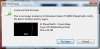
The issue now is trying to transfer the files. 90% of them are fine and transfer, however I get the odd one that will come up with the error, cannot locate file...try again etc.(See attached image) And no matter how much I try, I can't transfer that file to my computer..be it a movie, photo, music file. On top of that, if I am doing mass transfers ( like my music collection), randomly at some point, when it tries moving an infected file, the error will show up. Once this has happened, every other file on the HDD then disappears. Folders will show up as empty. I have to then uninstall and plug the HDD back in and go through it all again, trying to miss the affected file. Which isn't really practical with 40gb of music. Does anyone know what is going on here? Obviously some files became corrupted and when they are triggered they trigger some big disappearing act. If you need any more info other than this essay just ask. Big thanks to anyone taking the time with this problem.
I have an external HDD with stuff on it. While travelling and using multiple computers, something happened. All the files, I thought, were wiped. However turns out they were just put into a file that was hidden from view (even with show hidden folders checked). So to get to the files I had to physically type in the location i.e. G:\WINDOWS and then I would go to the WINDOWS folder where all my files were, just as they were originally. I don't know if this is overly relevant, but it shows something happened.
The issue now is trying to transfer the files. 90% of them are fine and transfer, however I get the odd one that will come up with the error, cannot locate file...try again etc.(See attached image) And no matter how much I try, I can't transfer that file to my computer..be it a movie, photo, music file. On top of that, if I am doing mass transfers ( like my music collection), randomly at some point, when it tries moving an infected file, the error will show up. Once this has happened, every other file on the HDD then disappears. Folders will show up as empty. I have to then uninstall and plug the HDD back in and go through it all again, trying to miss the affected file. Which isn't really practical with 40gb of music. Does anyone know what is going on here? Obviously some files became corrupted and when they are triggered they trigger some big disappearing act. If you need any more info other than this essay just ask. Big thanks to anyone taking the time with this problem.