found something....

DonMills313

New Member
Found a little bar thing, its green and has 3 black boxes on it. I got 4 of them off of the old computer(wtf is a turbo option on a computer?)from these white slots. It says Ft-B9 on the upper left corner with 94V0 underneath. so its
FT-B9 BBBBBBBBB BBBB BBBBBBBB CUBIG MX8P
94V0 BBBBBBBBB BBBB BBBBBBBB MADE IN USA

lol hope that helps. B is the box thing lol.:D
 
Those are the virtual memory for your computer, in contrast, your hard drive is the physical memory. It's really very simple, while your computer is on, it stores information to run processes in the RAM, but when your computer is turned off, that information is lost. Basically, the more RAM you have the smoother processes will run there are other...intricacies.. but I'm too tired to talk about those.
 
Those are the virtual memory for your computer, in contrast, your hard drive is the physical memory.

Virtual memory is the space you've set aside for the Windows pagefile, or swap partition in Linux. The RAM is actually the physical memory, while a hard drive stores all the data. Sorry, it may seem as though I'm nit-picking, but I think it's important that the proper terms are used.
 
(wtf is a turbo option on a computer?)

The Turbo button on a 386/486 was to lower the FSB or disable the processors cache. The name is sorta of a oxymoron. When you installed older games and some programs on a 386/486 in would run really fast:D. Pushing the Turbo button allowed it to run normal.
 
Virtual memory is the space you've set aside for the Windows pagefile, or swap partition in Linux. The RAM is actually the physical memory, while a hard drive stores all the data. Sorry, it may seem as though I'm nit-picking, but I think it's important that the proper terms are used.

Quite alright, I'm on this forum to learn.
 
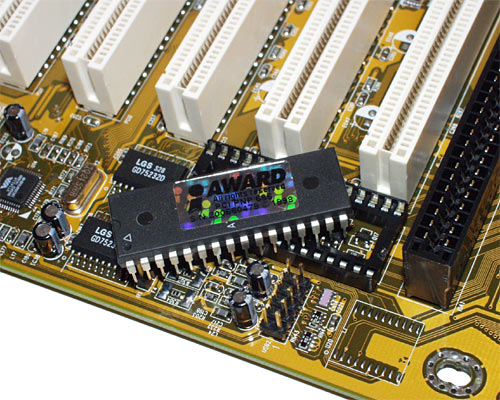
ok, so what are the centipede looking things on the board things.
oh, and also hear to learn. lol bc i have no clue what is what.
 
ok, so what are the centipede looking things on the board things.

I have no idea what that means:D:D. Need a little bit better description. Off the top of my head you might be referring to maybe a row of capacitors.:confused:

Where is says Gigabyte, thats the Northbridge chip and the heatsink a little lower to the left on the other side of the PCIe slot is the Southbridge chip. The little metal cap looking things are the capacitors.

Motherboard-Parts-Descriptions.jpg
 
Last edited:
its not that. it has a bunch of metal tabs and there all bent down to be pushed into something. but how do i know the difference when looking at a graphics card or a sound card? and whats the smallest board for?
 
its not that. it has a bunch of metal tabs and there all bent down to be pushed into something. but how do i know the difference when looking at a graphics card or a sound card? and whats the smallest board for?

You talking about something like a bios chip. Its the only removable chip I can think of on a newer board. Some are smaller than this one.

biosout500.jpg
 
Back
Top