googleupdate.exe problem

mangofresh

New Member
I think I was able to get rid of googleupdate.exe error pop up from my computer. I googled how to get rid of of it but it didn't work for me until I just went to search googleupdate in my start menu. But yeah the googleupdate.exe just started to pop up as error for my computer just recently never happened before. I have google chrome but I never used it so I dont know why I kept getting error boxes recently. I unistalled it and I think the pop up stopped. But the weirdest thing is whenever I try to search ANYTHING on search engines like google or yahoo and I click the link in the search engine, it would take me to RANDOM websites and doesn't take me to the place i clicked. But If I type the web address in my bar like www.computerforum.com it would direct me there. But if i typed computerforum.com in google and clicked the link to get there, it would not take me there but to some random website. So search engines for me are taking me to random websites. Any idea on what is going on?

Thanks in advance.
 
Doing that now, thanks for the suggestion. But anyone else ever experience that problem with googleupdate.exe or the unable to search.
 
Some users can only use www.computerforum.com. You may be one of those users. However, follow the advice from Respital by running malwarebytes and hijackthis.

It's not just computerfourm.com If I type anything in google or yahoo so any search engine and click the link it will take me to some random website. But when i type the full web address in my bar up top like bestbuy.com or newegg.com it will take me there. But if i type newegg in google and click it, it will take me to some random website.

But yeah the googleupdate.exe error box popped up again. Wow this is so anoying.

I used them, nothing has come up.
 
Last edited:
Logfile of Trend Micro HijackThis v2.0.3 (BETA)
Scan saved at 10:39:20 PM, on 1/6/2010
Platform: Windows XP SP2 (WinNT 5.01.2600)
MSIE: Internet Explorer v6.00 SP2 (6.00.2900.2180)
Boot mode: Normal

Running processes:
C:\WINDOWS\System32\smss.exe
C:\WINDOWS\system32\winlogon.exe
C:\WINDOWS\system32\services.exe
C:\WINDOWS\system32\lsass.exe
C:\WINDOWS\system32\nvsvc32.exe
C:\WINDOWS\system32\svchost.exe
C:\WINDOWS\System32\svchost.exe
C:\Program Files\Common Files\Symantec Shared\ccSetMgr.exe
C:\Program Files\Common Files\Symantec Shared\ccEvtMgr.exe
C:\Program Files\Common Files\Symantec Shared\SPBBC\SPBBCSvc.exe
C:\WINDOWS\Explorer.EXE
C:\WINDOWS\system32\spoolsv.exe
C:\Program Files\Common Files\Apple\Mobile Device Support\bin\AppleMobileDeviceService.exe
C:\Program Files\Bonjour\mDNSResponder.exe
C:\Program Files\Symantec AntiVirus\DefWatch.exe
C:\Program Files\GIGABYTE\EnergySaver\GSvr.exe
C:\Program Files\Java\jre6\bin\jqs.exe
C:\WINDOWS\system32\svchost.exe
C:\Program Files\Symantec AntiVirus\Rtvscan.exe
C:\Program Files\Common Files\InstallShield\UpdateService\issch.exe
C:\Program Files\Viewpoint\Common\ViewpointService.exe
C:\WINDOWS\RTHDCPL.EXE
C:\WINDOWS\SOUNDMAN.EXE
C:\Program Files\Java\jre6\bin\jusched.exe
C:\Program Files\iTunes\iTunesHelper.exe
C:\Program Files\Common Files\Symantec Shared\ccApp.exe
C:\PROGRA~1\SYMANT~1\VPTray.exe
C:\WINDOWS\system32\RUNDLL32.EXE
C:\Documents and Settings\JC\Local Settings\Application Data\Google\Update\GoogleUpdate.exe
C:\Program Files\Linksys\WUSB600N\WUSB600N.exe
C:\Program Files\V CAST Media Manager\MEMonitor.exe
C:\Program Files\iPod\bin\iPodService.exe
C:\WINDOWS\System32\svchost.exe
C:\WINDOWS\system32\wuauclt.exe
C:\PROGRA~1\GRETECH\GOMPLA~1\GOM.exe
C:\Program Files\Mozilla Firefox\firefox.exe
C:\Program Files\AIM6\aim6.exe
C:\Program Files\AIM6\aolsoftware.exe
C:\Program Files\Malwarebytes' Anti-Malware\mbam.exe
C:\Program Files\Ventrilo\Ventrilo.exe
C:\Program Files\TrendMicro\HiJackThis\HiJackThis.exe

R1 - HKCU\Software\Microsoft\Windows\CurrentVersion\Internet Settings,ProxyOverride = *.local
R3 - URLSearchHook: DeviceVM Url Search Hook - {0063BF63-BFFF-4B8F-9D26-4267DF7F17DD} - C:\WINDOWS\system32\dvmurl.dll
O2 - BHO: AcroIEHelperStub - {18DF081C-E8AD-4283-A596-FA578C2EBDC3} - C:\Program Files\Common Files\Adobe\Acrobat\ActiveX\AcroIEHelperShim.dll
O2 - BHO: Java(tm) Plug-In SSV Helper - {761497BB-D6F0-462C-B6EB-D4DAF1D92D43} - C:\Program Files\Java\jre6\bin\ssv.dll
O2 - BHO: Java(tm) Plug-In 2 SSV Helper - {DBC80044-A445-435b-BC74-9C25C1C588A9} - C:\Program Files\Java\jre6\bin\jp2ssv.dll
O2 - BHO: JQSIEStartDetectorImpl - {E7E6F031-17CE-4C07-BC86-EABFE594F69C} - C:\Program Files\Java\jre6\lib\deploy\jqs\ie\jqs_plugin.dll
O4 - HKLM\..\Run: [ISUSPM Startup] C:\PROGRA~1\COMMON~1\INSTAL~1\UPDATE~1\ISUSPM.exe -startup
O4 - HKLM\..\Run: [ISUSScheduler] "C:\Program Files\Common Files\InstallShield\UpdateService\issch.exe" -start
O4 - HKLM\..\Run: [GBTUpd] C:\Program Files\GIGABYTE\GBTUpd\PreRun.exe
O4 - HKLM\..\Run: [RTHDCPL] RTHDCPL.EXE
O4 - HKLM\..\Run: [SoundMan] SOUNDMAN.EXE
O4 - HKLM\..\Run: [AlcWzrd] ALCWZRD.EXE
O4 - HKLM\..\Run: [Alcmtr] ALCMTR.EXE
O4 - HKLM\..\Run: [GEST] m‘|\ü
O4 - HKLM\..\Run: [JMB36X IDE Setup] C:\WINDOWS\RaidTool\xInsIDE.exe
O4 - HKLM\..\Run: [36X Raid Configurer] C:\WINDOWS\system32\xRaidSetup.exe boot
O4 - HKLM\..\Run: [Adobe Reader Speed Launcher] "C:\Program Files\Adobe\Reader 9.0\Reader\Reader_sl.exe"
O4 - HKLM\..\Run: [SunJavaUpdateSched] "C:\Program Files\Java\jre6\bin\jusched.exe"
O4 - HKLM\..\Run: [QuickTime Task] "C:\Program Files\QuickTime\QTTask.exe" -atboottime
O4 - HKLM\..\Run: [iTunesHelper] "C:\Program Files\iTunes\iTunesHelper.exe"
O4 - HKLM\..\Run: [ccApp] "C:\Program Files\Common Files\Symantec Shared\ccApp.exe"
O4 - HKLM\..\Run: [vptray] C:\PROGRA~1\SYMANT~1\VPTray.exe
O4 - HKLM\..\Run: [nwiz] C:\Program Files\NVIDIA Corporation\nView\nwiz.exe /install
O4 - HKLM\..\Run: [NvCplDaemon] RUNDLL32.EXE C:\WINDOWS\system32\NvCpl.dll,NvStartup
O4 - HKLM\..\Run: [NvMediaCenter] RUNDLL32.EXE C:\WINDOWS\system32\NvMcTray.dll,NvTaskbarInit
O4 - HKLM\..\Run: [KernelFaultCheck] %systemroot%\system32\dumprep 0 -k
O4 - HKCU\..\Run: [Google Update] "C:\Documents and Settings\JC\Local Settings\Application Data\Google\Update\GoogleUpdate.exe" /c
O4 - HKCU\..\Run: [Octoshape Streaming Services] "C:\Documents and Settings\JC\Application Data\Octoshape\Octoshape Streaming Services\OctoshapeClient.exe" -inv:bootrun
O4 - Startup: AutoClick.lnk = C:\Program Files\AutoClick\AutoClick.exe
O4 - Startup: V CAST Media Monitor.lnk = C:\Program Files\V CAST Media Manager\MEMonitor.exe
O4 - Global Startup: Wireless Network Monitor.lnk = C:\Program Files\Linksys\WUSB600N\WUSB600N.exe
O8 - Extra context menu item: E&xport to Microsoft Excel - res://C:\PROGRA~1\MICROS~2\OFFICE11\EXCEL.EXE/3000
O9 - Extra button: Research - {92780B25-18CC-41C8-B9BE-3C9C571A8263} - C:\PROGRA~1\MICROS~2\OFFICE11\REFIEBAR.DLL
O9 - Extra button: Messenger - {FB5F1910-F110-11d2-BB9E-00C04F795683} - C:\Program Files\Messenger\msmsgs.exe
O9 - Extra 'Tools' menuitem: Windows Messenger - {FB5F1910-F110-11d2-BB9E-00C04F795683} - C:\Program Files\Messenger\msmsgs.exe
O16 - DPF: {4E218431-2F07-40BD-A9D3-035324C1F13F} (DyynoX Class) - http://webserver.dyyno.com/tng/dyyno-client/DyynoCAB.CAB
O20 - AppInit_DLLs: C:\WINDOWS\system32\0019.DLL
O22 - SharedTaskScheduler: Browseui preloader - {438755C2-A8BA-11D1-B96B-00A0C90312E1} - C:\WINDOWS\system32\browseui.dll
O22 - SharedTaskScheduler: Component Categories cache daemon - {8C7461EF-2B13-11d2-BE35-3078302C2030} - C:\WINDOWS\system32\browseui.dll
O23 - Service: Apple Mobile Device - Apple Inc. - C:\Program Files\Common Files\Apple\Mobile Device Support\bin\AppleMobileDeviceService.exe
O23 - Service: Bonjour Service - Apple Inc. - C:\Program Files\Bonjour\mDNSResponder.exe
O23 - Service: Symantec Event Manager (ccEvtMgr) - Symantec Corporation - C:\Program Files\Common Files\Symantec Shared\ccEvtMgr.exe
O23 - Service: Symantec Settings Manager (ccSetMgr) - Symantec Corporation - C:\Program Files\Common Files\Symantec Shared\ccSetMgr.exe
O23 - Service: Symantec AntiVirus Definition Watcher (DefWatch) - Symantec Corporation - C:\Program Files\Symantec AntiVirus\DefWatch.exe
O23 - Service: GEST Service for program management. (GEST Service) - Unknown owner - C:\Program Files\GIGABYTE\EnergySaver\GSvr.exe
O23 - Service: InstallDriver Table Manager (IDriverT) - Macrovision Corporation - C:\Program Files\Common Files\InstallShield\Driver\11\Intel 32\IDriverT.exe
O23 - Service: iPod Service - Apple Inc. - C:\Program Files\iPod\bin\iPodService.exe
O23 - Service: Java Quick Starter (JavaQuickStarterService) - Sun Microsystems, Inc. - C:\Program Files\Java\jre6\bin\jqs.exe
O23 - Service: LiveUpdate - Symantec Corporation - C:\PROGRA~1\Symantec\LIVEUP~1\LUCOMS~1.EXE
O23 - Service: NVIDIA Display Driver Service (NVSvc) - NVIDIA Corporation - C:\WINDOWS\system32\nvsvc32.exe
O23 - Service: SAVRoam (SavRoam) - symantec - C:\Program Files\Symantec AntiVirus\SavRoam.exe
O23 - Service: Symantec Network Drivers Service (SNDSrvc) - Symantec Corporation - C:\Program Files\Common Files\Symantec Shared\SNDSrvc.exe
O23 - Service: Symantec SPBBCSvc (SPBBCSvc) - Symantec Corporation - C:\Program Files\Common Files\Symantec Shared\SPBBC\SPBBCSvc.exe
O23 - Service: Symantec AntiVirus - Symantec Corporation - C:\Program Files\Symantec AntiVirus\Rtvscan.exe
O23 - Service: Viewpoint Manager Service - Viewpoint Corporation - C:\Program Files\Viewpoint\Common\ViewpointService.exe

--
End of file - 7714 bytes
 
You are infected. Please run malwarebytes antimalware and post the log.


How to run a scan with Malwarebytes' Anti-Malware

Download Malwarebytes' Anti-Malware from Here , Here or Here

Double Click mbam-setup.exe to install the application.
  • Make sure a checkmark is placed next to Update Malwarebytes' Anti-Malware and Launch Malwarebytes' Anti-Malware, then click Finish.
  • If an update is found, it will download and install the latest version.
  • Once the program has loaded, select "Perform quick Scan", then click Scan.
  • The scan may take some time to finish,so please be patient.
  • When the scan is complete, click OK, then Show Results to view the results.
  • Make sure that everything is checked, and click Remove Selected.
  • When disinfection is completed, a log will open in Notepad and you may be prompted to Restart. (See Note)
  • The log is automatically saved by MBAM and can be viewed by clicking the Logs tab in MBAM.
Note:
If MBAM encounters a file that is difficult to remove, you will be presented with 1 of 2 prompts.
Click OK to either and let MBAM proceed with the disinfection process.
If asked to restart the computer, please do so immediately.


Afterwards, post a fresh hijackthis log as well.
 
Last edited:
You are infected. Please run malwarebytes antimalware and post the log.


How to run a scan with Malwarebytes' Anti-Malware

Download Malwarebytes' Anti-Malware from Here , Here or Here

Double Click mbam-setup.exe to install the application.
  • Make sure a checkmark is placed next to Update Malwarebytes' Anti-Malware and Launch Malwarebytes' Anti-Malware, then click Finish.
  • If an update is found, it will download and install the latest version.
  • Once the program has loaded, select "Perform quick Scan", then click Scan.
  • The scan may take some time to finish,so please be patient.
  • When the scan is complete, click OK, then Show Results to view the results.
  • Make sure that everything is checked, and click Remove Selected.
  • When disinfection is completed, a log will open in Notepad and you may be prompted to Restart. (See Note)
  • The log is automatically saved by MBAM and can be viewed by clicking the Logs tab in MBAM.
Note:
If MBAM encounters a file that is difficult to remove, you will be presented with 1 of 2 prompts.
Click OK to either and let MBAM proceed with the disinfection process.
If asked to restart the computer, please do so immediately.


Afterwards, post a fresh hijackthis log as well.

Thanks a lot. Will do. Just curious, where in that log does it show I am infected. Haha so many things.
 
Right here.

O20 - AppInit_DLLs: C:\WINDOWS\system32\0019.DLL

Plus there is one more entry that is questionable.
 
Malwarebytes' Anti-Malware 1.43
Database version: 3506
Windows 5.1.2600 Service Pack 2
Internet Explorer 6.0.2900.2180

1/6/2010 11:11:17 PM
mbam-log-2010-01-06 (23-11-17).txt

Scan type: Full Scan (A:\|C:\|D:\|)
Objects scanned: 162749
Time elapsed: 32 minute(s), 1 second(s)

Memory Processes Infected: 0
Memory Modules Infected: 0
Registry Keys Infected: 0
Registry Values Infected: 0
Registry Data Items Infected: 0
Folders Infected: 0
Files Infected: 0

Memory Processes Infected:
(No malicious items detected)

Memory Modules Infected:
(No malicious items detected)

Registry Keys Infected:
(No malicious items detected)

Registry Values Infected:
(No malicious items detected)

Registry Data Items Infected:
(No malicious items detected)

Folders Infected:
(No malicious items detected)

Files Infected:
(No malicious items detected)
 
Download and Run ComboFix
If you already have Combofix, please delete this copy and download it again as it's being updated regularly.
Note: Do not mouseclick combofix's window whilst it's running. That may cause it to stall

Combofix should never take more that 20 minutes including the reboot if malware is detected.
If it does, open Task Manager then Processes tab (press ctrl, alt and del at the same time) and end any processes of findstr, find, sed or swreg, then combofix should continue.
If that happened we want to know, and also what process you had to end.

In your next reply please post:
  • The ComboFix log
  • A fresh HiJackThis log
  • An update on how your computer is running
 
ComboFix 10-01-04.01 - JC 01/06/2010 23:26:03.1.4 - x86
Microsoft Windows XP Professional 5.1.2600.2.1252.1.1033.18.3326.1647 [GMT -5:00]
Running from: c:\documents and settings\JC\My Documents\Downloads\ComboFix.exe
AV: Symantec AntiVirus Corporate Edition *On-access scanning enabled* (Updated) {FB06448E-52B8-493A-90F3-E43226D3305C}
.

((((((((((((((((((((((((((((((((((((((( Other Deletions )))))))))))))))))))))))))))))))))))))))))))))))))
.

c:\documents and settings\JC\Start Menu\Programs\Startup\AutoClick.lnk
c:\windows\system32\0019.DLL
c:\windows\system32\WORK.DAT

.
((((((((((((((((((((((((( Files Created from 2009-12-07 to 2010-01-07 )))))))))))))))))))))))))))))))
.

2010-01-07 02:25 . 2010-01-07 02:25 388096 ----a-r- c:\documents and settings\JC\Application Data\Microsoft\Installer\{0761C9A8-8F3A-4216-B4A7-B7AFBF24A24A}\HiJackThis.exe
2010-01-07 02:25 . 2010-01-07 02:25 -------- d-----w- c:\program files\TrendMicro
2010-01-07 02:23 . 2010-01-07 02:23 -------- d-----w- c:\documents and settings\JC\Application Data\Malwarebytes
2010-01-07 02:23 . 2009-12-30 19:55 38224 ----a-w- c:\windows\system32\drivers\mbamswissarmy.sys
2010-01-07 02:23 . 2010-01-07 02:23 -------- d-----w- c:\program files\Malwarebytes' Anti-Malware
2010-01-07 02:23 . 2010-01-07 02:23 -------- d-----w- c:\documents and settings\All Users\Application Data\Malwarebytes
2010-01-07 02:23 . 2009-12-30 19:54 19160 ----a-w- c:\windows\system32\drivers\mbam.sys
2010-01-06 04:37 . 2010-01-07 01:19 0 ---ha-w- c:\windows\system32\wupd.dat
2009-12-19 07:31 . 2001-08-18 03:36 8704 -c--a-w- c:\windows\system32\dllcache\kbdjpn.dll
2009-12-19 07:31 . 2001-08-18 03:36 8704 ----a-w- c:\windows\system32\kbdjpn.dll
2009-12-19 07:31 . 2001-08-18 03:36 8192 -c--a-w- c:\windows\system32\dllcache\kbdkor.dll
2009-12-19 07:31 . 2001-08-18 03:36 8192 ----a-w- c:\windows\system32\kbdkor.dll
2009-12-19 07:31 . 2001-08-17 19:55 6144 -c--a-w- c:\windows\system32\dllcache\kbd106.dll
2009-12-19 07:31 . 2001-08-17 19:55 6144 -c--a-w- c:\windows\system32\dllcache\kbd101c.dll
2009-12-19 07:31 . 2001-08-17 19:55 6144 ----a-w- c:\windows\system32\kbd106.dll
2009-12-19 07:31 . 2001-08-17 19:55 6144 ----a-w- c:\windows\system32\kbd101c.dll
2009-12-19 07:31 . 2001-08-17 19:55 5632 -c--a-w- c:\windows\system32\dllcache\kbd103.dll
2009-12-19 07:31 . 2001-08-17 19:55 5632 ----a-w- c:\windows\system32\kbd103.dll
2009-12-19 07:31 . 2001-08-17 19:55 6144 -c--a-w- c:\windows\system32\dllcache\kbd101b.dll
2009-12-19 07:31 . 2001-08-17 19:55 6144 ----a-w- c:\windows\system32\kbd101b.dll
2009-12-13 14:46 . 2007-10-23 14:27 110592 ----a-w- c:\documents and settings\JC\Application Data\U3\temp\cleanup.exe
2009-12-13 06:05 . 2008-05-02 15:41 3493888 ---ha-w- c:\documents and settings\JC\Application Data\U3\temp\Launchpad Removal.exe
2009-12-13 06:04 . 2009-12-13 14:46 -------- d-----w- c:\documents and settings\JC\Application Data\U3
2009-12-08 23:57 . 2009-12-26 00:58 -------- d-----w- c:\program files\Garena
2009-12-08 07:53 . 2009-12-08 07:53 -------- d-----w- c:\program files\AutoClick
2009-12-08 07:50 . 2009-12-08 16:50 -------- d-----w- c:\program files\auto-clicker

.
(((((((((((((((((((((((((((((((((((((((( Find3M Report ))))))))))))))))))))))))))))))))))))))))))))))))))))
.
2010-01-07 02:40 . 2009-09-04 15:27 -------- d-----w- c:\program files\Symantec AntiVirus
2010-01-07 02:39 . 2009-03-16 17:36 16608 ----a-w- c:\windows\gdrv.sys
2010-01-06 07:06 . 2009-07-28 04:40 -------- d-----w- c:\program files\Warcraft III
2010-01-06 00:03 . 2009-11-07 02:16 71960 ----a-w- c:\documents and settings\JC\Application Data\Mozilla\Plugins\npoctoshape.dll
2009-12-20 14:22 . 2009-03-16 16:51 -------- d-----w- c:\program files\World of Warcraft
2009-12-16 01:13 . 2009-11-23 19:36 79488 ----a-w- c:\documents and settings\JC\Application Data\Sun\Java\jre1.6.0_17\gtapi.dll
2009-11-20 03:52 . 2009-11-20 03:52 -------- d-----w- c:\documents and settings\JC\Application Data\Smith Micro
2009-11-20 03:52 . 2009-03-16 17:08 44976 ----a-w- c:\documents and settings\JC\Local Settings\Application Data\GDIPFONTCACHEV1.DAT
2009-11-20 03:51 . 2009-11-20 03:51 53248 ----a-r- c:\documents and settings\JC\Application Data\Microsoft\Installer\{A93762E6-8EA6-4E7F-9557-64E51AA3AB84}\ARPPRODUCTICON.exe
2009-11-20 03:51 . 2009-11-20 03:51 -------- d-----w- c:\program files\CASIO
2009-11-20 03:51 . 2009-03-16 17:37 -------- d--h--w- c:\program files\InstallShield Installation Information
2009-11-20 03:51 . 2009-11-20 03:51 -------- d-----w- c:\program files\Samsung
2009-10-29 05:48 . 2004-08-04 12:00 662016 ----a-w- c:\windows\system32\wininet.dll
2009-10-21 06:00 . 2004-08-04 12:00 75776 ----a-w- c:\windows\system32\strmfilt.dll
2009-10-21 06:00 . 2004-08-04 12:00 25088 ----a-w- c:\windows\system32\httpapi.dll
2009-10-20 14:58 . 2004-08-04 12:00 263552 ----a-w- c:\windows\system32\drivers\http.sys
2009-10-13 10:53 . 2004-08-04 12:00 266752 ----a-w- c:\windows\system32\oakley.dll
2009-10-12 13:54 . 2004-08-04 12:00 69632 ----a-w- c:\windows\system32\raschap.dll
2009-10-12 13:54 . 2004-08-04 12:00 112128 ----a-w- c:\windows\system32\rastls.dll
.

((((((((((((((((((((((((((((((((((((( Reg Loading Points ))))))))))))))))))))))))))))))))))))))))))))))))))
.
.
*Note* empty entries & legit default entries are not shown
REGEDIT4

[HKEY_CURRENT_USER\SOFTWARE\Microsoft\Windows\CurrentVersion\Run]
"Google Update"="c:\documents and settings\JC\Local Settings\Application Data\Google\Update\GoogleUpdate.exe" [2009-03-16 133104]
"Octoshape Streaming Services"="c:\documents and settings\JC\Application Data\Octoshape\Octoshape Streaming Services\OctoshapeClient.exe" [2009-01-08 70936]

[HKEY_LOCAL_MACHINE\SOFTWARE\Microsoft\Windows\CurrentVersion\Run]
"GEST"="m‘|\ü" [X]
"ISUSPM Startup"="c:\progra~1\COMMON~1\INSTAL~1\UPDATE~1\ISUSPM.exe" [2005-02-16 221184]
"ISUSScheduler"="c:\program files\Common Files\InstallShield\UpdateService\issch.exe" [2005-02-16 81920]
"GBTUpd"="c:\program files\GIGABYTE\GBTUpd\PreRun.exe" [2008-04-03 297480]
"RTHDCPL"="RTHDCPL.EXE" [2008-07-23 16804864]
"SoundMan"="SOUNDMAN.EXE" [2008-06-18 77824]
"AlcWzrd"="ALCWZRD.EXE" [2008-06-19 2808832]
"JMB36X IDE Setup"="c:\windows\RaidTool\xInsIDE.exe" [2007-03-20 36864]
"36X Raid Configurer"="c:\windows\system32\xRaidSetup.exe" [2007-11-19 1966080]
"Adobe Reader Speed Launcher"="c:\program files\Adobe\Reader 9.0\Reader\Reader_sl.exe" [2009-02-27 35696]
"SunJavaUpdateSched"="c:\program files\Java\jre6\bin\jusched.exe" [2009-04-03 136600]
"QuickTime Task"="c:\program files\QuickTime\QTTask.exe" [2009-05-26 413696]
"iTunesHelper"="c:\program files\iTunes\iTunesHelper.exe" [2009-06-05 292136]
"ccApp"="c:\program files\Common Files\Symantec Shared\ccApp.exe" [2006-07-19 52896]
"vptray"="c:\progra~1\SYMANT~1\VPTray.exe" [2006-10-24 125120]
"NvCplDaemon"="c:\windows\system32\NvCpl.dll" [2009-09-27 13918208]
"NvMediaCenter"="c:\windows\system32\NvMcTray.dll" [2009-09-27 86016]

c:\documents and settings\JC\Start Menu\Programs\Startup\
V CAST Media Monitor.lnk - c:\program files\V CAST Media Manager\MEMonitor.exe [2009-11-19 2676072]

c:\documents and settings\All Users\Start Menu\Programs\Startup\
Wireless Network Monitor.lnk - c:\program files\Linksys\WUSB600N\WUSB600N.exe [2008-1-9 6922240]

[HKEY_LOCAL_MACHINE\software\microsoft\windows nt\currentversion\winlogon]
"UIHost"="c:\windows\resources\Themes\EXE\RONIZ.PO.exe"

[HKEY_LOCAL_MACHINE\software\microsoft\security center\Monitoring\SymantecAntiVirus]
"DisableMonitoring"=dword:00000001

[HKLM\~\services\sharedaccess\parameters\firewallpolicy\standardprofile\AuthorizedApplications\List]
"%windir%\\system32\\sessmgr.exe"=
"c:\\Program Files\\GIGABYTE\\GBTUpd\\RunUpd.exe"=
"c:\\Program Files\\GIGABYTE\\GBTUpd\\GBTUpd.exe"=
"c:\\Program Files\\Ventrilo\\Ventrilo.exe"=
"c:\\Program Files\\Common Files\\AOL\\Loader\\aolload.exe"=
"c:\\Program Files\\AIM6\\aim6.exe"=
"c:\\Program Files\\Bonjour\\mDNSResponder.exe"=
"c:\\Program Files\\World of Warcraft\\BackgroundDownloader.exe"=
"c:\\Program Files\\World of Warcraft\\Launcher.exe"=
"c:\\Program Files\\Steam\\steamapps\\kjcx0\\counter-strike\\hl.exe"=
"c:\\Documents and Settings\\JC\\Local Settings\\Application Data\\Dyyno Receiver\\DPPM.exe"=
"c:\\Program Files\\LimeWire\\LimeWire.exe"=
"c:\\Program Files\\iTunes\\iTunes.exe"=
"c:\\Program Files\\World of Warcraft\\WoW-3.1.3.9947-to-3.2.0.10192-enUS-downloader.exe"=
"c:\\Program Files\\World of Warcraft\\WoW-3.2.0.10192-to-3.2.0.10314-enUS-downloader.exe"=
"c:\\Program Files\\World of Warcraft\\WoW-3.2.0.10314-to-3.2.2.10482-enUS-downloader.exe"=
"c:\\Program Files\\World of Warcraft\\WoW-3.2.2.10482-to-3.2.2.10505-enUS-downloader.exe"=
"c:\\Documents and Settings\\JC\\Application Data\\Octoshape\\Octoshape Streaming Services\\OctoshapeClient.exe"=
"c:\\Program Files\\Garena\\Garena.exe"=

[HKLM\~\services\sharedaccess\parameters\firewallpolicy\standardprofile\GloballyOpenPorts\List]
"3724:TCP"= 3724:TCP:Blizzard Downloader: 3724

R2 GEST Service;GEST Service for program management.;c:\program files\GIGABYTE\EnergySaver\GSvr.exe [3/16/2009 12:40 PM 68136]
R2 Viewpoint Manager Service;Viewpoint Manager Service;c:\program files\Viewpoint\Common\ViewpointService.exe [3/16/2009 6:30 PM 24652]
R3 EraserUtilRebootDrv;EraserUtilRebootDrv;c:\program files\Common Files\Symantec Shared\EENGINE\EraserUtilRebootDrv.sys [9/4/2009 7:00 PM 102448]
S3 GarenaPEngine;GarenaPEngine;\??\c:\docume~1\JC\LOCALS~1\Temp\YTC541.tmp --> c:\docume~1\JC\LOCALS~1\Temp\YTC541.tmp [?]
S3 rt2870;Linksys 802.11n USB Wireless LAN Card Driver;c:\windows\system32\drivers\rt2870.sys [12/14/2007 5:04 PM 551680]
S3 SavRoam;SAVRoam;c:\program files\Symantec AntiVirus\SavRoam.exe [10/24/2006 6:32 PM 116416]

--- Other Services/Drivers In Memory ---

*Deregistered* - MBAMSwissArmy
.
Contents of the 'Scheduled Tasks' folder

2010-01-01 c:\windows\Tasks\AppleSoftwareUpdate.job
- c:\program files\Apple Software Update\SoftwareUpdate.exe [2008-07-30 17:34]
.
.
------- Supplementary Scan -------
.
uInternet Settings,ProxyOverride = *.local
IE: E&xport to Microsoft Excel - c:\progra~1\MICROS~2\OFFICE11\EXCEL.EXE/3000
FF - ProfilePath - c:\documents and settings\JC\Application Data\Mozilla\Firefox\Profiles\7ualz6w7.default\
FF - prefs.js: browser.startup.homepage - www.google.com
FF - plugin: c:\documents and settings\JC\Application Data\Mozilla\Firefox\Profiles\7ualz6w7.default\extensions\[email protected]\plugins\npDyyno.dll
FF - plugin: c:\documents and settings\JC\Application Data\Mozilla\plugins\npoctoshape.dll
FF - plugin: c:\documents and settings\JC\Local Settings\Application Data\Google\Update\1.2.183.13\npGoogleOneClick8.dll
FF - plugin: c:\program files\Mozilla Firefox\plugins\npViewpoint.dll
FF - plugin: c:\program files\Viewpoint\Viewpoint Media Player\npViewpoint.dll
FF - HiddenExtension: Microsoft .NET Framework Assistant: {20a82645-c095-46ed-80e3-08825760534b} - c:\windows\Microsoft.NET\Framework\v3.5\Windows Presentation Foundation\DotNetAssistantExtension\
.
- - - - ORPHANS REMOVED - - - -

HKLM-Run-nwiz - c:\program files\NVIDIA Corporation\nView\nwiz.exe
AddRemove-NVIDIA nView Desktop Manager - c:\program files\NVIDIA Corporation\nView\nViewSetup.exe


**************************************************************************

catchme 0.3.1398 W2K/XP/Vista - rootkit/stealth malware detector by Gmer, http://www.gmer.net
Rootkit scan 2010-01-06 23:27
Windows 5.1.2600 Service Pack 2 NTFS

scanning hidden processes ...

scanning hidden autostart entries ...

scanning hidden files ...

scan completed successfully
hidden files: 0

**************************************************************************

[HKEY_LOCAL_MACHINE\System\ControlSet001\Services\GarenaPEngine]
"ImagePath"="\??\c:\docume~1\JC\LOCALS~1\Temp\YTC541.tmp"
.
Completion time: 2010-01-06 23:28:48
ComboFix-quarantined-files.txt 2010-01-07 04:28

Pre-Run: 375,601,238,016 bytes free
Post-Run: 375,911,100,416 bytes free

WindowsXP-KB310994-SP2-Pro-BootDisk-ENU.exe
[boot loader]
timeout=2
default=multi(0)disk(0)rdisk(0)partition(1)\WINDOWS
[operating systems]
c:\cmdcons\BOOTSECT.DAT="Microsoft Windows Recovery Console" /cmdcons
multi(0)disk(0)rdisk(0)partition(1)\WINDOWS="Microsoft Windows XP Professional" /noexecute=optin /fastdetect

- - End Of File - - 412B73DFA83F5A9D43CBA37C7DE8457B
 
Logfile of Trend Micro HijackThis v2.0.3 (BETA)
Scan saved at 11:33:11 PM, on 1/6/2010
Platform: Windows XP SP2 (WinNT 5.01.2600)
MSIE: Internet Explorer v6.00 SP2 (6.00.2900.2180)
Boot mode: Normal

Running processes:
C:\WINDOWS\System32\smss.exe
C:\WINDOWS\system32\winlogon.exe
C:\WINDOWS\system32\services.exe
C:\WINDOWS\system32\lsass.exe
C:\WINDOWS\system32\nvsvc32.exe
C:\WINDOWS\system32\svchost.exe
C:\WINDOWS\System32\svchost.exe
C:\Program Files\Common Files\Symantec Shared\ccSetMgr.exe
C:\Program Files\Common Files\Symantec Shared\ccEvtMgr.exe
C:\Program Files\Common Files\Symantec Shared\SPBBC\SPBBCSvc.exe
C:\WINDOWS\system32\spoolsv.exe
C:\Program Files\Common Files\Apple\Mobile Device Support\bin\AppleMobileDeviceService.exe
C:\Program Files\Bonjour\mDNSResponder.exe
C:\Program Files\Symantec AntiVirus\DefWatch.exe
C:\Program Files\GIGABYTE\EnergySaver\GSvr.exe
C:\Program Files\Java\jre6\bin\jqs.exe
C:\WINDOWS\system32\svchost.exe
C:\Program Files\Symantec AntiVirus\Rtvscan.exe
C:\Program Files\Common Files\InstallShield\UpdateService\issch.exe
C:\Program Files\Viewpoint\Common\ViewpointService.exe
C:\WINDOWS\RTHDCPL.EXE
C:\WINDOWS\SOUNDMAN.EXE
C:\Program Files\Java\jre6\bin\jusched.exe
C:\Program Files\iTunes\iTunesHelper.exe
C:\Program Files\Common Files\Symantec Shared\ccApp.exe
C:\PROGRA~1\SYMANT~1\VPTray.exe
C:\Documents and Settings\JC\Local Settings\Application Data\Google\Update\GoogleUpdate.exe
C:\Program Files\Linksys\WUSB600N\WUSB600N.exe
C:\Program Files\V CAST Media Manager\MEMonitor.exe
C:\Program Files\iPod\bin\iPodService.exe
C:\WINDOWS\System32\svchost.exe
C:\PROGRA~1\GRETECH\GOMPLA~1\GOM.exe
C:\Program Files\AIM6\aim6.exe
C:\Program Files\AIM6\aolsoftware.exe
C:\WINDOWS\system32\wuauclt.exe
C:\WINDOWS\explorer.exe
C:\Program Files\Mozilla Firefox\firefox.exe
C:\Program Files\TrendMicro\HiJackThis\HiJackThis.exe

R1 - HKLM\Software\Microsoft\Internet Explorer\Main,Default_Page_URL = http://go.microsoft.com/fwlink/?LinkId=69157
R1 - HKLM\Software\Microsoft\Internet Explorer\Main,Default_Search_URL = http://go.microsoft.com/fwlink/?LinkId=54896
R1 - HKLM\Software\Microsoft\Internet Explorer\Main,Search Page = http://go.microsoft.com/fwlink/?LinkId=54896
R1 - HKCU\Software\Microsoft\Windows\CurrentVersion\Internet Settings,ProxyOverride = *.local
R3 - URLSearchHook: DeviceVM Url Search Hook - {0063BF63-BFFF-4B8F-9D26-4267DF7F17DD} - C:\WINDOWS\system32\dvmurl.dll
O2 - BHO: AcroIEHelperStub - {18DF081C-E8AD-4283-A596-FA578C2EBDC3} - C:\Program Files\Common Files\Adobe\Acrobat\ActiveX\AcroIEHelperShim.dll
O2 - BHO: Java(tm) Plug-In SSV Helper - {761497BB-D6F0-462C-B6EB-D4DAF1D92D43} - C:\Program Files\Java\jre6\bin\ssv.dll
O2 - BHO: Java(tm) Plug-In 2 SSV Helper - {DBC80044-A445-435b-BC74-9C25C1C588A9} - C:\Program Files\Java\jre6\bin\jp2ssv.dll
O2 - BHO: JQSIEStartDetectorImpl - {E7E6F031-17CE-4C07-BC86-EABFE594F69C} - C:\Program Files\Java\jre6\lib\deploy\jqs\ie\jqs_plugin.dll
O4 - HKLM\..\Run: [ISUSPM Startup] C:\PROGRA~1\COMMON~1\INSTAL~1\UPDATE~1\ISUSPM.exe -startup
O4 - HKLM\..\Run: [ISUSScheduler] "C:\Program Files\Common Files\InstallShield\UpdateService\issch.exe" -start
O4 - HKLM\..\Run: [GBTUpd] C:\Program Files\GIGABYTE\GBTUpd\PreRun.exe
O4 - HKLM\..\Run: [RTHDCPL] RTHDCPL.EXE
O4 - HKLM\..\Run: [SoundMan] SOUNDMAN.EXE
O4 - HKLM\..\Run: [AlcWzrd] ALCWZRD.EXE
O4 - HKLM\..\Run: [GEST] m‘|\ü
O4 - HKLM\..\Run: [JMB36X IDE Setup] C:\WINDOWS\RaidTool\xInsIDE.exe
O4 - HKLM\..\Run: [36X Raid Configurer] C:\WINDOWS\system32\xRaidSetup.exe boot
O4 - HKLM\..\Run: [Adobe Reader Speed Launcher] "C:\Program Files\Adobe\Reader 9.0\Reader\Reader_sl.exe"
O4 - HKLM\..\Run: [SunJavaUpdateSched] "C:\Program Files\Java\jre6\bin\jusched.exe"
O4 - HKLM\..\Run: [QuickTime Task] "C:\Program Files\QuickTime\QTTask.exe" -atboottime
O4 - HKLM\..\Run: [iTunesHelper] "C:\Program Files\iTunes\iTunesHelper.exe"
O4 - HKLM\..\Run: [ccApp] "C:\Program Files\Common Files\Symantec Shared\ccApp.exe"
O4 - HKLM\..\Run: [vptray] C:\PROGRA~1\SYMANT~1\VPTray.exe
O4 - HKLM\..\Run: [NvCplDaemon] RUNDLL32.EXE C:\WINDOWS\system32\NvCpl.dll,NvStartup
O4 - HKLM\..\Run: [NvMediaCenter] RUNDLL32.EXE C:\WINDOWS\system32\NvMcTray.dll,NvTaskbarInit
O4 - HKCU\..\Run: [Google Update] "C:\Documents and Settings\JC\Local Settings\Application Data\Google\Update\GoogleUpdate.exe" /c
O4 - HKCU\..\Run: [Octoshape Streaming Services] "C:\Documents and Settings\JC\Application Data\Octoshape\Octoshape Streaming Services\OctoshapeClient.exe" -inv:bootrun
O4 - Startup: V CAST Media Monitor.lnk = C:\Program Files\V CAST Media Manager\MEMonitor.exe
O4 - Global Startup: Wireless Network Monitor.lnk = C:\Program Files\Linksys\WUSB600N\WUSB600N.exe
O8 - Extra context menu item: E&xport to Microsoft Excel - res://C:\PROGRA~1\MICROS~2\OFFICE11\EXCEL.EXE/3000
O9 - Extra button: Research - {92780B25-18CC-41C8-B9BE-3C9C571A8263} - C:\PROGRA~1\MICROS~2\OFFICE11\REFIEBAR.DLL
O9 - Extra button: Messenger - {FB5F1910-F110-11d2-BB9E-00C04F795683} - C:\Program Files\Messenger\msmsgs.exe
O9 - Extra 'Tools' menuitem: Windows Messenger - {FB5F1910-F110-11d2-BB9E-00C04F795683} - C:\Program Files\Messenger\msmsgs.exe
O16 - DPF: {4E218431-2F07-40BD-A9D3-035324C1F13F} (DyynoX Class) - http://webserver.dyyno.com/tng/dyyno-client/DyynoCAB.CAB
O22 - SharedTaskScheduler: Browseui preloader - {438755C2-A8BA-11D1-B96B-00A0C90312E1} - C:\WINDOWS\system32\browseui.dll
O22 - SharedTaskScheduler: Component Categories cache daemon - {8C7461EF-2B13-11d2-BE35-3078302C2030} - C:\WINDOWS\system32\browseui.dll
O23 - Service: Apple Mobile Device - Apple Inc. - C:\Program Files\Common Files\Apple\Mobile Device Support\bin\AppleMobileDeviceService.exe
O23 - Service: Bonjour Service - Apple Inc. - C:\Program Files\Bonjour\mDNSResponder.exe
O23 - Service: Symantec Event Manager (ccEvtMgr) - Symantec Corporation - C:\Program Files\Common Files\Symantec Shared\ccEvtMgr.exe
O23 - Service: Symantec Settings Manager (ccSetMgr) - Symantec Corporation - C:\Program Files\Common Files\Symantec Shared\ccSetMgr.exe
O23 - Service: Symantec AntiVirus Definition Watcher (DefWatch) - Symantec Corporation - C:\Program Files\Symantec AntiVirus\DefWatch.exe
O23 - Service: GEST Service for program management. (GEST Service) - Unknown owner - C:\Program Files\GIGABYTE\EnergySaver\GSvr.exe
O23 - Service: InstallDriver Table Manager (IDriverT) - Macrovision Corporation - C:\Program Files\Common Files\InstallShield\Driver\11\Intel 32\IDriverT.exe
O23 - Service: iPod Service - Apple Inc. - C:\Program Files\iPod\bin\iPodService.exe
O23 - Service: Java Quick Starter (JavaQuickStarterService) - Sun Microsystems, Inc. - C:\Program Files\Java\jre6\bin\jqs.exe
O23 - Service: LiveUpdate - Symantec Corporation - C:\PROGRA~1\Symantec\LIVEUP~1\LUCOMS~1.EXE
O23 - Service: NVIDIA Display Driver Service (NVSvc) - NVIDIA Corporation - C:\WINDOWS\system32\nvsvc32.exe
O23 - Service: SAVRoam (SavRoam) - symantec - C:\Program Files\Symantec AntiVirus\SavRoam.exe
O23 - Service: Symantec Network Drivers Service (SNDSrvc) - Symantec Corporation - C:\Program Files\Common Files\Symantec Shared\SNDSrvc.exe
O23 - Service: Symantec SPBBCSvc (SPBBCSvc) - Symantec Corporation - C:\Program Files\Common Files\Symantec Shared\SPBBC\SPBBCSvc.exe
O23 - Service: Symantec AntiVirus - Symantec Corporation - C:\Program Files\Symantec AntiVirus\Rtvscan.exe
O23 - Service: Viewpoint Manager Service - Viewpoint Corporation - C:\Program Files\Viewpoint\Common\ViewpointService.exe

--
End of file - 7614 bytes


So far, my problems for search engines is working again. Wow I think it might be fixed...if it is many thanks.
 
I need to check over your combofix log but it seems everything is ok. I'll post back tomorrow after looking over the log.

While you are waiting, go into add/remove programs and uninstall anything that says viewpoint, such as viewpoint media player and viewpoint manager. It's considered foistware and is not needed on a system.
 
If you haven't done so already, please place the combofix file on the desktop so we may perform the following procedure.


1. Go to Start > Run > type Notepad.exe and click OK to open Notepad.
It must be Notepad, not Wordpad.
2. Copy the text in the below code box

Code:
KILLALL

File::
c:\windows\system32\wupd.dat

3. Go to the Notepad window and click Edit > Paste
4. Then click File > Save
5. Name the file CFScript.txt - Save the file to your Desktop
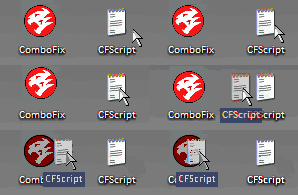
6. Then drag the CFScript (hold the left mouse button while dragging the file) and drop it (release the left mouse button) into ComboFix.exe as you see in the screenshot below. Important: Perform this instruction carefully!


CFScript-1.gif


ComboFix will begin to execute, just follow the prompts.
After reboot (in case it asks to reboot), it will produce a log for you.
Post that log (Combofix.txt) in your next reply.
 
Did you run that combofix script? Viewpoint is not considered an infection but its not needed on a computer.
 
It started to run when I dragged the cfscript to comboxfix but after it ran I didn't get a log of anything. Nothing came up.
 
See if you have a file at c:\combofix.txt and post it. Or you can try running it again. It should have created a log if it was completed.
 
Back
Top