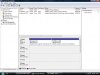
you can extend a partition with windows 7 pro. you might be able to with disk management. at least i can create, format, shrink or and extend to either or.
To create and format a new partition (volume)
Click to open Computer Management. If you're prompted for an administrator password or confirmation, type the password or provide confirmation.
In the left pane, under Storage, click Disk Management.
Right-click an unallocated region on your hard disk, and then click New Simple Volume.
In the New Simple Volume Wizard, click Next.
Type the size of the volume you want to create in megabytes (MB) or accept the maximum default size, and then click Next.
Accept the default drive letter or choose a different drive letter to identify the partition, and then click Next.
In the Format Partition dialog box, do one of the following:
If you don't want to format the volume right now, click Do not format this volume, and then click Next.
To format the volume with the default settings, click Next.
Review your choices, and then click Finish.
Note
When you create new partitions on a basic disk, the first three will be formatted as primary partitions. Beginning with the fourth, each one will be configured as a logical drive within an extended partition.
To format an existing partition (volume)
Warning
Formatting a volume will destroy any data on the partition. Be sure to back up any data you want to save before you begin.
Click to open Computer Management. If you're prompted for an administrator password or confirmation, type the password or provide confirmation.
In the left pane, under Storage, click Disk Management.
Right-click the volume that you want to format, and then click Format.
To format the volume with the default settings, in the Format dialog box, click OK, and then click OK again.
Notes
You cannot format a disk or partition that is currently in use, including the partition that contains Windows.
The Perform a quick format option will create a new file table, but will not fully overwrite or erase the volume. A quick format is much faster than a normal format, which fully erases any existing data on the volume.