Have a case question

Laudanum

New Member
I recently bought an HP desktop. Only use for DVD ripping/burning and encoding Mpegs to feed a network media player. I wasnt very concerned about the features, just needed a decently fast processor for the encoding and the HP has an AMD Phenom II Quad core which does the job.

The motherboard is a Foxconn u-ATX. I was looking at cases and most seem to accomodate both the ATX and Micro ATX form factors. But heres the thing. The HP has the motherboard placed on the left side of the case when looking at the case from the front. Ive never seen this before. Ive Only ever seen the MB placed on the opposite side which is exactly how all the cases I have seen locate the motherboard.

So my question is ... is it just a simple matter of flipping the motherboard upside down to install in a new case? It seems like that's all it would involve. The outputs for USB, Video, sound, ethernet etc. are on the lower, right side when looking at the back of the HP. So flipping it the other way to install in a different case would locate them on the upper, left side when looking at the back of a new case. So Im assuming here that it is just a standard u-ATX board that HP, for whatever reason, decided to place on the opposite side of "normal".

I have a second hard drive installed in the case already as well as a second DVDrom drive. I would like to move my external hard drive inside the case as well. I am concerned about cooling because I would have to install it in the bay where a floppy drive would usually go and there is no air movement there in the HP case. Also, no front fan so I am already concerned about heat with the existing HDD's which dont get any direct air flow as it is.

So, has anyone seen this before (MB on "wrong side)? Does it sound like just a matter of flipping it "upside down" to install in another case?
If it doesnt sound like a problem, can anyone recommend a decent case with room for expansion and good cooling that doesnt cost an arm and a leg and will accomodate a micro atx MB? Im assuming that the u-ATX MB's have a standard for mounting holes, yes?

Appreciate the advice.

Thanks
 
Last edited:
HP and other OEM's like to use proprietary designs to stop people from doing such changes. I would suggest searching around on google and seeing what you can find.

Alternatively, a picture of your motherboard in the HP case should tell us whether it can be changed into another case or not.
 
From the screw holes, its looks like you should be able to flip it around and fit a standard case. The only problem you might have is matching up the power switch/Power LED/reset switch and so on pins.
 
Last edited:
From the screw holes, its looks like you should be able to flip it around and fit a standard case. The only problem you might have is matching up the power switch/Power LED/reset switch and so on pins.

So, you're saying that the sockets for the power switch/led/reset switch on the board I have may not be standard such that the corresponding connectors that come prewired with a new case may not plug right up, correct?
 
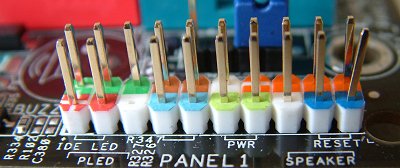
The case you have now, are the pins in one connector for all. Or is each connection individual. And on the motherboard, is each one marked.

Like this
Pins.jpg
 
On the board it's 9 pin header. The wiring goes into a single 9 contact connector with 6 wires total (I think it's 6). One thing though, I dont know what you mean by a reset. I assume you mean a seperate switch to reset the computer but I havent had one of those on a machine since an old Packard Bell, years ago. Of course, I have only owned prebuilt machines.
Please explain the reset if it's not what I think it is.

Anyway ... picture links attached. Thanks for the help so far.

http://i130.photobucket.com/albums/p243/BlueThomas/Computer/DSCN0205.jpg

http://i130.photobucket.com/albums/p243/BlueThomas/Computer/DSCN0206.jpg
 
Since you have one single connector from the case. You will need to figure out what pins go where with a new case, they have separate pins for each.
Like this
front_panel%20connectors.jpg


In the top photo. The orange and blue connector is SATA. The others, would have to have a better look.

The second photo, looks like a USB connector from the case.
 
Since you have one single connector from the case. You will need to figure out what pins go where with a new case, they have separate pins for each.
Like this
front_panel%20connectors.jpg


In the top photo. The orange and blue connector is SATA. The others, would have to have a better look.

The second photo, looks like a USB connector from the case.

The first photo, below the orange sata connector you can see a 9 pin header. The second photo is of the connector that I unplugged from that header. That plug goes to the power switch, the power led and the activity led which are all located together, absolutely, definitely. But, There is no seperate reset switch on this machine.

From your photo and other motherboards I have seen on the net, looks like the Foxconn in the HP is using a proprietary connector and socket for the machine. I can figure out which wire goes to switch, power led and activity led but it doesnt seem like it's worth the hassle. It doesnt look like the standard connectors that would come pre-wired in a case would fit the individual pins of the header on my MB so I would probably have to cut the wires and solder them to the connector of the HP in order to have them fit on that header. Not worth the trouble I dont think. Plus, like I mentioned, there is no reset switch, unless it's integrated with the main power switch in this computer. But there is no seperate one.

I would consider buying a new MB along with the case but I dont have a Windows 7 disc to do a clean install. I have read that the machine may boot if I just replace the MB (if I buy another Foxconn MB) but it may not. Plus, the best way to do it is probably with a clean install. So, looks like Im kinda stuck with the case I have unless I want to spend some money on a case, MB and a windows 7 disc.

All that said, I appreciate the help very much. If it wasnt for the forums and folks like you who are willing to help, I probably would have assumed it was an easy swap and bought a case only to be dissapointed and out a few bucks. Unless, you have an easier, less expensive solution, I think Im kinda stuck staying with what I have for the time being, unless I decide to shell out and extra 200 bucks more on Windows 7 disc and another hundred bucks, give or take, on a half way decent MB on top of what the case would cost.

Im all ears to any simpler, less expensive solutions you may have. But either way, you have been a great help, once again. I appreciate it greatly. Thanks.
 
What model HP is it?

It's a P6620F. It has a Phenom II Quad Core (820) 2.8ghz which may be either a discontinued processor or just for HP because I didnt see it on AMD website. Onboard AMD HD 4200 graphics which is fine for my needs.
6gigs DDR3 and a 1TB 7200RPM Hitachi drive. It was about 500 bucks. It replaced a Compaq with an Athlon 64 single core. Like I think I mentioned, I bought it for the processor/price because encoding speed was dead slow with the single core. And it serves it's function well in that the regard. Encoding MKV from ISO's is literally 5 - 10 times faster compared to the single core, depending on the encode and settings. It's just a hair slower encoding compared to the I7 in my laptop. I had/have no intentions of installing a graphics card, I dont watch movies on the computer or game. All the DVD ripping and encoding is for use with a network media player connected to the TV which is basically our substitute for playing loading and playing DVD's. Point is that it's not a high end machine obviously but for what I needed it for it was a decent value and easy solution. I replaced the PSU as you know (stock was a cheap 250 watt) and added a PCIe sata card that is raid capable. It didnt have an esata port and I wanted one for another external drive.
So I have added a 1.5tb internal drive and another 1.5gb external. I may configure for RAID later on.

But the idea of the case came up because of the better cooling and the ability to mount all the drives, current and future, internally and have adequate ventilation. I will probably just end up moving the internal drive that I added, externally later on and use a multi bay external drive enclosure if I configure for RAID. The money that would most likely need to be spent to go to a better/bigger case (mobo, case and probably windows 7) would pretty much just as effectively be spent on a multibay/raid external drive case and another drive or two. I dont think cooling would be an issue in the existing case with just the stock components inside of it.

So that's the background. Im all ears to suggestions.

Thanks again.
 
Last edited:
Back
Top