

Strokes
New Member
I had a thread on this before, but I really need to fix this so I can install windows 7. I see this when I open my disc management:
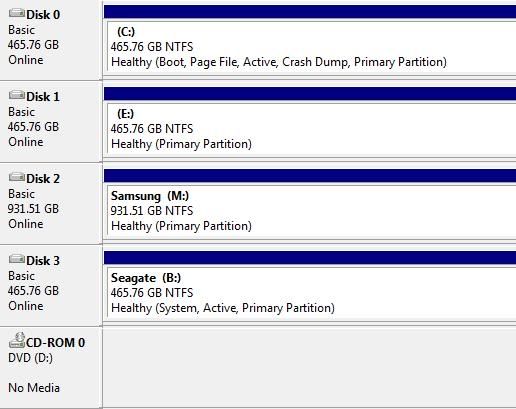
See the "B:" HD, it says system and it's practically empty, and no programs installed on it. I formatted it with gparted and all I had was a boot error from windows, so after the use of a recovery disc I had windows up and running again, with the same "System" property. I have no idea why a HD that's never used is a secondary system HD!?!?!?!
Any ways, I Google'd this problem and nothing came up, so can anyone help me fix this because Win 7 wont install with "system" files on more than 1 HD.
See the "B:" HD, it says system and it's practically empty, and no programs installed on it. I formatted it with gparted and all I had was a boot error from windows, so after the use of a recovery disc I had windows up and running again, with the same "System" property. I have no idea why a HD that's never used is a secondary system HD!?!?!?!
Any ways, I Google'd this problem and nothing came up, so can anyone help me fix this because Win 7 wont install with "system" files on more than 1 HD.

