HELP.Error Message, Now windows won't load

celina728

Member
Turn on my desktop today and got the error message
"USB Device Over Current Status Detected" Windows will shut down.
Shut down computer, unplugged power supply,disconnected the front (case) USB's,printer,and mouse. Plugged in wired mouse(non-usb) wireless keyboard,power supply and turned on. Now I get the screen where it says
Windows will start in xx sec's. Start windows normaly,last best known configeration, the 3 safe mode's listings. I tried start Windows Normaly,Last known but still won't start.
I don't want to lose the stuff I have on my Hd so i haven't tried the safe modes.
What can or should I do???
Between desktop and my laptop I'm at my wits end.

Comp Spec's
Asus P8Z77-V_LK
Intel i-5 3570k
WD Blue 750 GB
Antec TP-750
Asus monitor
Logitech K250 keyboard
Logitech M570 Mouse (disconnected) using generic wired mouse
Epson RX 700 Printer(disconnected)
 
Turn on my desktop today and got the error message
"USB Device Over Current Status Detected" Windows will shut down.
Shut down computer, unplugged power supply,disconnected the front (case) USB's,printer,and mouse. Plugged in wired mouse(non-usb) wireless keyboard,power supply and turned on. Now I get the screen where it says
Windows will start in xx sec's. Start windows normaly,last best known configeration, the 3 safe mode's listings. I tried start Windows Normaly,Last known but still won't start.
I don't want to lose the stuff I have on my Hd so i haven't tried the safe modes.
What can or should I do???
Between desktop and my laptop I'm at my wits end.

Comp Spec's
Asus P8Z77-V_LK
Intel i-5 3570k
WD Blue 750 GB
Antec TP-750
Asus monitor
Logitech K250 keyboard
Logitech M570 Mouse (disconnected) using generic wired mouse
Epson RX 700 Printer(disconnected)

Safe mode will not delete all of your stuff. Try that first and post if you have any luck.
If you can get on, try going to device manager and seeing if there is any "!" or "x" next to your USBs.
 
Re;AshleyScopes, I'll try what you suggested early evening and post back.
Re;Ambushed, if you mean does it boot to hd first and then cd rom, yes that is the boot mode in Bios.
 
Up Date: A friend of mine has my computer and is going to repair it if he can. He has more knowledge about computers then I do. I'll report back in a week or so. Hope it is not the MB, but from what I have read it could be.
Thanks for the help
 
Usually this is caused by the usb ports on the case itself. If you disconnect the usb ports from the motherboard it should work. If not, then you know its the usb ports on the motherboard itself. Or it could be a psu issue.
 
RE:johnb35
I did disconnect the USB ports that are on the front of case from the MB. That is when it would not boot to Windows all i got was the Start Windows Normally and so forth. I tried Start normal and last known config but it still would not load Windows. My friend is going to take a look at it for me (knows more about computer then I do). Hopefully he will beable to get it working.
Thanks for your reply.
 
The error you are getting is usually reffered to USB ports wether they are intergrated on the motherboard or the external ones connected to the motherboard.Let's hope they are external ones.
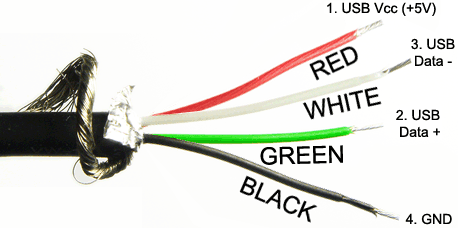
Each USB port needs 4 wires connected on the right places on the motherboard in order to work properly and those are:

-USB vcc (+5 V)
-USB data (minus)
-USB data (plus)
-GND

Also each one of them is in different color so pay attenton on that as it can help.Here is how it approximately looks like:
usb_cable_diagram.gif


So disconnect ALL these kind of wires from the motherboard chip,then turn on the computer,go in the BIOS,load OPTIMAL DEFAULTS,save changes to CMOS and exit/restart the BIOS.When the computer restarts,your problem should be solved.
Once the problem has been solved,but you DO WANT to use those external (usually the front ones) USB ports,connect those wires correctly.
(Of course if that part of the motherboard does not work properly then even correctly connected wires will not work and you will need to replace the motherboard).

If you are still getting the error,the problem could be either the motherboard or the power supply unit or both.


Cheers!
God I am so thirsty!
 
Back
Top