
Help on Hard drives

sden10

New Member
First of all, Hello! :)
Secondly I hope this isn't in the wrong place? It's too do with external hard drives BUT it is for my home desktop computer so I hope this is okay and i apologise in advance if it isn't!

My c: drive is always telling me that I have a low disk drive, and some times it tells me i have none at all! It's constantly changing, but is never above 200mb! It can only hold 30gb and something tells me that this is ridiculously low? I've deleted everything I can/want to from the drive as well, so is the answer to my problem simply to buy a external hard drive, and if so what would be a good size for a home computer? I was thinking 160 gb would be better?

Also would having this new Hard drive effect how slow my internet seems to be? We have a good speed but sometimes it will go unbelievably slow, if not then can you think of anything else that could be effecting it?

Sorry if this seems vague :/ I didn't really know what to put! any information you may need about my computer would be happily provided as long as you are willing to tell me how to provide it! :) I'm not great with computers!

Thank You for any help you provide :)
 
Hey Sden10 and welcome to the forums. Is your computer a laptop or a desktop?

Firstly your hard disk drive is running out of space as you only have 200 mb remaining of 30 gb. Therefore it would be a good idea to purchase another hard drive in this case an internal Hard disk drive would suit best.

Secondly if you buy a new hard drive you will need to copy/backup all your files on your machine so that you can transfer them over to a fresh (new) install of windows (another question here is do you have a windows xp disc that came with the computer or not)

Lastly it is likely that the hard drive you are using is an older one and that may be impacting on slow loading times of windows and could also be contributing to your slow running problem of the internet browser you are using.
 
Thank You :)

It's a desktop, sorry I should have mentioned that!
I did think about an internal hard drive, but I was concerned as to how hard they are to set up :/ are they overly difficult, if not are they around the same price? Otherwise if they're too expensive I think i'd just get a new computer to save me hastle! :)

No I don't have the Disc i'm afraid, would this be a problem? Would this be a good time to finally leave behind the world of Windows XP and upgrade anyway, or could my computer not hold that? :)

Sorry for all the questions, I've made it my aim after all this to become more computer literate!

Thanks again!
 
can you tell us what computer you have? A link would be great if you can find one.

I would recommend getting another internal drive and either cloning it or using it as extra storage space if you are uncomfortable with cloning the drive. (we can help you with that)
 
I've tried to find a link :/ but i don't think that there is one! I don't believe this to be new enough to be honest that there would be a link anywhere. :(

Where would I get an internal hard drive? :)
 
You can get one from Newegg.com but we need to know more about your computer.

1. manufacturer, model (like Dell MX220 or something like that. it might say it on the front of the case)
2. if you feel comfortable opening it up you can look to see what connectors your hard drive has.

1100230407_1d84255e80.jpg


The HDD on the left uses IDE and the one on the right uses SATA

3. How big is your hard drive now and how much space do you want on your new drive?
 
I believe it's a packard bell imedia 1308 (i googled it and thats exactly what my computer looks like and thats what it says on a white sticker on the back) is that what you need?

My hard drive capacity is 29.9gb apparantly, and I'm not sure how much more I would like :) just so it stops telling me I'm low on disk space, because it reminds me every 2 minutes! :) what would be an optimum amount?

Will opening it up be simple? because it's in quite a difficult place and one of my legs muscles is strained so getting down to it will be a bit of a problem today :/
 
I believe it's a packard bell imedia 1308 (i googled it and thats exactly what my computer looks like and thats what it says on a white sticker on the back) is that what you need?
That's what I needed. Thanks.

My hard drive capacity is 29.9gb apparantly, and I'm not sure how much more I would like :) just so it stops telling me I'm low on disk space, because it reminds me every 2 minutes! :) what would be an optimum amount?
If you have been fine for a while with 30gb then just about anything will be more then enough for your needs. I would say something in the range of 120gb to 320gb would last you quite a while. and you could move it to a new desktop down the road if you do get a new one.

Will opening it up be simple? because it's in quite a difficult place and one of my legs muscles is strained so getting down to it will be a bit of a problem today :/
It is not too hard to take apart but it will require that you take it out from under a desk and lay it on it's side. For another time unless you feel like taking a shot at it, I would think there are screws in the back of the case where the audio, ethernet, power, etc.. cables are. Unscrew those and you should be able to slide off the left panel of your case.

I googled the motherboard and got almost nothing but I did find a few places that said that it is connected via SATA. So that means that you should be able to get a sata 2 drive and it will be backwards compatabale with your system and also fully compatable with newer systems.

http://www.newegg.com/Product/Product.aspx?Item=N82E16822136075

I believe that should fit your system well.
 
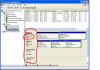
I have a feeling that you have a bigger hard drive in your system. It seems you only have a parition size of 29.9 gb but I bet your actual drive is bigger. Right click on "my computer" click on manage, when the computer management screen comes up click on disk management on left. Then look on the right side of the screen toward the bottom where you see drive 0, drive 1, cdrom 0, cdrom 1 Under drive 0 what does it say for size? Look in the image below. I need to know what the inner red circle says.
 

Attachments

  • disk management.JPG
    disk management.JPG
    94.1 KB · Views: 67
Thank you so much! If Johnb35's idea doesn't work eitehr than i shall purchase that! Thanks! Really wish there was something I could do in return! You guys are great how you do this! :) Cheers mate!

It say's
'Disk 0
Basic
149.03 GB
Online'

This to me sounds like good news!? :)
 
Ok, that means you have a 160 gb hard drive with 2 partitions. As long as the other partition is formatted you can transfer data from the smaller partition to the bigger partition. Or you will have to use a partitioning program like partition magic to resize your smaller partition taking space away from the other partition to the smaller one. Do you have data on the other partition?

If you can provide a screen shot the disk management screen, that would help.
 
Back
Top