
You are using an out of date browser. It may not display this or other websites correctly.
You should upgrade or use an alternative browser.
You should upgrade or use an alternative browser.
Help Please!!
- Thread starter tbest08
- Start date
TrainTrackHack
VIP Member
What virus/malware protection do you have? Your PC could be infected with all kinds of notsupposedtobethereware. Also, I'd recommend dowloading CCleaner and RegCleaner and cleaning out all other crap.

cohen
New Member
Instructions for CCleaner + regcleaner, run these and then post a hijackthis log
*NOTE* CCleaner deletes EVERYTHING out of temp/temporary folders. If you have anything in a temp folder, back it up or move it to a permanent folder prior to running CCleaner!
Download CCleaner from here to clean temp files from your computer.
Download: CCleaner (freeware)
http://www.majorgeeks.com/download4191.html
Run the installer, and uncheck the option to install Yahoo toolbar (unless you want Yahoo toolbar).
Once installed, run CCleaner click the Windows [tab]
The following should be selected by default, if not, please select:
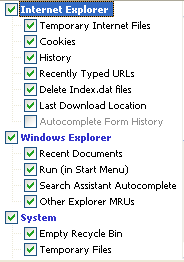
Next: click Options click the Settings tab
Uncheck: "Only delete files older than 48 hrs.", click Ok
Then click Run Cleaner (bottom right) then Exit
Hijackthis log:
If after that you are still infected, please post a Hijackthis log. To post a Hijackthis log, please do the following:
Click Here to download HJTsetup.exe
* Save HJTsetup.exe to your desktop.
* Double click on the HJTsetup.exe icon on your desktop.
* By default it will install to C:\Program Files\Hijack This.
* Continue to click Next in the setup dialogue boxes until you get to the Select Additional Tasks dialogue.
* Put a check by Create a desktop icon then click Next again.
* Continue to follow the rest of the prompts from there.
* At the final dialogue box click Finish and it will launch Hijack This.
* Click on the Do a system scan and save a log file button. It will scan and then ask you to save the log.
* Click Save to save the log file and then the log will open in notepad.
* Click on "Edit > Select All" then click on "Edit > Copy" to copy the entire contents of the log.
* Come back Paste the log in a new post, using Hijackthis in your Subject bar
* DO NOT have Hijack This fix anything yet. Most of what it finds will be harmless or even required.
We will look at your log as soon as we see it, and give you further instructions on how to fix your computer. Most of the time it will involve downloading more programs that will either give us logs to locate the malware or delete those malware.
Once you have posted a HJT Thread DO NOT make any changes to your PC unless the advisor helping you has instructed you to do so!
thanks
[*]Download and install it RegCleaner
[*]Click on the RegCleanr.exe
[*]Tools (at the top) > Registry Cleanup > Do Them All
[*]Then 'Select' (at top left) > choose ALL
'Remove Selected" (at bottom right)
[*]A backup of all that was removed will be made, just choose 'Backups' (top right) to view them, you can delete them when you're confident they're no longer needed.
[*]Also available Here and AlsoHere
*NOTE* CCleaner deletes EVERYTHING out of temp/temporary folders. If you have anything in a temp folder, back it up or move it to a permanent folder prior to running CCleaner!
Download CCleaner from here to clean temp files from your computer.
- Double click on the file to start the installation of the program.
- Select your language and click OK, then next.
- Read the license agreement and click I Agree.
- Click next to use the default install location. Click Install then finish to complete installation.
- Double click the CCleaner shortcut on the desktop to start the program.
- On the "Windows" tab, under "Internet Explorer," uncheck "Cookies" if you do not want them deleted. (If deleted, you will likely need to reenter your passwords at all sites where a cookie is used to recognize you when you visit).
- If you use either the Firefox or Mozilla browsers, the box to uncheck for "Cookies" is on the Applications tab, under Firefox/Mozilla.
- Click on the "Options" icon at the left side of the window, then click on "Advanced."
deselect "Only delete files in Windows Temp folders older than 48 hours." - Click on the "Cleaner" icon on the left side of the window, then click Run Cleaner to run the program.
- Caution: It is not recommended that you use the "Issues" feature unless you are very familiar with the registry as it has been known to find legitimate items.
- After CCleaner has completed its process, click Exit.
Download: CCleaner (freeware)
http://www.majorgeeks.com/download4191.html
Run the installer, and uncheck the option to install Yahoo toolbar (unless you want Yahoo toolbar).
Once installed, run CCleaner click the Windows [tab]
The following should be selected by default, if not, please select:
Next: click Options click the Settings tab
Uncheck: "Only delete files older than 48 hrs.", click Ok
Then click Run Cleaner (bottom right) then Exit
Hijackthis log:
If after that you are still infected, please post a Hijackthis log. To post a Hijackthis log, please do the following:
Click Here to download HJTsetup.exe
* Save HJTsetup.exe to your desktop.
* Double click on the HJTsetup.exe icon on your desktop.
* By default it will install to C:\Program Files\Hijack This.
* Continue to click Next in the setup dialogue boxes until you get to the Select Additional Tasks dialogue.
* Put a check by Create a desktop icon then click Next again.
* Continue to follow the rest of the prompts from there.
* At the final dialogue box click Finish and it will launch Hijack This.
* Click on the Do a system scan and save a log file button. It will scan and then ask you to save the log.
* Click Save to save the log file and then the log will open in notepad.
* Click on "Edit > Select All" then click on "Edit > Copy" to copy the entire contents of the log.
* Come back Paste the log in a new post, using Hijackthis in your Subject bar
* DO NOT have Hijack This fix anything yet. Most of what it finds will be harmless or even required.
We will look at your log as soon as we see it, and give you further instructions on how to fix your computer. Most of the time it will involve downloading more programs that will either give us logs to locate the malware or delete those malware.
Once you have posted a HJT Thread DO NOT make any changes to your PC unless the advisor helping you has instructed you to do so!
thanks

Droogie
New Member
try malewarebyte's anti virus, that got rid of some malware for me that was pretty deep, and nothing else could even detect.
http://www.malwarebytes.org/
http://www.malwarebytes.org/