Help regarding the Basics of Graphic Cards?

o.ash92

New Member
Hey,

I understand that certain types of memory is needed for different motherboards, but is it the same for Graphics Card? I'm thinking of upgrading my graphics card to enable Windows Aero, and I have found a list of graphic card's that will do this - but I'm not sure if I need one that will fit my motherboard, or will any fit?

Thanks,
Oli
 
What motherboard you got mate?

Usually there are 3 different types of graphics cards PCI, AGP & PCI-Express.

Find out your motherboard make/model and do a google search for the spec or just look in the mobo manual. It should tell you what type of motherboard you have.
 
There's still not enough information. I believe you may have integrated graphics unless a graphics card has been added and you will need to check what slots you have. If it is older than a few years it may well be AGP but again is it X4 or X8.
 
How would I check what slots I have? When I run the system scan on Crucial.com it sais it could not provide information about my graphics card or something like that.

"If it is older than a few years it may well be AGP but again is it X4 or X8."- I have no idea what that means? Sorry, but all I know about Graphics Cards is that they are inside your computer and provide the visual stuff :P.
 
It has two things.

It looks like this:
Intel Extreme Graphics 2, Video Adapter
Intel Extreme Graphics 2 (but with a different icon beside it), 3D Accelerator
 
That tells us that you have onboard video but nothing else. If you're using Everest, go to motherboard<motherboard<motherboard name. Tell is what the name is.
 
better yet man, just pop the side of the case off and look for ports that look like this and tell us what you have:

PCI-E (The blue and the orgnage port are PCI-Express ports, look for the clip. AND THE legnth. this is the best current video card port)
Dual_x16_PCI-E.jpg


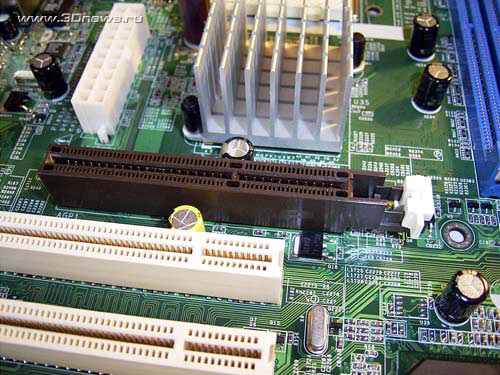
AGP (the brown one is AGP, its shorter and set futher into the middle of the case that the others.. if you have this then there is 2 difrent speeds 4X or 8X, for that we would need to know the mobo)

agp.jpg


if you dont have either of these then all you have is PCI, wich in that case its not workth gettin a new video card, its time for a new computer
 
Looked inside my computer. Although you said PCI-Express was orange and blue, I had three white slots which are apparently PCI? Not sure if it's PCI-Express but I'm sure it's PCI at least. Wasn't sure how to check for the length and clip?

Oli

Edit: Did some further research. I have three PCI slots. Surely there's some graphics cards I can buy which will support Aero? If you know any, links or names would be very much appreciated. I really want Aero without buying a new PC!
 
Last edited:
are there any other slots above those 3 PCI SLOTS ? either the AGP one would be a bit bigger but same length as the PCI or longer which is the PCIe
 
Well it seems you only have 3 PCI slots available, the bad news is that graphics cards for these sockets are few are far between and I doubt you can still buy a decent one, but you may want to check yourself.

Just so you know your current graphics is integrated or sometimes referred to as onboard, basically the hardware which is normally on a graphics "card" is now part of the motherboard and there is no way of changing it with out changing the motherboard for a completely new one, which as it's a dell can present many problems.

Sometimes motherboards with integrated graphics also provided a free AGP or PCI-e slot, but this doesn't look to be the case.
 
http://www.tigerdirect.com/applications/SearchTools/item-details.asp?EdpNo=3101644&CatId=319

There is the video card you need:

"This graphics card is about the best you can get for a PCI slot. I researched around for awhile and finally decided on this one. Added it to my Dell Dimension 2400. It handles Vista Home Premium w/Aero with no problems. HDTV viewing on a WinTV HVR-1600 is a bit sluggish full screen but great when viewed in a smaller window. 256MB of DDR2 helps free up some my system memory. I currently have two monitors hooked up to it and love it. It creates a wall of workspace to multi-task like a madman. Catalyst control center has every option available to take full control of your card. Recommended for anyone upgrading an older system like mine."


or this one:

http://www.tigerdirect.com/applications/searchtools/item-details.asp?EdpNo=2802675&body=REVIEWS


"Powerful low profile card (which are sooo rare). Excellent with Vista. Runs Aero, full effects, no issues on P4 2,8 Ghz Ht. Hint: Better performance with Vista package provided driver set."


these are both pci slot cards that will work for you.. and im prety sure your PSU will be fine with these video cards because they proably use less power than an extra hard drive..
 
Last edited:
Back
Top