Help with build please?

mikedeuk

Member
Hi, i have just installed a Asus PK5-E mobo into my case believing it to be a fairly decent socket 775 board.
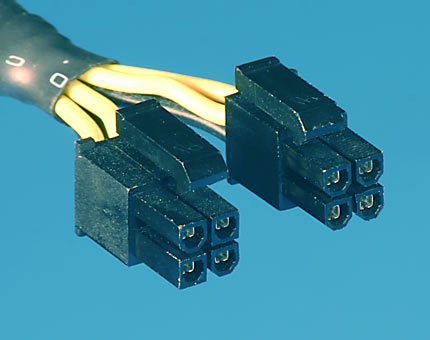
But i was under the impression socket 775 boards have a 4pin cpu plug? This has 8! I have a 2, 4pin plugs from the psu but only 1 half fits as shown in the pic.

I remember in my last build for some reason i split my 24 pin mobo connection and just had 20 into the mobo which ran fine. If i did this again the remaining 4 would fit into the remaining cpu socket. But i think the reason i had to split last time was different! I just cant remember what im doing! :confused:

Help please?

http://i116.photobucket.com/albums/o34/mikedeuk/aaaaaa.jpg
 
Last edited:
You may have to twist the other 4 around to make it work. They will only go in one way.
 
Thanks for the quick response, After a good look at the pins theres no way it will fit the half moons are where the circles should be if that makes sense! Why is there 8 anyway? :confused:
 
Thanks for the quick response, After a good look at the pins theres no way it will fit the half moons are where the circles should be if that makes sense! Why is there 8 anyway? :confused:

maybe you have the thing upside down? the newer mobos demand more power, you can get good modular psu's for good prices, i suggest silverstone
 
The spec on you power supply.

One ATX12V connector and one EPS12V connector. You should have a 8 pin CPU power connector.

It should have a 8 pin CPU power connector, and a 4 pin CPU power connector. Not a 4/4. Sure you looking at the right connector?
 
I really appreciate all the replys but for the last time i am not trying to put it in upside down!
The following pic will show the socket and the plugs i have available. You will see that the socket has 2 square pins in the middle and the plugs do not, Spinning them round will not change this:

http://i116.photobucket.com/albums/o34/mikedeuk/plugss.jpg

Stranglehold i may have a unusual psu (nexus 430), But it took me a while get my hands on a economical silent psu so i'd like to keep it if possible.

In my last build i only used 20 out of my 24 pin mobo connection and it ran fine, Maybe i used the remaining 4 on the cpu. Can you see any problem in doing this?
Perhaps my last board was only 20 pin? :confused:
 
I really appreciate all the replys but for the last time i am not trying to put it in upside down!
The following pic will show the socket and the plugs i have available. You will see that the socket has 2 square pins in the middle and the plugs do not, Spinning them round will not change this:

http://i116.photobucket.com/albums/o34/mikedeuk/plugss.jpg

Stranglehold i may have a unusual psu (nexus 430), But it took me a while get my hands on a economical silent psu so i'd like to keep it if possible.

In my last build i only used 20 out of my 24 pin mobo connection and it ran fine, Maybe i used the remaining 4 on the cpu. Can you see any problem in doing this?
Perhaps my last board was only 20 pin? :confused:

What that pic is, is a pic of 2 4's right next to eachother right? a normal one is one six with a 2 next to it
 
http://i116.photobucket.com/albums/o34/mikedeuk/plugss.jpg

Stranglehold i may have a unusual psu (nexus 430), But it took me a while get my hands on a economical silent psu so i'd like to keep it if possible.

Thought you had a Earthwatts 500W

What that pic is, is a pic of 2 4's right next to eachother right? a normal one is one six with a 2 next to it

A 6 plus 2 pin power connector is a PCIe power connector for video cards. Not a CPU power connector
 
RoRoYoBoat123 – Correct the pic is 2 4’s, thats the closest i have but dosn't fit.

StrangleHold – Sorry i should of mentioned this is a new build, My existing media center has the Earthwatts.

johnb35 – I see it says it has a 8 pin, but its actually (4+4 pin), Which must be what i’ve shown in my picture. Problem is plugs do not fit socket!

Anybody got any work around ideas? I can provide more specs if required.

Thanks all,
Mike
 
Can you take a better resolution pic of the plug (not the jack)? Are both of the 4 pin connectors identical? The only thing I can think of is that the PSU was manufactured incorrectly and two 4pin connectors were put on instead of a 4+4pin connector. The connector should look like this, with one side squared/rounded the other side all rounded:

eps4plus4.jpg
 
Yes correct the picture you show is exactly how my plugs look, The problem is if you look at my earlier pic of my socket, Its different!
Its like the plug on the left of your pic (round/square) and then a mirror image on the other side! Where they should be all round on the right side to match the plug!

Maybe the motherboard has been manufactured with the wrong socket? :confused:
 
Contact Asus to see if they can rma it so you can get a new one. I can't believe Asus put the wrong connector on there, but anything is possible.
 
Yes correct the picture you show is exactly how my plugs look, The problem is if you look at my earlier pic of my socket, Its different!
Its like the plug on the left of your pic (round/square) and then a mirror image on the other side! Where they should be all round on the right side to match the plug!

Maybe the motherboard has been manufactured with the wrong socket? :confused:

That's exactly how it should be. The rounded plugs can go in the square holes, just not vice versa. If the problem is with the all rounded 4 pin, then maybe it's not aligned perfectly or you're not using quite enough force.
 
Back
Top