

1960darrenh
New Member
Hi.
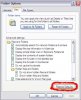
I have hidden folders on my PC which obviously when I want to access them I go into Folder Options - View - Show Hidden Files. Today I have gone in there and that option has completely disappeared. All my folders are now visible to all. I cannot hide them anymore because of that option being gone. Does anyone know how this happened and how to get it back to normal.
Thanks.
I have hidden folders on my PC which obviously when I want to access them I go into Folder Options - View - Show Hidden Files. Today I have gone in there and that option has completely disappeared. All my folders are now visible to all. I cannot hide them anymore because of that option being gone. Does anyone know how this happened and how to get it back to normal.
Thanks.

 Thanks APJ101.