Hiding User Accounts?

Kesava

Active Member
Hello all, I don't really post on here much anymore, but when I need help, look who I turn to :)

I'm currently using my mum's laptop which has Vista installed.
She is about to go away for 6 weeks (party time) and we have separate user accounts on the laptop. For the time that she is away I want to somehow "hide" her user account so that when the laptop starts it opens my account automatically rather then showing the login screen.

Is this possible? I can't just delete her user account, so would it be possible to somehow hide it or make it so it automatically logs into mine?

Thanks :)
 
you could try disabling her account. not sure if you can. but i know you can do that to a guest account, so maybe you can do that to another account.
 
Since it's someone else's laptop to start with you are better off leaving it as is and not tampering with it. If she comes back and finds out you made any changes I can imagine she would be a bit disappointed with you! When you have your own laptop or desktop even then you can customize it any which way without worry.
 
you could try disabling her account. not sure if you can. but i know you can do that to a guest account, so maybe you can do that to another account.

Yeah I had a look around and couldn't see anything. I'll keep trying. It would be so useful to get this sorted so I can just get it to log straight in.

Since it's someone else's laptop to start with you are better off leaving it as is and not tampering with it. If she comes back and finds out you made any changes I can imagine she would be a bit disappointed with you! When you have your own laptop or desktop even then you can customize it any which way without worry.

Oh, don't worry about that side of things. It's perfectly fine for me to do this. I just need to figure out a way. If I stuffed things up and had to reformat, she might not like it, but still wouldn't be a big problem.

Any more ideas?
 
Thanks Brian, said it was sucessfully completed.

I have restarted and it works.

Thank You :)
 
Last edited:
Uh oh. So it is time to "unhide" my mums user account now so I put in Brians command except with "yes" and it says the username could not be found.

Any ideas?
 
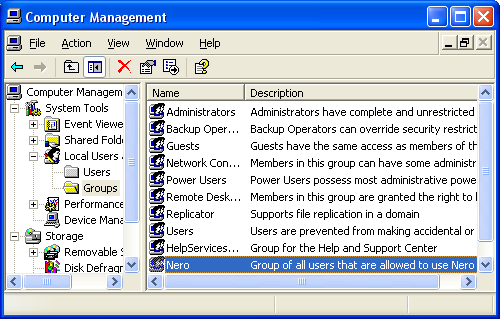
Try going into Strat>right click my computer>manage>users and groups>users and find your mom. You should be able to unhide it from there
 
It should look like this

computer-management-groups-nero.png
 
<insert mom joke here>

In Computer Management, you don't have a Local Users and Groups folder?
 
Back
Top