
You are using an out of date browser. It may not display this or other websites correctly.
You should upgrade or use an alternative browser.
You should upgrade or use an alternative browser.
how do i get my timings down to what they're supposed to be?
- Thread starter Beyond
- Start date


Beyond
Active Member
34erd said:Go into the BIOS and change them or use A64 tweaker.
with a64 tweaker which values do i change?
are those the only 4 to change?
also, do you think running at 2-3-3-6 will cause any problems?


xcaliber
New Member
yea when i first recieved my dual channel mushkin ram on my last build for some reason when i had both sticks in running dual channel the timmings were 2.5-2-2 instead of 2-2-2 like it was advertised and my rig was extremely unstable....however when i just ran one stick single channel it was fine. i just changed the timings to 2-2-2 via the bios setting and everything was fine, but my prob was more with my mobo settings than my ram.
Beyond
Active Member
Beyond said:with a64 tweaker which values do i change?
anyone? ^
Beyond
Active Member
34erd said:Change the CAS latency to 2 and the TRAS to 6.
welp.. i tried that and my system completely locked up as soon as i clicked set.. music i was playing turned into a hiss, as well.
when i tried again after the crash, the program won't even work.. the two values remain at what they are.
how do you do it from the bios? which values there?
will i even notice any difference with anything by doing this?
Beyond
Active Member
http://www.picturetrail.com/gallery/view?p=999&gid=8964948&uid=4117156&members=1
when i try to change the cas latency or the other value to what they're supposed to be and click set... it reverts back to what was..
when i try to change the cas latency or the other value to what they're supposed to be and click set... it reverts back to what was..
xcaliber
New Member
do me a favor....if possible take your memory and try to find out exactly which model you have....dont look on the site you bought it from look at the actual ram module (if possible) and then look at this site
there are like 2 diff versions for each 2 gig kit of the xms memory....on type has the 2-3-3-6 timing the other has 3-3-3-8 ......you might have had them pull the old you want one model and they send ya somthin that looks like the same thing but is a different model.....check it out....
http://www.newegg.com/Product/Produ...ce=&MaxPrice=&SubCategory=147&Submit=Property
it looks like me the only diffence is what the voltage is....check which model you actually have then if you want i guess if you do infact have the model that is listed as 3-3-3-8 try changing the voltage from whatever it maybe (prob 2.6v) to the voltage the other model is listed as (2.75v) and change your timings from 3-3-3-8 to the 2-3-3-6.....that might do the trick
there are like 2 diff versions for each 2 gig kit of the xms memory....on type has the 2-3-3-6 timing the other has 3-3-3-8 ......you might have had them pull the old you want one model and they send ya somthin that looks like the same thing but is a different model.....check it out....
http://www.newegg.com/Product/Produ...ce=&MaxPrice=&SubCategory=147&Submit=Property
it looks like me the only diffence is what the voltage is....check which model you actually have then if you want i guess if you do infact have the model that is listed as 3-3-3-8 try changing the voltage from whatever it maybe (prob 2.6v) to the voltage the other model is listed as (2.75v) and change your timings from 3-3-3-8 to the 2-3-3-6.....that might do the trick
Last edited:

Try changing the values in the BIOS, I never liked windows based utilties for things you change in the BIOS. If it doesn't run at 2-3-3-6 increase the voltage to the dimms by 1 increment and try it again, Corsair keeps the ram under warrenty to 2.9V but don't go that high.
How can you change these settings in the BIOS? I haven't looked thoroughly, but I haven't seen anything with timing anywhere.
I have 768 Ram in my computer, a faster stick of 512 and a slower stick of 256.
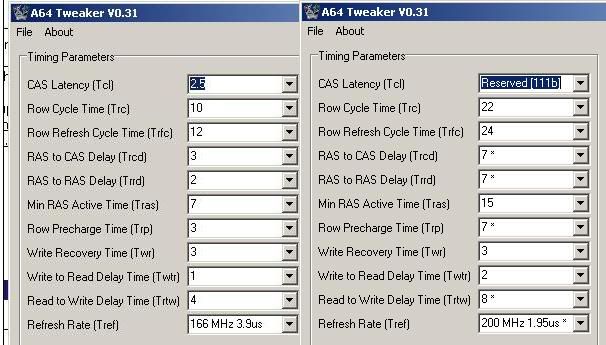
The part on the left is 768 total with the slower ram, and the part on the right is only 512 of the fast ram. I can see that the refresh rate is higher, which i assume is better, but what about the timing?
Oh yeah, with the slower ram, ECC is disabled, but with the faster ram its enabled. The last time I checked it didn't say anything about ECC on the package or ram. Would it be better just to leave only the stick of 512 in there?
I have 768 Ram in my computer, a faster stick of 512 and a slower stick of 256.
The part on the left is 768 total with the slower ram, and the part on the right is only 512 of the fast ram. I can see that the refresh rate is higher, which i assume is better, but what about the timing?
Oh yeah, with the slower ram, ECC is disabled, but with the faster ram its enabled. The last time I checked it didn't say anything about ECC on the package or ram. Would it be better just to leave only the stick of 512 in there?
Last edited:
Hm, there doesn't seem to be any reference in the manual to setting any latenceis in the BIOS nor on gigabytes site. Yay for AWARD BIOS...
It looks like everything but the frequency is better with the slow stick in there. You are probably better off with the 100MHz than the better timings though.
It looks like everything but the frequency is better with the slow stick in there. You are probably better off with the 100MHz than the better timings though.
Beyond
Active Member
in the screenshot, which timings are the actual timings?
if the 2-3-3-8 values are the correct timings, which value should be changed to get the 8 to a 6?
http://www.picturetrail.com/gallery/view?p=999&gid=8991010&uid=4117156&members=1
if the 2-3-3-8 values are the correct timings, which value should be changed to get the 8 to a 6?
http://www.picturetrail.com/gallery/view?p=999&gid=8991010&uid=4117156&members=1
