

multi-tasker-X
Member
I sometimes get this error screen when i boot my computer, i think it might be a usb device connected that causes this, i have to do some tests, but for now my questions is concerning this screen:
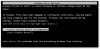
1. How can i change the default "Launch startup repair (recommended)", instead i would like to make "Start Windows Normally" as default
or
2. How can i disable this screen completely,
The reason is sometimes i am away from home and if there is a power outage, my computer restarts and it goes into this screen, and it will automatically choose the default in 14 seconds,
therefore, i will not be able to remotely log into my computer if it picks launch startup repair,
is question 1 or 2 possible?
advice?
1. How can i change the default "Launch startup repair (recommended)", instead i would like to make "Start Windows Normally" as default
or
2. How can i disable this screen completely,
The reason is sometimes i am away from home and if there is a power outage, my computer restarts and it goes into this screen, and it will automatically choose the default in 14 seconds,
therefore, i will not be able to remotely log into my computer if it picks launch startup repair,
is question 1 or 2 possible?
advice?
