
You are using an out of date browser. It may not display this or other websites correctly.
You should upgrade or use an alternative browser.
You should upgrade or use an alternative browser.
How to prevent the computer from recognizing new hardware?
- Thread starter Hkcuong
- Start date


If you right click on each device in device manager that has a yellow question mark on it and click on properties, then click on the details tab and give me the 4 digit vendor and device ID numbers, i'll point you to where to download the drivers. They look like this.
Attachments
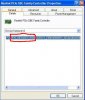
If you right click on each device in device manager that has a yellow question mark on it and click on properties, then click on the details tab and give me the 4 digit vendor and device ID numbers, i'll point you to where to download the drivers. They look like this.
Ah, sound great! So could you help me find the driver for ESS Allegro 1969 which has the red board design in an installation package? I've posted a request on the "soundcards and speakers" section and I got stuck there...
I've done as you said but next time I start the machine, that announcement appeared again. I also tried to UNINSTALL them but it seemed to be useless.Well, if you really want to do that, just go to Start-->Control Panel-->System-->Hardware tab-->Device Manager and scroll down the list until you find the hardware that you do not wish to be detected, right click it and select "Disable"
What sort of hardware is it?
Last edited: