
You are using an out of date browser. It may not display this or other websites correctly.
You should upgrade or use an alternative browser.
You should upgrade or use an alternative browser.
Hp dv9000 vga onboard problem
- Thread starter Kingo
- Start date
What is the exact model of laptop? The dv9000 has a wide variety of different models. Look on the bottom for a sticker with the model number listed. What driver did you download?
This is an HP DV9303TX
not sure which driver (its on the disk)
which driver should it be?
thanks Kingo

What operating system are you using?
The driver will be either one of these depending on the model you have installed.
geforce video - http://h10025.www1.hp.com/ewfrf/wc/...dlc=en&cc=us&os=2100&product=3411267&sw_lang=
or the
intel video - http://h10025.www1.hp.com/ewfrf/wc/...dlc=en&cc=us&os=2100&product=3411267&sw_lang=
The driver will be either one of these depending on the model you have installed.
geforce video - http://h10025.www1.hp.com/ewfrf/wc/...dlc=en&cc=us&os=2100&product=3411267&sw_lang=
or the
intel video - http://h10025.www1.hp.com/ewfrf/wc/...dlc=en&cc=us&os=2100&product=3411267&sw_lang=
Last edited:
what operating system are you using?
xp
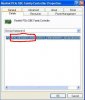
Ok do this, uninstall the driver you have now and then right click on the device and click on properties, then click on the details tab and give me the 4 digit vendor and device id numbers, which look like this.
Attachments

The_Other_One
VIP Member
Bingo fixed, my repair shop wanted to fit a new motherboard!!!!.
Thanks so much.
Kingo
I don't blame them... Well aside from it not being AMD based, pretty much every dv2000/dv6000/dv9000 has died or is dying

I don't blame them... Well aside from it not being AMD based, pretty much every dv2000/dv6000/dv9000 has died or is dying
Well I'm back with the same problem again , its changed the driver!!!!!