I AM TOLD THIS IS FAKE

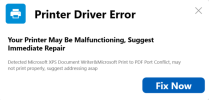
My adult daughter got me a new all in one printer for fathers day. After she installed it I started getting this pop up. She is very smart with computers and stuff, and she told me to ask Google f this was for real. Google says it's 100% fake so I asked how to get rid of it and it gave me some options. One was to delete from my extensions, but when I checked it won't allow me. So does anyone out there who is familiar with the HP Al In One Printers know how I can permanetly uninstall this?
1782852631838.png
 
Is it a window, is it a popup notification like in the bottom right hand corner or where? Need more info before we can direct you on how to get rid of it.
 
Hi Johnb35,
It's a pop up that appears over any page that I am looking at ta the moment. It only pops up in the morning, and it appears like every 30 seconds to a minute over several dozen times. If I don't click on the "Fix Now" button it will go away after several dozen times. I have run a dozen virus scans but it won't stop appearing after I sign in.
 
So I'm assuming it only popups in the morning cause you just turned your computer on? If thats the case then there is something running at bootup that is causing this. Go into task manager, then go to the startup tab and list what there that is enabled.
 
Wouldn't you know it....after a week of popping up only after I sign on in the morning, this pop up came back yesterday afternoon! Go figure!
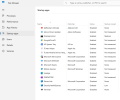
Anyway here you go:
By the way, whay looks odd to me is the 2nd one on the list as I never heard of an "Adore Driver Updater".
1783015413823.png
 
By the way, whay looks odd to me is the 2nd one on the list as I never heard of an "Adore Driver Updater".
disable that and look in the installed program list and uninstall it if it shows up there. That is scam software. It most likely came from however the printer driver software was installed. After that, you should be good.
 
A little late to the thread, but wanted to give my 2c.

I would second that the Adore Driver Updater would be the most likely cause, since the Microsoft XPS Document Writer and the Print to PDF are print queues that have print drivers. Most likely a false positive.

I would recommend just removing that application. Nothing (for the most part) comes good with a driver/OS optimizer, plus HP printers (that I know of) do not come with that app; they use HP Smart.
 
Back
Top