
Icon Problem

eckx

New Member
I installed a Stardock Application which gives the computer an alienware look. IT changed the skin and the icons. Once i got sick of it, i deleted the software, but some of the icons decided to stay behind. All my readonly files and other system files have the alienware folder icon.

I have attached the screeenshot. Please advice on what i can do.

I have already tried deleting the icon cache and also replacing the icon cache.

HELP!!
 

Attachments
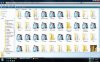
  • screenshot icon.jpg
    screenshot icon.jpg
    97.1 KB · Views: 46
Last edited:
The size of your font is obnoxious.

That being said, I have the solution. I don't have a computer with Vista in front of me to check, but the way to do it should be very similar to how you do it in XP. Go Control Panel>Folder Options>File Types, and you will be able to change the icon associated with specific types of files.
 
The size of your font is obnoxious.

That being said, I have the solution. I don't have a computer with Vista in front of me to check, but the way to do it should be very similar to how you do it in XP. Go Control Panel>Folder Options>File Types, and you will be able to change the icon associated with specific types of files.

I tried that, but once you restart the machine,it restores to the previous state. is there any other way i can fix this??..appreciate the response :)
 
Well just newbie Hi!
Have you tried to see if the folder of the installed program is still in the programs and files folder on the C: drive
 
Check your startup programs and services to see if there is anything leftover from the application running in the background that might be changing the icons back.

Run>msconfig
 
On a lighter side just to try. You should anyway have more than one profile. create one called Admin or whatever. reboot the system. start up the other and see what happens.
 
On a lighter side just to try. You should anyway have more than one profile. create one called Admin or whatever. reboot the system. start up the other and see what happens.


Tried that, the icons still exist. Thanks though:)
 
Check your startup programs and services to see if there is anything leftover from the application running in the background that might be changing the icons back.

Run>msconfig

Doesnt show up in the startup programs or services. Thanks though..Appreciate it:)
 
Wait...if you go into your Display Properties and under Themes, can't you change it to the default which should be Windows Vista? I think you should try that and it might work.
 
Wait...if you go into your Display Properties and under Themes, can't you change it to the default which should be Windows Vista? I think you should try that and it might work.

I tried that, doesnt work. i even tried deleting the stardock folder through dos..lol..still i have nothing
 
Back
Top