Installed 8GB memory but Windows is only showing 3.65, what could be wrong?

rdane1010

New Member
I just finished building my new machine. I'm using a GA-EP45T-UD3LR motherboard by Gigabyte and 4 2GB sticks of DDR3 RAM, for a total of 8GB.

When I check the Bios at bootup it shows the full amount of RAM but then when I go to the system information in Windows it is only showing something like 3.65 GB of RAM.

Does anyone know why this would be the case and if it is in fact using all of the RAM or not. What can I do to fix this? I am using Windows Vista. Thanks for any advice.
 
I just finished building my new machine. I'm using a GA-EP45T-UD3LR motherboard by Gigabyte and 4 2GB sticks of DDR3 RAM, for a total of 8GB.

When I check the Bios at bootup it shows the full amount of RAM but then when I go to the system information in Windows it is only showing something like 3.65 GB of RAM.

Does anyone know why this would be the case and if it is in fact using all of the RAM or not. What can I do to fix this? I am using Windows Vista. Thanks for any advice.
You're probably running 32bit not 64.
 
Yes I'm running 32bit.. so I need 64 bit to run the 8GB RAM? (sorry I'm new to this)

32 bit only supports up to 3.25 gigs I believe, including video memory. Vista Home premium 64bit supports up to 12 or 24 I believe.
 
32 bit only supports up to 3.25 gigs I believe, including video memory. Vista Home premium 64bit supports up to 12 or 24 I believe.

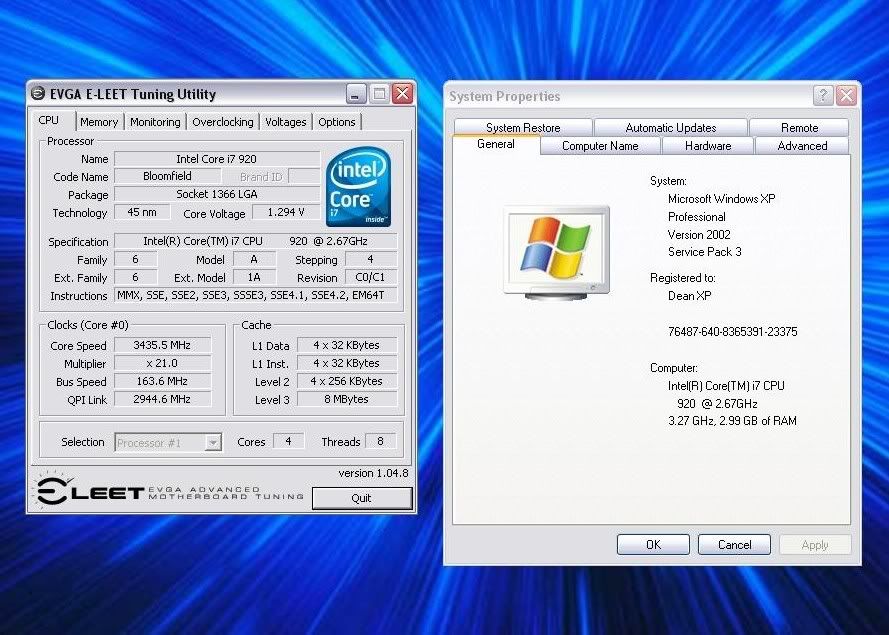
I see 3.
XP3Gigs.jpg
 
I recommend going to Tigerdirect.com or any computer shop and checking the price on a dual-core 64-bit processor for your computer. Should be around $150-200 for a good one. It'll be worth the money to get the full potential out of your RAM.
 
^ dude, practically every cpu out there is 64 bit, and has been for the past few years, and chances are that if he has 8 gigs or ram, he is going to have a pretty decent build... But like everyone said above your going to have to get 64 :)
 
bodaggit, it is anywhere from 3-3.5 that the OS will see if it is 32 bit, depends on video and physical memory.

mx344, any p4 upwards processor or athlon 64 or later is capable of XP and vista 64 bit
 
32 bit supports 4 gigs total, but you have to include your dedicated graphics memory.

indeed, but he said he only saw 3, the other 1GB will be for his video card. By todays standards, a 512MB video card is the norm, so it will be 3-3.5 for those that dual card or have a 1GB card they will only see 3, anybody with more powerful than that really need to stop spending money on their video cards and on a copy of a 64 bit os
 
I recommend going to Tigerdirect.com or any computer shop and checking the price on a dual-core 64-bit processor for your computer. Should be around $150-200 for a good one. It'll be worth the money to get the full potential out of your RAM.

When they say 64 bit above they are referring to the operating system, not the processor.
 

A 32 bit operating system can address 4 gb of memory. The difference between that and what your system shows is the memory occupied by the O/S itself, drivers, video memory etc. etc. etc. That figure will vary from computer to computer.
 
Get Vista x64, I would prefer the Ultimate. Most programs never get past 2gb running. The only real reason to use more than 4gb of memory is for CADD programs, Photo and video editing.
 
I was just chiming in. :)

I understand the concept. That's why this XP 32bit OS is on a partition,
and I run Vista Ultimate x64 primary, as it states in my siggy. :P
 
What is wrong with your 32 bit system as it is? Do you really want to purchase another OS just so you can use the full 8 GB of RAM? If gamer or some other memory intenstive applications, then I understand...otherwise....A quick google will tell you that all 32 bit OS are limited to using just over 3GB RAM. Depending on which 64 bit OS, will determine max RAM. Just so you know Windows Server 2003 SP3 64 bit OS can use up to 128 GB RAM.
 
Back
Top