
is my computer done?

Gamepsyched

New Member
I have had my computer for a little under 3 years and now everytime i am on my computer for a long period of time i get the blue screen and words saying the system halted.

Sometimes it even does it as soon as i start it up.

pic:
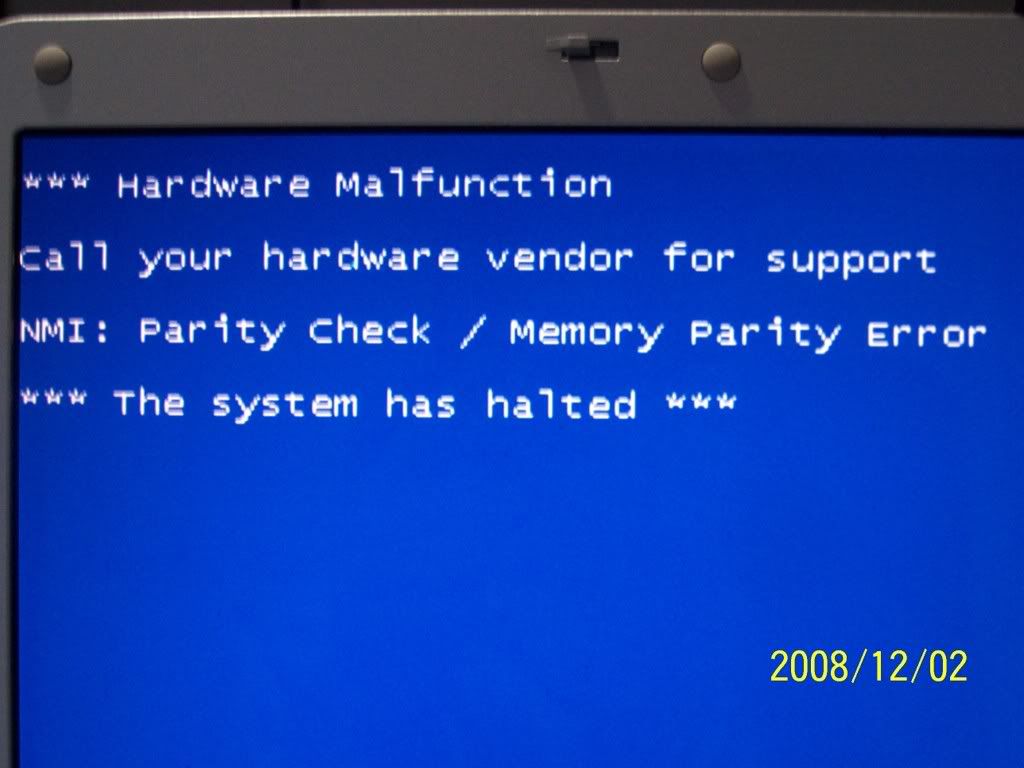
compdone.jpg


Now can anyone tell me is my computer done or can i fix it?

EDIT: when this happened before someone said it was my memory/ram so i went and purchased 2x2GB sticks of corsair memory and it still does it so dont say its my ram
 
Last edited:
Well if you can get into safe mode without issue then it sounds like a software/driver issue. Is this the laptop that's in your sig? If it is then I would go to Dell's website and try to reinstall the latest drivers for all your hardware.
 
hmm, i have absolutly no clue,
lol i know thats not the answer you were looking for

maybe your cpu is over heating or somthing check your temps, on everything chipset and all,

try going for a while with your onbored graphics just incase its the graphics card,

just keep trying a bunch of differnt thing's till it either fixes or it doesnt fix
 
"HardWare Malfunction" Probably has something to do with your Hardware, I had BCOD and it kept poping up every time i restarted so i took out ram and put back in and it stopped (but ram isnt your problem):P
 
Last edited:
I going to put my 2 cents worth in. Run a knoppix cd, a couple times, for a couple hours. Run it from the ram, to do this at the knoppix boot screen type: knoppix toram
This will load the entire OS into the ram. When the desktop comes up, remove the cd. Try this a few times, if you still get the blue screen, at least we will know its not a windows problem, and likely a hardware problem.
 
You should do a complete reinstall on your operating system.. but it seems that there is something wrong with your physical memory..
 
One of my old PCs had something like this happen. I replaced the hard drive, booted up and the problem was fixed.
 
Hey

first i would make sure that all your drivers are upto date like said earlier:
http://support.euro.dell.com/suppor...en/product_support_central?SystemID=XPS_M1710

then eventhough i'm not 100% sure if it is a RAM problem there's no harm in trying to run memtest which will test your RAM for errors.

Download memtest from here (the precompiled bootable iso .zip):
http://www.memtest.org/

Then you'll need to burn the iso to a CD- use somat like isoburner from the link below:
http://www.ntfs.com/iso-burning.htm

Put the disc in your comp, restart and boot from CD. Let it run for a few hours.
 
Back
Top