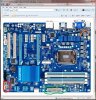
is my PSU incompatible with my mobo?

diabl

New Member
ok so i bought a prebuilt from cyberpowerpc.com and when i turned it on it, the driver kept crashing and the monitor was flickering and the system would autoshutoff in like 30 seconds. i googled and found out that my PSU xg-h700 was not strong enough to power my pc. i proceed to order a 950 watt called pc power and cooling silencer mk ii and after spending 3 hours playing legos/trial and error, i think i have connected everything properly. one problem! it wouldn't turn on! i realized that my old psu has these extra cables that my new one doesn't seem to have?

sorry guys i'm a complete noob at computer stuff and would really appreciate help
edit: err i tried to take pictures but it says that my quota has been exceeded i guess because i'm a new member but i found out that they are called front panel connectors and the front panel module is also missing!
i am using the ga-z77-d3h motherboard if that helps
 
What extra cables are you talking about? The only thing you need to power the motherboard is the 24 pin main plug and the 4 pin cpu connector. All the wires for the front panel come from the case not the power supply.
 
http://img808.imageshack.us/img808/4296/20120822225106.jpg
this cable is from my old PSU that was attached to
http://img543.imageshack.us/img543/8156/20120822224634.jpg
this slot and that same cable also had
http://img717.imageshack.us/img717/1926/20120822225132.jpg
these o.o none of which were in my case, these were all attached to my PSU
both of them are not modular

right now my main concern ( i THINK!) is that i'm missing that cable which i read from the manual of the motherboard has the power switch, speaker, and the LED lights which show the activity of each
 
20120822225132.jpg


Those are the cables from your case which will go to the fpanel connector which are the connections surrounded in white to the right of the black connection here. The black connection is your usb 3.0 connection.

20120822224634.jpg


And without a better picture, I have no idea what this connection is.

20120822225106.jpg


Look in your manual and it will tell you how to hook up those case connections.
 
i don't have any of those cables in my case at all for some reason. i think cyberpowerpc did some weird stuff and wired those cables onto the old PSU somehow and also that black connector i don't have any wires to plug into that which my guide tells me is the power button and speakers and leds
 
Your case wires get plugged into the white connector to the right of the black one. The black one is for a USB 3.0 connection which most likely your case doesn't have. Your PSU should have a 24 pin main connector and a 4/8 pin CPU connector for the motherboard.
 
do you know where i can find the case wires? i opened up my case and can only find 2 sata connectors but none of the wires from my case that you say i should have o.o
 
See the attached image.

The connector circled in red is where the case wires go. The HDD, LED, and power switch.

The connector circled in green is the for the big 24 pin connector from the new psu

The connector circled in orange is the 4 pin cpu power connection which the psu will have an 8 pin which separates into 2 - 4pin connections. The only other power connections you need are the sata connectors which look like an L connector and the 4 pin molex. There is no way that big long connector you showed attaches to the gigabyte motherboard. Was there a different motherboard in there previously?
 

Attachments

  • mobo.jpg
    mobo.jpg
    99.1 KB · Views: 56
the problem is that i don't have any case wires
everything else i seem to have done right but i can't even turn on the pc because i have no way of connecting power switch or anything in that white connector you circled in red

actually that big long connector was attached in every way to the motherboard and the pc was working for about 30 seconds before shutting down

i bought this pc prebuilt by cyberpowerpc just a few days ago and i called them asking why my pc kept shutting down and they told me that the psu was probably not a big enough supply and recommended me to get a bigger one and my problems would be fixed...

it seems as though that this case is defective since it has no case wires... would me buying a new case solve my problem?
 
yeah that is exactly what i'm saying! there are absolutely ZERO case wires right now on my case at all. they are connected to my old PSU for some reason so i don't know what to do at this point
 
This is the reason you don't buy prebuilt pc's. They do weird things. You will need to buy a new case now. Looks like cyberpower uses no name brand psu's and weird setups so that you have to go back to them for repair. Sorry for misunderstanding you. I've never seen anything like this before.
 
it's okay, thank you so much for your help!
so my silencer mk ii 950w is perfectly fine for my motherboard right?
would you by any chance help me find a case?
i refuse to go back to them for repair as it already took them forever to ship my pc to begin with. i will just black list them and tell my friends not to purchase from them too.
 
Are there any computer stores near you? I buy all my parts from Newegg or TigerDirect online. Its all personal preference on what type of case you like. What video card do you have? The 950 watt is way overkill for just one card. The Coolermaster HAF series are great cases. I have the 912 and its a great case.

http://www.newegg.com/Product/Product.aspx?Item=N82E16811119233

It all depends on if you want to buy online or buy from a local retailer and what they have.
 
i have 2x gtx 570s
i noticed the haf912 doesn't have any usb 3.0 port, is there any noticeable difference between 3.0 and 2.0?
 
You could have bought a 750 watt power supply to run 2-570's and still have enough headroom. There aren't many usb 3.0 devices out right now. You'll find some flash drives, external drives. If you do want the option then you'll just have to search for a case that usb 3 ports on it.
 
Back
Top