Is this a virus?

remeday86

New Member
I have a windows vista.

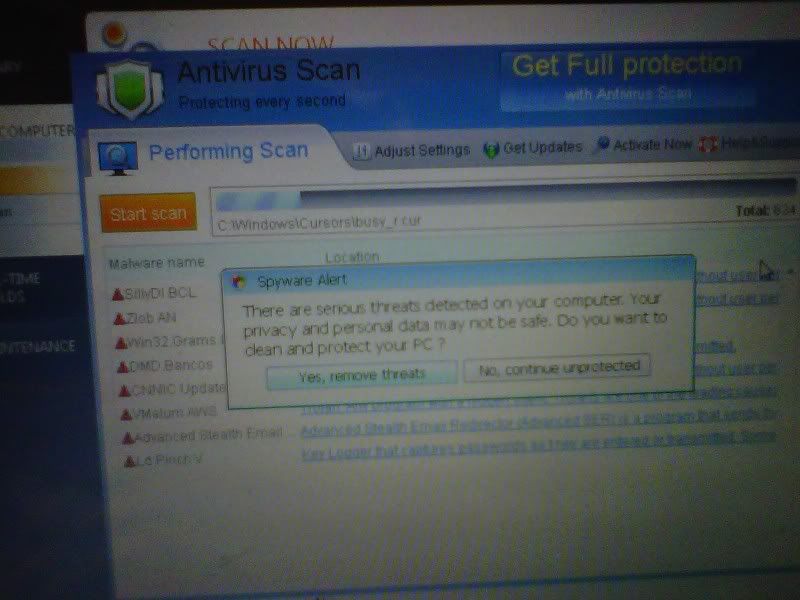
On monday, I was surfing the net and all of a sudden notifications started to popped up on the bottom right of my computer and said my computer was infected. It started to show certain applications with ".exe" on the end getting infected.

Then this image started to pop up: (SORRY i don't know how to resize it :confused:)

IMG00822-20110121-2255.jpg


I discontinued it because I already have an antivirus software (avast). Also, after my computer got infected, avast notified me that a virus was detected and they blocked it. I closed this program because I have never seen this and I thought it was a program that came with the virus.

But notifications still kept showing up. I did a quick scan using Avast and found no files infected. I did a system restore but it too said that the system restore was infected and it would not open.

So I did it on safe mode. It worked there. Once system restore was completed, it returned to the normal start up (it took awhile though) but all of a sudden, my screen just turned pitched black.


My computer was still on. I pressed the ctrl atl delete twice and I would hear the shut down tone but my computer would not shut down. I pressed ctrl alt del again and the shut down tone would go on again :confused: I did that a couple of times and it would do the same thing.

Should I let that program (above) continue it's scan?????
What should I do? :(
THanks in advance btw!
 
Do not let the application do anything. Never click an exe you didn't ask for or pick. Someone who knows more will give better advice. Just wait.

If not I will dig up JohnB's advice and post.
 
Yes you are infected, its a fake scanner. Please do the following.

Please download Malwarebytes' Anti-Malware from here or here and save it to your desktop.
  • Double-click mbam-setup.exe and follow the prompts to install the program.
  • At the end, be sure a checkmark is placed next to
    • Update Malwarebytes' Anti-Malware
    • and Launch Malwarebytes' Anti-Malware
  • then click Finish.
  • If an update is found, it will download and install the latest version. Please keep updating until it says you have the latest version.
  • Once the program has loaded, select Perform quick scan, then click Scan.
  • When the scan is complete, click OK, then Show Results to view the results.
  • Be sure that everything is checked, and click Remove Selected.
  • A log will be saved automatically which you can access by clicking on the Logs tab within Malwarebytes' Anti-Malware

If for some reason Malwarebytes will not install or run please download and run Rkill.scr, Rkill.exe, or Rkill.com but DO NOT reboot the system and then try installing or running Malwarebytes. If Rkill (which is a black box) appears and then disappears right away or you get a message saying rkill is infected, keep trying to run rkill until it over powers the infection and temporarily kills it. Once a log appears on the screen, you can try running malwarebytes or downloading other programs.


Download the HijackThis installer from here.
Run the installer and choose Install, indicating that you accept the licence agreement. The installer will place a shortcut on your desktop and launch HijackThis.

Click Do a system scan and save a logfile

Most of what HijackThis lists will be harmless or even essential, don't fix anything yet.

Post the logfile that HijackThis produces along with the Malwarebytes Anti-Malware log
 
Thank you,
I just turned on my computer just now.
I wish I could do what you told me but the screen just turns pitched black (not even grayish) once it logs into windows :(
It would show the brand name, the windows load bar, then the start up sound would go on but the screen turns black after :(
I can't see a thing after that, how can I do this?
 
Boot into safe mode and you shouldn't get that black screen. Run malware bytes and basically follow Johnb35's instructions above.
 
I can't connect to the internet on the laptop.
Is there a site where I can download the latest updates for malware antimalware instead?
 
Just download the malwarebytes install file to a usb flash drive or burn it to a cd from another computer. Don't worry about updating it, just run it and post both logs for now. You will also have to download the rkill program in my post and run it first before malwarebytes will run.

However, open internet options in control panel and click on the connection tab, click on the lan settings button toward the bottom and make sure the boxes under proxy server settings are unchecked. This is what usually blocks you from getting online. The malware will enable a proxy which will stop you from downloading or browsing anywhere.
 
Hello John B,

I was able to perform a quick scan in Malware Anti-Malware now without the updates. The 6 infected files are now removed. I have restarted it.

Also, I checked the Lan settings in internet options. Yes they are unchecked but I can't connect to the internet.

However I can't perform HijackThis because it said it won't run on safe mode. It gave me two options: To install it on normal mode or do a system restore to it's previous good condition. I can't run it on normal mode because my screen just turns pitched black. I can't see a thing.

EDIT:
Btw, I don't have a recovery disk for this laptop. I bought it on ebay and the seller did not give me one.
Also, the last thing I want to do is wipe everything in this computer so I hope it would not come to that. :(
 
Last edited:
Please post the malwarebytes log so I can see what it removed.

Since you can't boot into normal mode yet, please download this file to a flash drive and transfer it to the desktop in safe mode and run it.

Download and Run ComboFix
If you already have Combofix, please delete this copy and download it again as it's being updated regularly.
Note: Do not mouseclick combofix's window whilst it's running. That may cause it to stall

Combofix should never take more that 20 minutes including the reboot if malware is detected.


In your next reply please post:
  • The ComboFix log
  • An update on how your computer is running
 
Thank you for your patience JohnB.

Here is the log from Maltware Anti-Malware:


Malwarebytes' Anti-Malware 1.50.1.1100
www.malwarebytes.org

Database version: 5363

Windows 6.0.6002 Service Pack 2 (Safe Mode)
Internet Explorer 7.0.6002.18005

1/29/2011 9:48:11 AM
mbam-log-2011-01-29 (09-48-11).txt

Scan type: Quick scan
Objects scanned: 136751
Time elapsed: 3 minute(s), 43 second(s)

Memory Processes Infected: 0
Memory Modules Infected: 0
Registry Keys Infected: 1
Registry Values Infected: 1
Registry Data Items Infected: 2
Folders Infected: 0
Files Infected: 2

Memory Processes Infected:
(No malicious items detected)

Memory Modules Infected:
(No malicious items detected)

Registry Keys Infected:
HKEY_LOCAL_MACHINE\SOFTWARE\Microsoft\Internet Explorer\Low Rights\ElevationPolicy\{A078F691-9C07-4AF2-BF43-35E79EECF8B7} (Adware.Softomate) -> Quarantined and deleted successfully.

Registry Values Infected:
HKEY_LOCAL_MACHINE\SOFTWARE\Microsoft\Windows\CurrentVersion\Explorer\Associations\bak_Application (Hijacker.Application) -> Value: bak_Application -> Quarantined and deleted successfully.

Registry Data Items Infected:
HKEY_CURRENT_USER\SOFTWARE\Microsoft\Windows\CurrentVersion\Explorer\Advanced\Start_ShowSearch (PUM.Hijack.StartMenu) -> Bad: (0) Good: (1) -> Quarantined and deleted successfully.
HKEY_LOCAL_MACHINE\SOFTWARE\Microsoft\Windows\CurrentVersion\Explorer\Associations\Application (Hijacker.Application) -> Bad: (http://www.helpmeopen.com/?n=app&ext=%s) Good: (http://shell.windows.com/fileassoc/x/xml/redir.asp?Ext=%s) -> Quarantined and deleted successfully.

Folders Infected:
(No malicious items detected)

Files Infected:
c:\Users\Owner\downloads\xvidsetup(2).exe (Adware.Hotbar) -> Quarantined and deleted successfully.
c:\Users\Owner\downloads\xvidsetup.exe (Adware.Hotbar) -> Quarantined and deleted successfully.


Here is the log from ComboFix:


ComboFix 11-01-24.01 - Owner 01/30/2011 11:02:39.1.2 - x86 MINIMAL
Microsoft® Windows Vista™ Home Premium 6.0.6002.2.1252.1.1033.18.2942.2366 [GMT -10:00]
Running from: c:\users\Owner\Desktop\ComboFix.exe
AV: avast! Antivirus *Enabled/Outdated* {C37D8F93-0602-E43C-40AA-47DAD597F308}
SP: avast! Antivirus *Enabled/Outdated* {781C6E77-2038-EBB2-7A1A-7CA8AE10B9B5}
SP: Windows Defender *Enabled/Updated* {D68DDC3A-831F-4fae-9E44-DA132C1ACF46}
.
- REDUCED FUNCTIONALITY MODE -
.

((((((((((((((((((((((((((((((((((((((( Other Deletions )))))))))))))))))))))))))))))))))))))))))))))))))
.

c:\windows\system32\twunk_32.exe

.
((((((((((((((((((((((((( Files Created from 2010-12-28 to 2011-01-30 )))))))))))))))))))))))))))))))
.

2011-01-30 21:03 . 2011-01-30 21:04 -------- d-----w- c:\users\Owner\AppData\Local\temp
2011-01-30 21:03 . 2011-01-30 21:03 -------- d-----w- c:\users\Default\AppData\Local\temp
2011-01-29 08:32 . 2011-01-29 08:32 -------- d-----w- c:\users\Owner\AppData\Roaming\Malwarebytes
2011-01-29 08:32 . 2010-12-21 04:09 38224 ----a-w- c:\windows\system32\drivers\mbamswissarmy.sys
2011-01-29 08:32 . 2011-01-29 08:32 -------- d-----w- c:\programdata\Malwarebytes
2011-01-29 08:32 . 2011-01-29 08:32 -------- d-----w- c:\program files\Malwarebytes' Anti-Malware
2011-01-29 08:32 . 2010-12-21 04:08 20952 ----a-w- c:\windows\system32\drivers\mbam.sys
2011-01-22 09:16 . 2010-11-10 04:33 6273872 ----a-w- c:\programdata\Microsoft\Windows Defender\Definition Updates\{57914C47-FAE6-494C-9C7D-E74BDBE00DCC}\mpengine.dll
2011-01-15 06:34 . 2008-12-14 06:01 77824 ----a-w- c:\windows\system32\xvid.ax
2011-01-15 06:34 . 2008-12-05 07:42 815104 ----a-w- c:\windows\system32\xvidcore.dll
2011-01-15 06:34 . 2011-01-15 06:34 -------- d-----w- c:\program files\Xvid
2011-01-15 06:34 . 2008-12-05 07:46 180224 ----a-w- c:\windows\system32\xvidvfw.dll
2011-01-14 06:44 . 2010-12-28 15:55 413696 ----a-w- c:\windows\system32\odbc32.dll
2011-01-14 06:44 . 2010-12-28 15:53 253952 ----a-w- c:\program files\Common Files\System\ado\msadox.dll
2011-01-14 06:44 . 2010-12-28 15:53 241664 ----a-w- c:\program files\Common Files\System\ado\msadomd.dll
2011-01-14 06:44 . 2010-12-28 15:53 708608 ----a-w- c:\program files\Common Files\System\ado\msado15.dll
2011-01-14 06:44 . 2010-12-28 15:53 57344 ----a-w- c:\program files\Common Files\System\msadc\msadcs.dll
2011-01-14 06:44 . 2010-12-28 15:53 180224 ----a-w- c:\program files\Common Files\System\msadc\msadco.dll
2011-01-14 06:44 . 2010-12-14 14:49 1169408 ----a-w- c:\windows\system32\sdclt.exe

.
(((((((((((((((((((((((((((((((((((((((( Find3M Report ))))))))))))))))))))))))))))))))))))))))))))))))))))
.
2010-11-04 18:56 . 2010-12-16 17:05 345600 ----a-w- c:\windows\system32\wmicmiplugin.dll
2010-11-04 18:55 . 2010-12-16 17:05 352768 ----a-w- c:\windows\system32\taskschd.dll
2010-11-04 18:55 . 2010-12-16 17:05 270336 ----a-w- c:\windows\system32\taskcomp.dll
2010-11-04 18:55 . 2010-12-16 17:05 601600 ----a-w- c:\windows\system32\schedsvc.dll
2010-11-04 16:34 . 2010-12-16 17:05 171520 ----a-w- c:\windows\system32\taskeng.exe
.

((((((((((((((((((((((((((((((((((((( Reg Loading Points ))))))))))))))))))))))))))))))))))))))))))))))))))
.
.
*Note* empty entries & legit default entries are not shown
REGEDIT4

[HKEY_CURRENT_USER\SOFTWARE\Microsoft\Windows\CurrentVersion\Run]
"Sidebar"="c:\program files\Windows Sidebar\sidebar.exe" [2009-04-11 1233920]
"ehTray.exe"="c:\windows\ehome\ehTray.exe" [2008-01-19 125952]
"RocketDock"="c:\program files\RocketDock\RocketDock.exe" [2007-09-02 495616]

[HKEY_LOCAL_MACHINE\SOFTWARE\Microsoft\Windows\CurrentVersion\Run]
"SMSERIAL"="c:\program files\Motorola\SMSERIAL\sm56hlpr.exe" [2009-10-27 1458176]
"SynTPEnh"="c:\program files\Synaptics\SynTP\SynTPEnh.exe" [2008-03-28 1045800]
"RtHDVCpl"="RtHDVCpl.exe" [2008-05-28 6144000]
"QPService"="c:\program files\HP\QuickPlay\QPService.exe" [2007-03-29 176128]
"QlbCtrl"="c:\program files\Hewlett-Packard\HP Quick Launch Buttons\QlbCtrl.exe" [2006-11-06 159744]
"snp2uvc"="c:\windows\vsnp2uvc.exe" [2008-08-02 675840]
"NvCplDaemon"="c:\windows\system32\NvCpl.dll" [2009-06-24 13601312]
"NvMediaCenter"="c:\windows\system32\NvMcTray.dll" [2009-06-24 92704]
"DivXUpdate"="c:\program files\DivX\DivX Update\DivXUpdate.exe" [2010-09-16 1164584]
"Malwarebytes' Anti-Malware (reboot)"="c:\program files\Malwarebytes' Anti-Malware\mbam.exe" [2010-12-21 963976]

[HKEY_LOCAL_MACHINE\SOFTWARE\Microsoft\Windows\CurrentVersion\RunOnce]
"GrpConv"="grpconv -o" [X]

[HKEY_LOCAL_MACHINE\software\microsoft\windows\currentversion\policies\system]
"EnableUIADesktopToggle"= 0 (0x0)

[HKEY_LOCAL_MACHINE\software\microsoft\windows nt\currentversion\drivers32]
"aux"=wdmaud.drv

[HKEY_LOCAL_MACHINE\SYSTEM\CurrentControlSet\Control\SafeBoot\Minimal\WudfSvc]
@="Service"

[HKEY_LOCAL_MACHINE\software\microsoft\shared tools\msconfig\startupreg\Adobe Reader Speed Launcher]
2009-02-28 03:10 35696 ----a-w- c:\program files\Adobe\Reader 9.0\Reader\reader_sl.exe

[HKEY_LOCAL_MACHINE\software\microsoft\shared tools\msconfig\startupreg\hpWirelessAssistant]
2007-03-01 20:18 472776 ----a-w- c:\program files\Hewlett-Packard\HP Wireless Assistant\HPWAMain.exe

[HKEY_LOCAL_MACHINE\software\microsoft\shared tools\msconfig\startupreg\SunJavaUpdateSched]
2009-03-09 15:19 148888 ----a-w- c:\program files\Java\jre6\bin\jusched.exe

[HKEY_LOCAL_MACHINE\software\microsoft\shared tools\msconfig\startupreg\WAWifiMessage]
2007-01-10 23:12 317128 ----a-w- c:\program files\Hewlett-Packard\HP Wireless Assistant\WiFiMsg.exe

[HKEY_LOCAL_MACHINE\software\microsoft\security center\Monitoring]
"DisableMonitoring"=dword:00000001

[HKEY_LOCAL_MACHINE\software\microsoft\security center\Monitoring\SymantecAntiVirus]
"DisableMonitoring"=dword:00000001

[HKEY_LOCAL_MACHINE\software\microsoft\security center\Monitoring\SymantecFirewall]
"DisableMonitoring"=dword:00000001

R0 egbmyicx;egbmyicx;c:\windows\System32\drivers\rooh.sys [x]
R1 aswSP;aswSP; [x]
R2 aswFsBlk;aswFsBlk; [x]
R2 aswMonFlt;aswMonFlt;c:\windows\system32\drivers\aswMonFlt.sys [2010-09-07 50768]
R2 clr_optimization_v4.0.30319_32;Microsoft .NET Framework NGEN v4.0.30319_X86;c:\windows\Microsoft.NET\Framework\v4.0.30319\mscorsvw.exe [2010-03-18 130384]
R2 Viewpoint Manager Service;Viewpoint Manager Service;c:\program files\Viewpoint\Common\ViewpointService.exe [2007-01-04 24652]
R3 R5U870FLx86;R5U870 UVC Lower Filter ;c:\windows\system32\Drivers\R5U870FLx86.sys [2006-12-19 73472]
R3 R5U870FUx86;R5U870 UVC Upper Filter ;c:\windows\system32\Drivers\R5U870FUx86.sys [2006-12-19 43904]
R3 WPFFontCache_v0400;Windows Presentation Foundation Font Cache 4.0.0.0;c:\windows\Microsoft.NET\Framework\v4.0.30319\WPF\WPFFontCache_v0400.exe [2010-03-18 753504]
S0 hotcore3;hc3ServiceName;c:\windows\system32\DRIVERS\hotcore3.sys [2008-12-27 40560]
S0 sptd;sptd;c:\windows\System32\Drivers\sptd.sys [2008-10-22 717296]


[HKEY_LOCAL_MACHINE\software\microsoft\windows nt\currentversion\svchost]
bthsvcs REG_MULTI_SZ BthServ
LocalServiceAndNoImpersonation REG_MULTI_SZ FontCache

[HKEY_CURRENT_USER\software\microsoft\windows\currentversion\explorer\mountpoints2\G]
\shell\AutoRun\command - G:\LaunchU3.exe -a

[HKEY_CURRENT_USER\software\microsoft\windows\currentversion\explorer\mountpoints2\{6e99cb87-dc95-11de-a34a-806e6f6e6963}]
\shell\AutoRun\command - G:\LaunchU3.exe -a

[HKEY_CURRENT_USER\software\microsoft\windows\currentversion\explorer\mountpoints2\{76679f5a-eb79-11dc-841f-001b24b283b2}]
\shell\AutoRun\command - F:\LaunchU3.exe -a

[HKEY_CURRENT_USER\software\microsoft\windows\currentversion\explorer\mountpoints2\{76679f5c-eb79-11dc-841f-001b24b283b2}]
\shell\AutoRun\command - G:\setupSNK.exe

[HKEY_CURRENT_USER\software\microsoft\windows\currentversion\explorer\mountpoints2\{88ef420f-9cff-11de-90c9-001b24b283b2}]
\shell\AutoRun\command - WDSetup.exe

[HKEY_CURRENT_USER\software\microsoft\windows\currentversion\explorer\mountpoints2\{b77f4ea1-971a-11dd-bde6-001b24b283b2}]
\shell\AutoRun\command - G:\LaunchU3.exe -a

[HKEY_CURRENT_USER\software\microsoft\windows\currentversion\explorer\mountpoints2\{e8c11618-9edd-11dd-ad14-001b24b283b2}]
\shell\AutoRun\command - F:\LaunchU3.exe -a
.
Contents of the 'Scheduled Tasks' folder

2011-01-29 c:\windows\Tasks\Final Media Player Update Checker.job
- c:\program files\FinalMediaPlayer\FMPCheckForUpdates.exe [2010-09-21 23:37]
.
.
------- Supplementary Scan -------
.
uStart Page = hxxp://www.google.com/
mStart Page = hxxp://ie.redirect.hp.com/svs/rdr?TYPE=3&tp=iehome&locale=EN_US&c=73&bd=Pavilion&pf=laptop
uInternet Settings,ProxyOverride = *.local
IE: E&xport to Microsoft Excel - c:\progra~1\MICROS~3\OFFICE11\EXCEL.EXE/3000
FF - ProfilePath - c:\users\Owner\AppData\Roaming\Mozilla\Firefox\Profiles\m6o9ifkd.default\
FF - prefs.js: browser.search.selectedEngine - Yahoo
FF - prefs.js: keyword.URL - hxxp://www.google.com/search?ie=UTF-8&oe=UTF-8&sourceid=navclient&gfns=1&q=
FF - Ext: Default: {972ce4c6-7e08-4474-a285-3208198ce6fd} - c:\program files\Mozilla Firefox\extensions\{972ce4c6-7e08-4474-a285-3208198ce6fd}
FF - Ext: Java Console: {CAFEEFAC-0016-0000-0007-ABCDEFFEDCBA} - c:\program files\Mozilla Firefox\extensions\{CAFEEFAC-0016-0000-0007-ABCDEFFEDCBA}
FF - Ext: Java Console: {CAFEEFAC-0016-0000-0011-ABCDEFFEDCBA} - c:\program files\Mozilla Firefox\extensions\{CAFEEFAC-0016-0000-0011-ABCDEFFEDCBA}
FF - Ext: Java Console: {CAFEEFAC-0016-0000-0013-ABCDEFFEDCBA} - c:\program files\Mozilla Firefox\extensions\{CAFEEFAC-0016-0000-0013-ABCDEFFEDCBA}
FF - Ext: Microsoft .NET Framework Assistant: {20a82645-c095-46ed-80e3-08825760534b} - %profile%\extensions\{20a82645-c095-46ed-80e3-08825760534b}
FF - Ext: Adblock Plus: {d10d0bf8-f5b5-c8b4-a8b2-2b9879e08c5d} - %profile%\extensions\{d10d0bf8-f5b5-c8b4-a8b2-2b9879e08c5d}
FF - Ext: Microsoft .NET Framework Assistant: {20a82645-c095-46ed-80e3-08825760534b} - c:\windows\Microsoft.NET\Framework\v3.5\Windows Presentation Foundation\DotNetAssistantExtension
FF - user.js: yahoo.homepage.dontask - true);user_pref(network.protocol-handler.warn-external.dnupdate, false
.
- - - - ORPHANS REMOVED - - - -

HKLM-RunOnce-<NO NAME> - (no file)
SafeBoot-WudfPf
SafeBoot-WudfRd
MSConfigStartUp-UfSeAgnt - c:\program files\Trend Micro\Internet Security\UfSeAgnt.exe


**************************************************************************

catchme 0.3.1398 W2K/XP/Vista - rootkit/stealth malware detector by Gmer, http://www.gmer.net
Rootkit scan 2011-01-30 11:04
Windows 6.0.6002 Service Pack 2 NTFS

scanning hidden processes ...

scanning hidden autostart entries ...

scanning hidden files ...

scan completed successfully
hidden files: 0

**************************************************************************
.
--------------------- LOCKED REGISTRY KEYS ---------------------

[HKEY_LOCAL_MACHINE\system\ControlSet001\Control\Class\{4D36E96D-E325-11CE-BFC1-08002BE10318}\0000\AllUserSettings]
@Denied: (A) (Users)
@Denied: (A) (Everyone)
@Allowed: (B 1 2 3 4 5) (S-1-5-20)
"BlindDial"=dword:00000000
"MSCurrentCountry"=dword:000000b5
.
--------------------- DLLs Loaded Under Running Processes ---------------------

- - - - - - - > 'explorer.exe'(812)
c:\program files\WinSCP\DragExt.dll
.
Completion time: 2011-01-30 11:07:08
ComboFix-quarantined-files.txt 2011-01-30 21:06

Pre-Run: 46,228,697,088 bytes free
Post-Run: 46,026,317,824 bytes free

- - End Of File - - 2351C510ECD11BA99DD21294D5C69A01

 
After letting the combofix to run and acquire the log, I restarted my computer. Went back to safe mode.
Then I restarted my computer again and let it load to normal mode.
I saw the windows loading bar but after that, the screen is still black once it logged on.
 
I'm at work now but do see issues in your combofix log. I won't be home for another 3 hours or so and will reply then.
 
Boot back into safe mode peform the following procedure. Please disable avast before continuing.

1. Go to Start > Run > type Notepad.exe and click OK to open Notepad.
It must be Notepad, not Wordpad.
2. Copy the text in the below code box

Code:
Killall::

Driver::
egbmyicx

File::
c:\windows\System32\drivers\rooh .sys

3. Go to the Notepad window and click Edit > Paste
4. Then click File > Save
5. Name the file CFScript.txt - Save the file to your Desktop
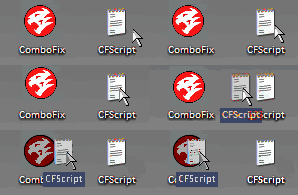
6. Then drag the CFScript (hold the left mouse button while dragging the file) and drop it (release the left mouse button) into ComboFix.exe as you see in the screenshot below. Important: Perform this instruction carefully!


CFScript-1.gif


ComboFix will begin to execute, just follow the prompts.
After reboot (in case it asks to reboot), it will produce a log for you.
Post that log (Combofix.txt) in your next reply.
 
ComboFix 11-01-24.01 - Owner 01/31/2011 13:48:42.1.2 - x86 MINIMAL
Microsoft® Windows Vista™ Home Premium 6.0.6002.2.1252.1.1033.18.2942.2452 [GMT -10:00]
Running from: c:\users\Owner\Desktop\ComboFix.exe
Command switches used :: c:\users\Owner\Desktop\CFScript.txt
AV: avast! Antivirus *Enabled/Outdated* {C37D8F93-0602-E43C-40AA-47DAD597F308}
SP: avast! Antivirus *Enabled/Outdated* {781C6E77-2038-EBB2-7A1A-7CA8AE10B9B5}
SP: Windows Defender *Enabled/Updated* {D68DDC3A-831F-4fae-9E44-DA132C1ACF46}
.
- REDUCED FUNCTIONALITY MODE -

FILE ::
"c:\windows\System32\drivers\rooh .sys"
.

((((((((((((((((((((((((( Files Created from 2010-12-28 to 2011-01-31 )))))))))))))))))))))))))))))))
.

2011-01-31 23:50 . 2011-01-31 23:55 -------- d-----w- c:\users\Owner\AppData\Local\temp
2011-01-29 08:32 . 2011-01-29 08:32 -------- d-----w- c:\users\Owner\AppData\Roaming\Malwarebytes
2011-01-29 08:32 . 2010-12-21 04:09 38224 ----a-w- c:\windows\system32\drivers\mbamswissarmy.sys
2011-01-29 08:32 . 2011-01-29 08:32 -------- d-----w- c:\programdata\Malwarebytes
2011-01-29 08:32 . 2011-01-29 08:32 -------- d-----w- c:\program files\Malwarebytes' Anti-Malware
2011-01-29 08:32 . 2010-12-21 04:08 20952 ----a-w- c:\windows\system32\drivers\mbam.sys
2011-01-22 09:16 . 2010-11-10 04:33 6273872 ----a-w- c:\programdata\Microsoft\Windows Defender\Definition Updates\{57914C47-FAE6-494C-9C7D-E74BDBE00DCC}\mpengine.dll
2011-01-15 06:34 . 2008-12-14 06:01 77824 ----a-w- c:\windows\system32\xvid.ax
2011-01-15 06:34 . 2008-12-05 07:42 815104 ----a-w- c:\windows\system32\xvidcore.dll
2011-01-15 06:34 . 2011-01-15 06:34 -------- d-----w- c:\program files\Xvid
2011-01-15 06:34 . 2008-12-05 07:46 180224 ----a-w- c:\windows\system32\xvidvfw.dll
2011-01-14 06:44 . 2010-12-28 15:55 413696 ----a-w- c:\windows\system32\odbc32.dll
2011-01-14 06:44 . 2010-12-28 15:53 253952 ----a-w- c:\program files\Common Files\System\ado\msadox.dll
2011-01-14 06:44 . 2010-12-28 15:53 241664 ----a-w- c:\program files\Common Files\System\ado\msadomd.dll
2011-01-14 06:44 . 2010-12-28 15:53 708608 ----a-w- c:\program files\Common Files\System\ado\msado15.dll
2011-01-14 06:44 . 2010-12-28 15:53 57344 ----a-w- c:\program files\Common Files\System\msadc\msadcs.dll
2011-01-14 06:44 . 2010-12-28 15:53 180224 ----a-w- c:\program files\Common Files\System\msadc\msadco.dll
2011-01-14 06:44 . 2010-12-14 14:49 1169408 ----a-w- c:\windows\system32\sdclt.exe

.
(((((((((((((((((((((((((((((((((((((((( Find3M Report ))))))))))))))))))))))))))))))))))))))))))))))))))))
.
2010-11-04 18:56 . 2010-12-16 17:05 345600 ----a-w- c:\windows\system32\wmicmiplugin.dll
2010-11-04 18:55 . 2010-12-16 17:05 352768 ----a-w- c:\windows\system32\taskschd.dll
2010-11-04 18:55 . 2010-12-16 17:05 270336 ----a-w- c:\windows\system32\taskcomp.dll
2010-11-04 18:55 . 2010-12-16 17:05 601600 ----a-w- c:\windows\system32\schedsvc.dll
2010-11-04 16:34 . 2010-12-16 17:05 171520 ----a-w- c:\windows\system32\taskeng.exe
.

((((((((((((((((((((((((((((((((((((( Reg Loading Points ))))))))))))))))))))))))))))))))))))))))))))))))))
.
.
*Note* empty entries & legit default entries are not shown
REGEDIT4

[HKEY_CURRENT_USER\SOFTWARE\Microsoft\Windows\CurrentVersion\Run]
"Sidebar"="c:\program files\Windows Sidebar\sidebar.exe" [2009-04-11 1233920]
"ehTray.exe"="c:\windows\ehome\ehTray.exe" [2008-01-19 125952]
"RocketDock"="c:\program files\RocketDock\RocketDock.exe" [2007-09-02 495616]

[HKEY_LOCAL_MACHINE\SOFTWARE\Microsoft\Windows\CurrentVersion\Run]
"SMSERIAL"="c:\program files\Motorola\SMSERIAL\sm56hlpr.exe" [2009-10-27 1458176]
"SynTPEnh"="c:\program files\Synaptics\SynTP\SynTPEnh.exe" [2008-03-28 1045800]
"RtHDVCpl"="RtHDVCpl.exe" [2008-05-28 6144000]
"QPService"="c:\program files\HP\QuickPlay\QPService.exe" [2007-03-29 176128]
"QlbCtrl"="c:\program files\Hewlett-Packard\HP Quick Launch Buttons\QlbCtrl.exe" [2006-11-06 159744]
"snp2uvc"="c:\windows\vsnp2uvc.exe" [2008-08-02 675840]
"NvCplDaemon"="c:\windows\system32\NvCpl.dll" [2009-06-24 13601312]
"NvMediaCenter"="c:\windows\system32\NvMcTray.dll" [2009-06-24 92704]
"DivXUpdate"="c:\program files\DivX\DivX Update\DivXUpdate.exe" [2010-09-16 1164584]
"Malwarebytes' Anti-Malware (reboot)"="c:\program files\Malwarebytes' Anti-Malware\mbam.exe" [2010-12-21 963976]

[HKEY_LOCAL_MACHINE\SOFTWARE\Microsoft\Windows\CurrentVersion\RunOnce]
"GrpConv"="grpconv -o" [X]

[HKEY_LOCAL_MACHINE\software\microsoft\windows\currentversion\policies\system]
"EnableUIADesktopToggle"= 0 (0x0)

[HKEY_LOCAL_MACHINE\software\microsoft\windows nt\currentversion\drivers32]
"aux"=wdmaud.drv

[HKEY_LOCAL_MACHINE\SYSTEM\CurrentControlSet\Control\SafeBoot\Minimal\WudfSvc]
@="Service"

[HKEY_LOCAL_MACHINE\software\microsoft\shared tools\msconfig\startupreg\Adobe Reader Speed Launcher]
2009-02-28 03:10 35696 ----a-w- c:\program files\Adobe\Reader 9.0\Reader\reader_sl.exe

[HKEY_LOCAL_MACHINE\software\microsoft\shared tools\msconfig\startupreg\hpWirelessAssistant]
2007-03-01 20:18 472776 ----a-w- c:\program files\Hewlett-Packard\HP Wireless Assistant\HPWAMain.exe

[HKEY_LOCAL_MACHINE\software\microsoft\shared tools\msconfig\startupreg\SunJavaUpdateSched]
2009-03-09 15:19 148888 ----a-w- c:\program files\Java\jre6\bin\jusched.exe

[HKEY_LOCAL_MACHINE\software\microsoft\shared tools\msconfig\startupreg\WAWifiMessage]
2007-01-10 23:12 317128 ----a-w- c:\program files\Hewlett-Packard\HP Wireless Assistant\WiFiMsg.exe

[HKEY_LOCAL_MACHINE\software\microsoft\security center\Monitoring]
"DisableMonitoring"=dword:00000001

[HKEY_LOCAL_MACHINE\software\microsoft\security center\Monitoring\SymantecAntiVirus]
"DisableMonitoring"=dword:00000001

[HKEY_LOCAL_MACHINE\software\microsoft\security center\Monitoring\SymantecFirewall]
"DisableMonitoring"=dword:00000001

R0 egbmyicx;egbmyicx;c:\windows\System32\drivers\rooh.sys [x]
R1 aswSP;aswSP; [x]
R2 aswFsBlk;aswFsBlk; [x]
R2 aswMonFlt;aswMonFlt;c:\windows\system32\drivers\aswMonFlt.sys [2010-09-07 50768]
R2 clr_optimization_v4.0.30319_32;Microsoft .NET Framework NGEN v4.0.30319_X86;c:\windows\Microsoft.NET\Framework\v4.0.30319\mscorsvw.exe [2010-03-18 130384]
R2 Viewpoint Manager Service;Viewpoint Manager Service;c:\program files\Viewpoint\Common\ViewpointService.exe [2007-01-04 24652]
R3 R5U870FLx86;R5U870 UVC Lower Filter ;c:\windows\system32\Drivers\R5U870FLx86.sys [2006-12-19 73472]
R3 R5U870FUx86;R5U870 UVC Upper Filter ;c:\windows\system32\Drivers\R5U870FUx86.sys [2006-12-19 43904]
R3 WPFFontCache_v0400;Windows Presentation Foundation Font Cache 4.0.0.0;c:\windows\Microsoft.NET\Framework\v4.0.30319\WPF\WPFFontCache_v0400.exe [2010-03-18 753504]
S0 hotcore3;hc3ServiceName;c:\windows\system32\DRIVERS\hotcore3.sys [2008-12-27 40560]
S0 sptd;sptd;c:\windows\System32\Drivers\sptd.sys [2008-10-22 717296]


[HKEY_LOCAL_MACHINE\software\microsoft\windows nt\currentversion\svchost]
bthsvcs REG_MULTI_SZ BthServ
LocalServiceAndNoImpersonation REG_MULTI_SZ FontCache

[HKEY_CURRENT_USER\software\microsoft\windows\currentversion\explorer\mountpoints2\{6e99cb87-dc95-11de-a34a-806e6f6e6963}]
\shell\AutoRun\command - G:\LaunchU3.exe -a

[HKEY_CURRENT_USER\software\microsoft\windows\currentversion\explorer\mountpoints2\{76679f5a-eb79-11dc-841f-001b24b283b2}]
\shell\AutoRun\command - F:\LaunchU3.exe -a

[HKEY_CURRENT_USER\software\microsoft\windows\currentversion\explorer\mountpoints2\{76679f5c-eb79-11dc-841f-001b24b283b2}]
\shell\AutoRun\command - G:\setupSNK.exe

[HKEY_CURRENT_USER\software\microsoft\windows\currentversion\explorer\mountpoints2\{88ef420f-9cff-11de-90c9-001b24b283b2}]
\shell\AutoRun\command - WDSetup.exe

[HKEY_CURRENT_USER\software\microsoft\windows\currentversion\explorer\mountpoints2\{b77f4ea1-971a-11dd-bde6-001b24b283b2}]
\shell\AutoRun\command - G:\LaunchU3.exe -a

[HKEY_CURRENT_USER\software\microsoft\windows\currentversion\explorer\mountpoints2\{e8c11618-9edd-11dd-ad14-001b24b283b2}]
\shell\AutoRun\command - F:\LaunchU3.exe -a
.
Contents of the 'Scheduled Tasks' folder

2011-01-30 c:\windows\Tasks\Final Media Player Update Checker.job
- c:\program files\FinalMediaPlayer\FMPCheckForUpdates.exe [2010-09-21 23:37]
.
.
------- Supplementary Scan -------
.
uStart Page = hxxp://www.google.com/
mStart Page = hxxp://ie.redirect.hp.com/svs/rdr?TYPE=3&tp=iehome&locale=EN_US&c=73&bd=Pavilion&pf=laptop
uInternet Settings,ProxyOverride = *.local
IE: E&xport to Microsoft Excel - c:\progra~1\MICROS~3\OFFICE11\EXCEL.EXE/3000
FF - ProfilePath - c:\users\Owner\AppData\Roaming\Mozilla\Firefox\Profiles\m6o9ifkd.default\
FF - prefs.js: browser.search.selectedEngine - Yahoo
FF - prefs.js: keyword.URL - hxxp://www.google.com/search?ie=UTF-8&oe=UTF-8&sourceid=navclient&gfns=1&q=
FF - Ext: Default: {972ce4c6-7e08-4474-a285-3208198ce6fd} - c:\program files\Mozilla Firefox\extensions\{972ce4c6-7e08-4474-a285-3208198ce6fd}
FF - Ext: Java Console: {CAFEEFAC-0016-0000-0007-ABCDEFFEDCBA} - c:\program files\Mozilla Firefox\extensions\{CAFEEFAC-0016-0000-0007-ABCDEFFEDCBA}
FF - Ext: Java Console: {CAFEEFAC-0016-0000-0011-ABCDEFFEDCBA} - c:\program files\Mozilla Firefox\extensions\{CAFEEFAC-0016-0000-0011-ABCDEFFEDCBA}
FF - Ext: Java Console: {CAFEEFAC-0016-0000-0013-ABCDEFFEDCBA} - c:\program files\Mozilla Firefox\extensions\{CAFEEFAC-0016-0000-0013-ABCDEFFEDCBA}
FF - Ext: Microsoft .NET Framework Assistant: {20a82645-c095-46ed-80e3-08825760534b} - %profile%\extensions\{20a82645-c095-46ed-80e3-08825760534b}
FF - Ext: Adblock Plus: {d10d0bf8-f5b5-c8b4-a8b2-2b9879e08c5d} - %profile%\extensions\{d10d0bf8-f5b5-c8b4-a8b2-2b9879e08c5d}
FF - Ext: Microsoft .NET Framework Assistant: {20a82645-c095-46ed-80e3-08825760534b} - c:\windows\Microsoft.NET\Framework\v3.5\Windows Presentation Foundation\DotNetAssistantExtension
FF - user.js: yahoo.homepage.dontask - true);user_pref(network.protocol-handler.warn-external.dnupdate, false
.
- - - - ORPHANS REMOVED - - - -

HKLM-RunOnce-<NO NAME> - (no file)


**************************************************************************

catchme 0.3.1398 W2K/XP/Vista - rootkit/stealth malware detector by Gmer, http://www.gmer.net
Rootkit scan 2011-01-31 13:56
Windows 6.0.6002 Service Pack 2 NTFS

scanning hidden processes ...

scanning hidden autostart entries ...

scanning hidden files ...

scan completed successfully
hidden files: 0

**************************************************************************
.
--------------------- LOCKED REGISTRY KEYS ---------------------

[HKEY_LOCAL_MACHINE\system\ControlSet001\Control\Class\{4D36E96D-E325-11CE-BFC1-08002BE10318}\0000\AllUserSettings]
@Denied: (A) (Users)
@Denied: (A) (Everyone)
@Allowed: (B 1 2 3 4 5) (S-1-5-20)
"BlindDial"=dword:00000000
"MSCurrentCountry"=dword:000000b5
.
------------------------ Other Running Processes ------------------------
.
c:\windows\SYSTEM32\WISPTIS.EXE
c:\program files\Common Files\microsoft shared\ink\TabTip.exe
c:\windows\SYSTEM32\WISPTIS.EXE
c:\program files\Common Files\microsoft shared\ink\TabTip.exe
c:\windows\system32\wbem\unsecapp.exe
c:\windows\helppane.exe
.
**************************************************************************
.
Completion time: 2011-01-31 13:58:32 - machine was rebooted
ComboFix-quarantined-files.txt 2011-01-31 23:58
ComboFix2.txt 2011-01-30 21:07

Pre-Run: 46,176,006,144 bytes free
Post-Run: 46,148,411,392 bytes free

- - End Of File - - E830A16811AEFB02EAB39D1511D067F6
 
You must not have done it right because it didn't delete what i wanted it to delete.

Please try again and this time please disable your antivirus software before running it.

1. Go to Start > Run > type Notepad.exe and click OK to open Notepad.
It must be Notepad, not Wordpad.
2. Copy the text in the below code box

Code:
Killall::

Driver::
egbmyicx

File::
c:\windows\System32\drivers\rooh .sys

3. Go to the Notepad window and click Edit > Paste
4. Then click File > Save
5. Name the file CFScript.txt - Save the file to your Desktop
6. Then drag the CFScript (hold the left mouse button while dragging the file) and drop it (release the left mouse button) into ComboFix.exe as you see in the screenshot below. Important: Perform this instruction carefully!


CFScript-1.gif


ComboFix will begin to execute, just follow the prompts.
After reboot (in case it asks to reboot), it will produce a log for you.
Post that log (Combofix.txt) in your next reply.
 
I thought I disabled avast.
I right clicked on my avast on the system tray >avast shields control > disable until computer is restarted

There is another option that says "Disable permanently" but I am not sure what that is.
Should I click on that instead?


When I open the avast user interface, I can't find the disabled option
Sorry.
 
I have disabled permanently but avast is still there.
The combofix says that I still have avast running. I even disabled it permanently and closed the program using the task manager.
I can't seem to disable it. Does it have something to do with being in safe mode?
 
Back
Top